

Top
Updated
11 Jun 2026Form Number
LP2181PDF size
46 pages, 4.7 MBSubscribed to LP2181.
Thank you for your feedback.
Table of Contents
Abstract
Lenovo Hybrid AI 285 is a platform that enables enterprises of all sizes to quickly deploy hybrid AI factory infrastructure, supporting Enterprise AI use cases as either a new, greenfield environment or an extension of their existing IT infrastructure. The offering is based on the NVIDIA 2-8-5 PCIe-optimized configuration — 2x CPUs, 8x GPUs, and 5x network adapters — and is ideally suited for medium (per GPU) to large (per node) Inference use cases, and small-to-large model training or fine-tuning, depending on chosen scale.
Lenovo Hybrid AI 285 combines market leading Lenovo ThinkSystem GPU-rich servers with NVIDIA Hopper or Blackwell GPUs, NVIDIA Spectrum X networking and enables the use of the NVIDIA AI Enterprise software stack with NVIDIA Blueprints for seamless setup and management.
The latest platform addition to the Lenovo Hybrid AI Advantage™ with NVIDIA includes the new NVIDIA RTX PRO 6000 Blackwell Server Edition GPU in both 2U and 3U form factors providing a new generation of compact, scalable enterprise AI infrastructure that’s accessible, reliable, and a scalable entry point into the world of AI-accelerated innovation. Lenovo’s ThinkSystem SR650a V4 and SR675 V3 servers and the cutting edge NVIDIA RTX PRO 6000 Blackwell Server Edition GPU come together to deliver unparalleled AI performance, scalability, and efficiency with a mini footprint.
This guide is for sales architects, customers and partners who want to quickly stand up a validated AI infrastructure solution.
Change History
Changes in the June 11, 2026 update:
- Updated text details and images under the Overview section
- Single Node with Red Hat OpenShift SNO (Single Node OpenShift)
- Added the following under Components section
- Networking sub-section
- NVIDIA Spectrum SN4700
- NVIDIA SN5610
- Added the following new sections
- Appendix A: Reference Bill of Materials
- Appendix B: Solution IDs in DCSC
Introduction
The evolution from Generative AI to Agentic AI has revolutionized the landscape of business and enterprise operations globally. By leveraging the capabilities of intelligent agents, companies can now streamline processes, enhance efficiency, and maintain a competitive edge.
These AI agents are adept at handling routine tasks, allowing skilled employees to focus on strategic initiatives and areas where their expertise truly adds value. This symbiotic relationship between AI agents and human employees fosters a collaborative environment that drives innovation and success.
Enterprises must proactively identify opportunities where AI agents can be integrated to support their operations, ensuring they remain agile and effective in an ever-evolving market. This new foundation of AI-driven optimization not only boosts productivity but also empowers employees to contribute more meaningfully to the organization's vision and goals.
Lenovo Hybrid AI 285 is a platform that enables enterprises of all sizes to quickly deploy hybrid AI factory infrastructure, supporting Enterprise AI use cases as either a new, greenfield environment or an extension of their existing IT infrastructure.
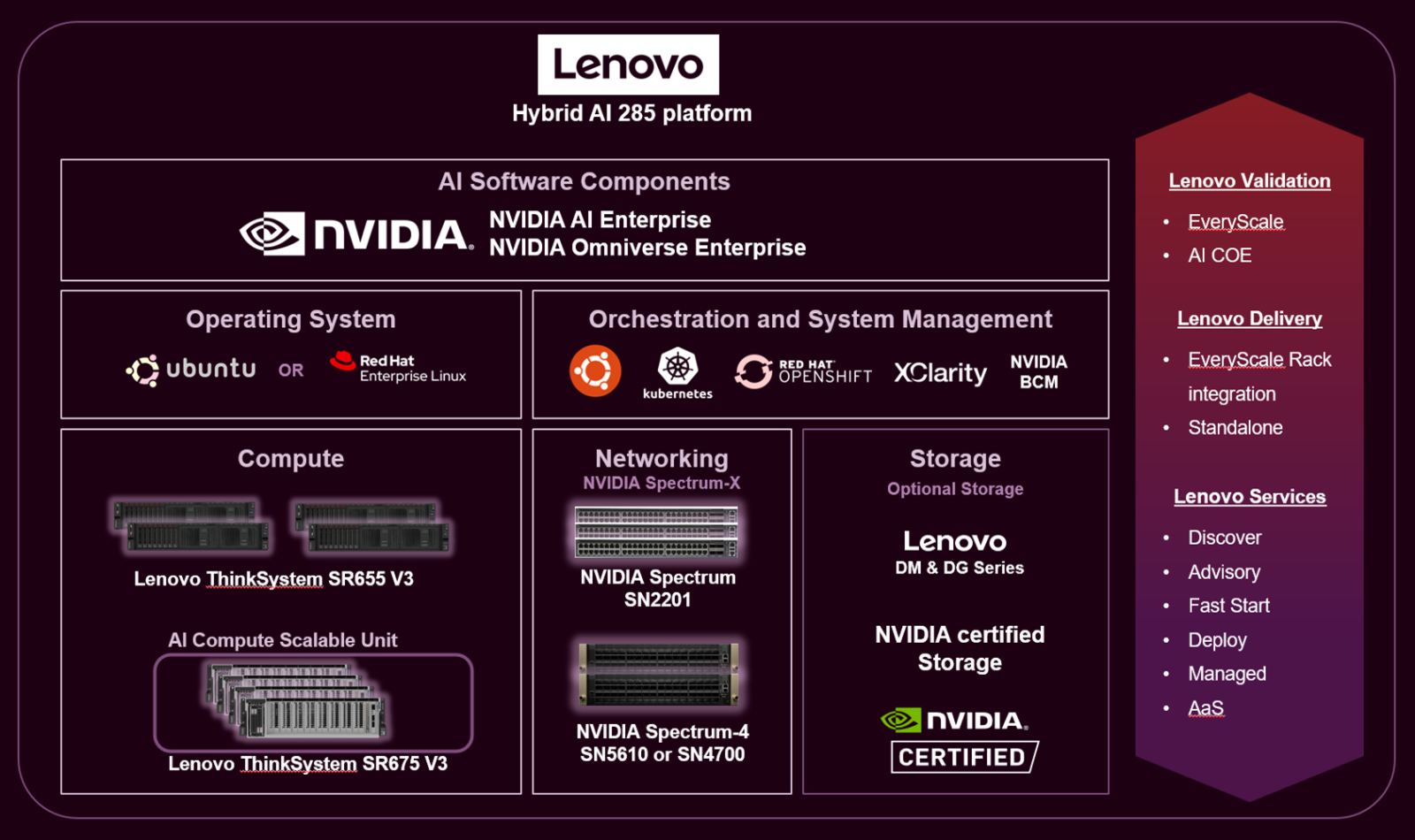
Figure 1. Lenovo Hybrid AI 285 platform overview
The offering is based on the NVIDIA 2-8-5 PCIe-optimized configuration — 2x CPUs, 8x GPUs, and 5x network adapters — and is ideally suited for medium (per GPU) to large (per node) Inference use cases, and small-to-large model training or fine-tuning, depending on chosen scale. It combines market leading Lenovo ThinkSystem GPU-rich servers with NVIDIA Hopper or Blackwell GPUs, NVIDIA Spectrum X networking and enables the use of the NVIDIA AI Enterprise software stack with NVIDIA Blueprints.
Following the principle of From Exascale to EveryScale™, Lenovo, widely recognized as a leader in High Performance Computing, leverages its expertise and capabilities from Supercomputing to create tailored enterprise-class hybrid AI factories.
Ideally utilizing Lenovo EveryScale Infrastructure (LESI) it comes with the EveryScale Solution verified interoperability for the tested Best Recipe hardware and software stack. Additionally, EveryScale allows Lenovo Hybrid AI platform deployments to be delivered as fully pre-built, rack-integrated systems that are ready for immediate use.
Did you know?
The same team of HPC and AI experts that stand behind the Lenovo EveryScale OVX solution, as deployed also for NVIDIA Omniverse Cloud, brings the Lenovo Hybrid AI 285 platform to market.
Following their excellent experience with Lenovo on Omniverse, NVIDIA has once again chosen Lenovo technology as the foundation for the development and test of their NVIDIA AI Enterprise Reference Architecture (ERA). This choice ensures complete alignment and an exact match of Lenovo Hybrid AI 285 platform with the NVIDIA 2-8-5-200 ERA specifications.
Overview
The Lenovo Hybrid AI 285 platform is built on the Lenovo ThinkSystem SR675 V3 server and is optimized for the following specifications:
- Compute (2 CPUs): Powered by dual AMD EPYC 9005 Series processors (such as the 9535). This provides high core counts (up to 128 cores per node) and massive memory bandwidth (12 channels) to support AI frameworks and data pre-processing.
- Acceleration (8 GPUs): Supports eight high-performance NVIDIA GPUs. Validated configurations include:
- NVIDIA H200 NVL: For large-scale LLM training and high-throughput inference, and mixed AI and HPC use cases.
- RTX Pro 6000 Blackwell Server Edition: For cost-effective, high-density inferencing, "Agentic AI" workloads, and graphics-heavy generative tasks.
- Networking (5 NICs): Features five PCIe Gen5 network slots, usually populated with NVIDIA BlueField-3 (BF-3) SuperNICs. This allows for a 2:1 GPU-to-NIC ratio, providing the necessary bandwidth for East-West traffic (node-to-node communication) which is critical for distributed training.
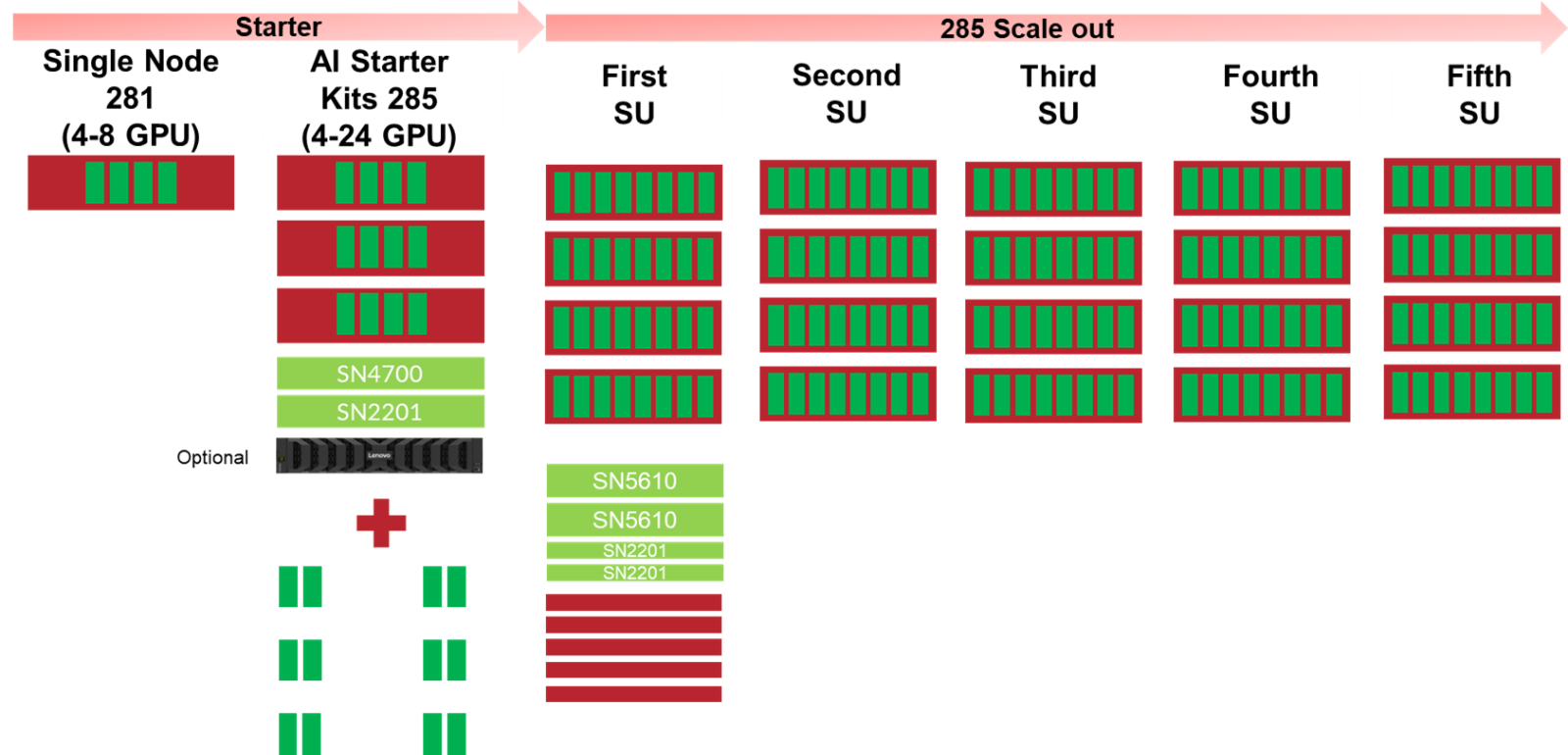
The Lenovo Hybrid AI 285 Platform scales from a single 281 server with just 4 to 8 GPUs as an entry environment, AI Starter Kits 285, to a rack Scalable Unit (SU) with four servers and 32 GPUs to up to 5 Scalable Units with 20 Servers and 160 GPUs.
This scaling process is shown in the following two figures.
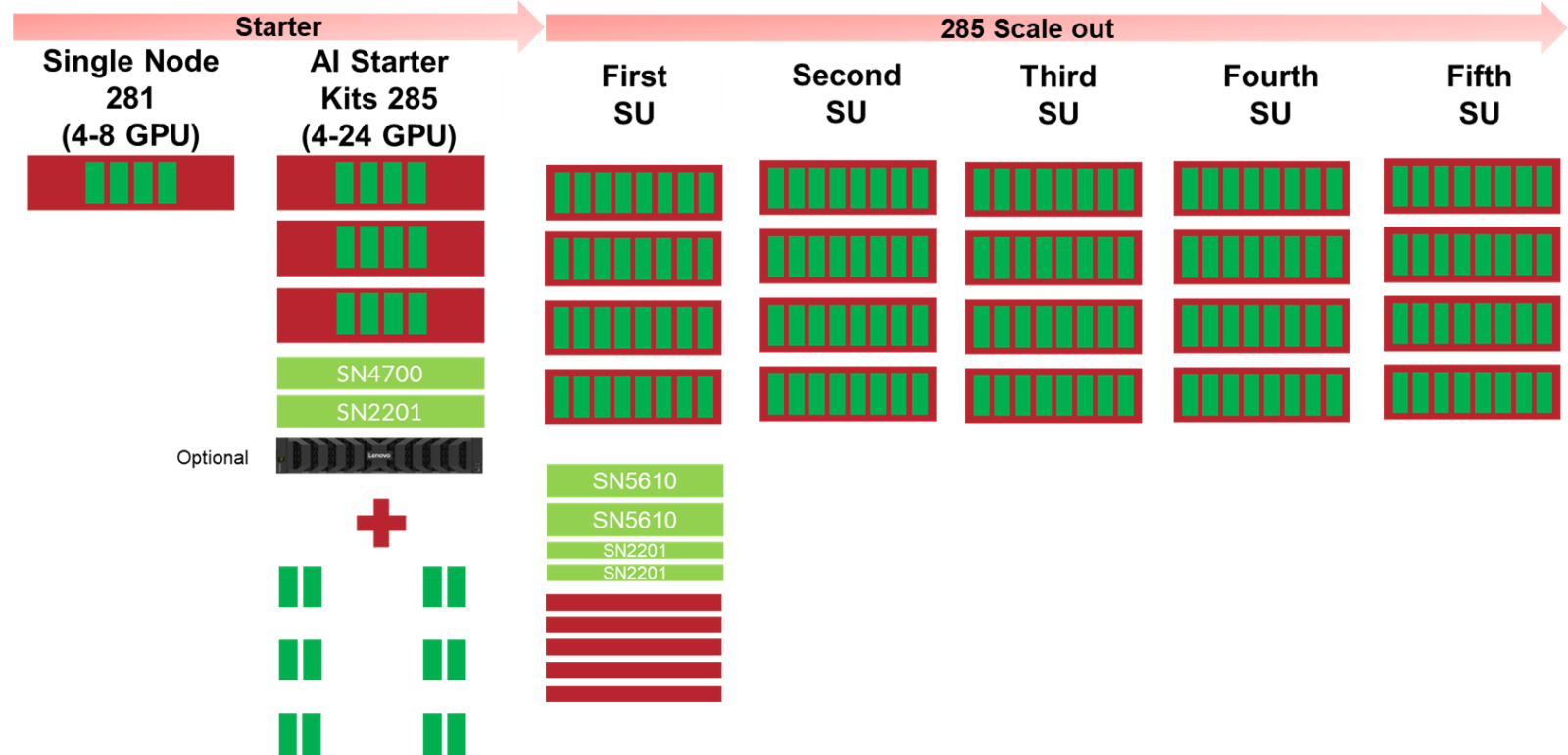
Figure 2. Lenovo Hybrid AI 285 Scaling from entry to 160 GPUs
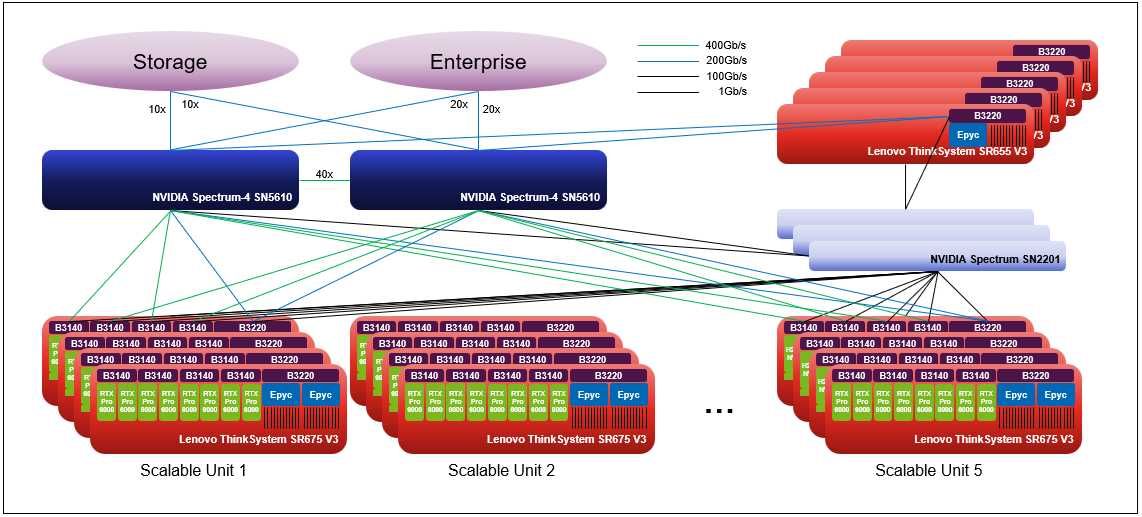
Figure 3. Lenovo Hybrid AI 285 platform with 5 Scalable Units
It can be deployed even for larger sizes with up to 8 Scalable Units with 32 Servers and 256 GPUs by breaking using two more SN5610s to create a dedicated East/West network for GPU to GPU communication.
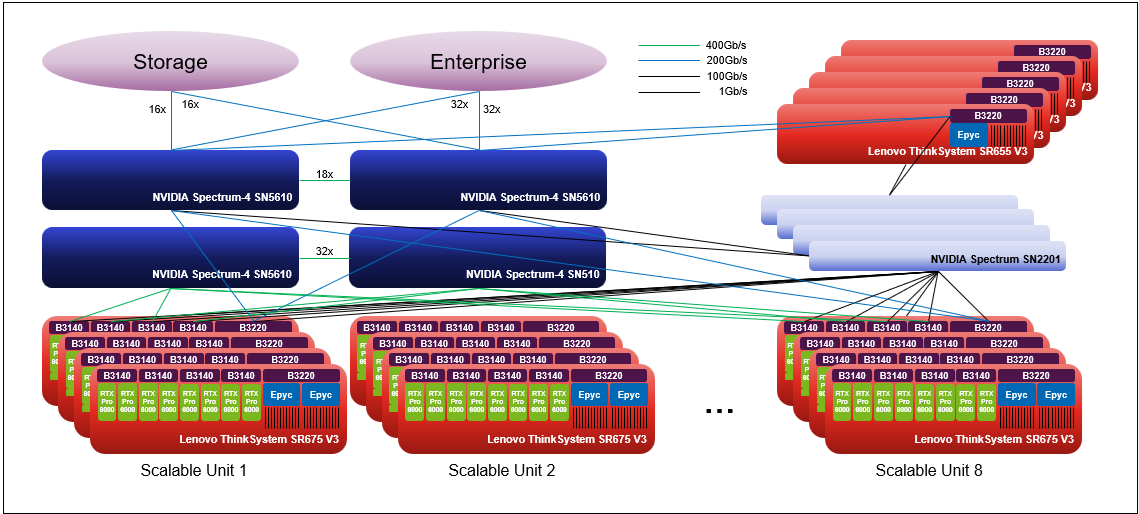
Figure 4. Lenovo Hybrid AI 285 platform with 8 Scalable Units
Components
The main hardware components of Lenovo Hybrid AI platforms are Compute nodes and the Networking infrastructure. As an integrated solution they can come together in either a Lenovo EveryScale Rack (Machine Type 1410) or Lenovo EveryScale Client Site Integration Kit (Machine Type 7X74).
Topics in this section:
AI Compute Node – SR675 V3
The AI Compute Node leverages the Lenovo ThinkSystem SR675 V3 GPU-rich server.
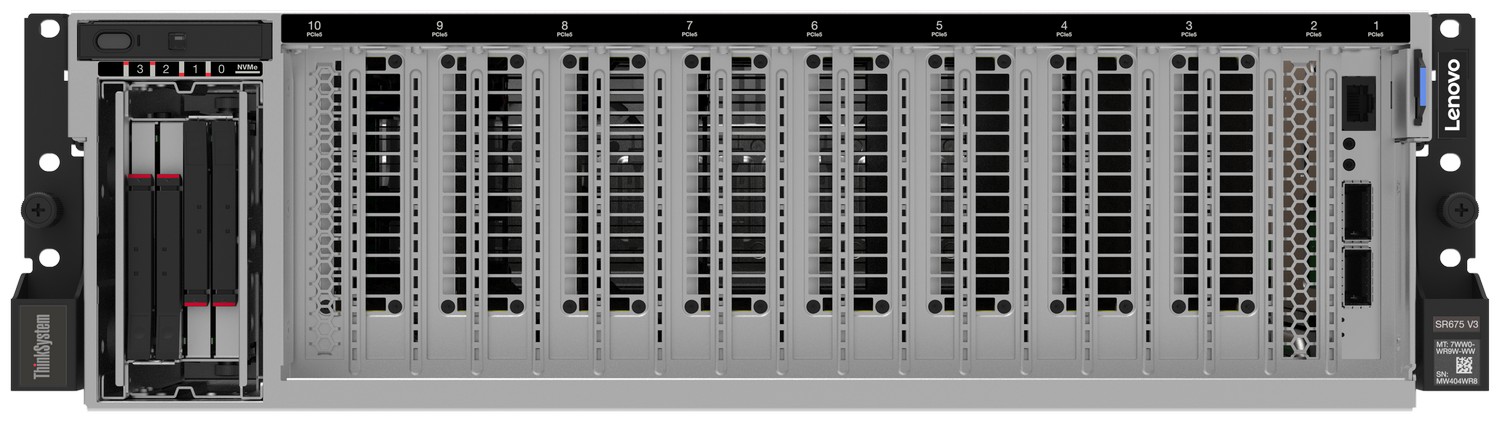
Figure 5. Lenovo ThinkSystem SR675 V3 in 8DW PCIe Setup
The SR675 V3 is a 2-socket 5th Gen AMD EPYC 9005 server supporting up to 8 PCIe DW GPUs with up to 5 network adapters in a 3U rack server chassis. This makes it the ideal choice for NVIDIA’s 2-8-5 configuration requirement.
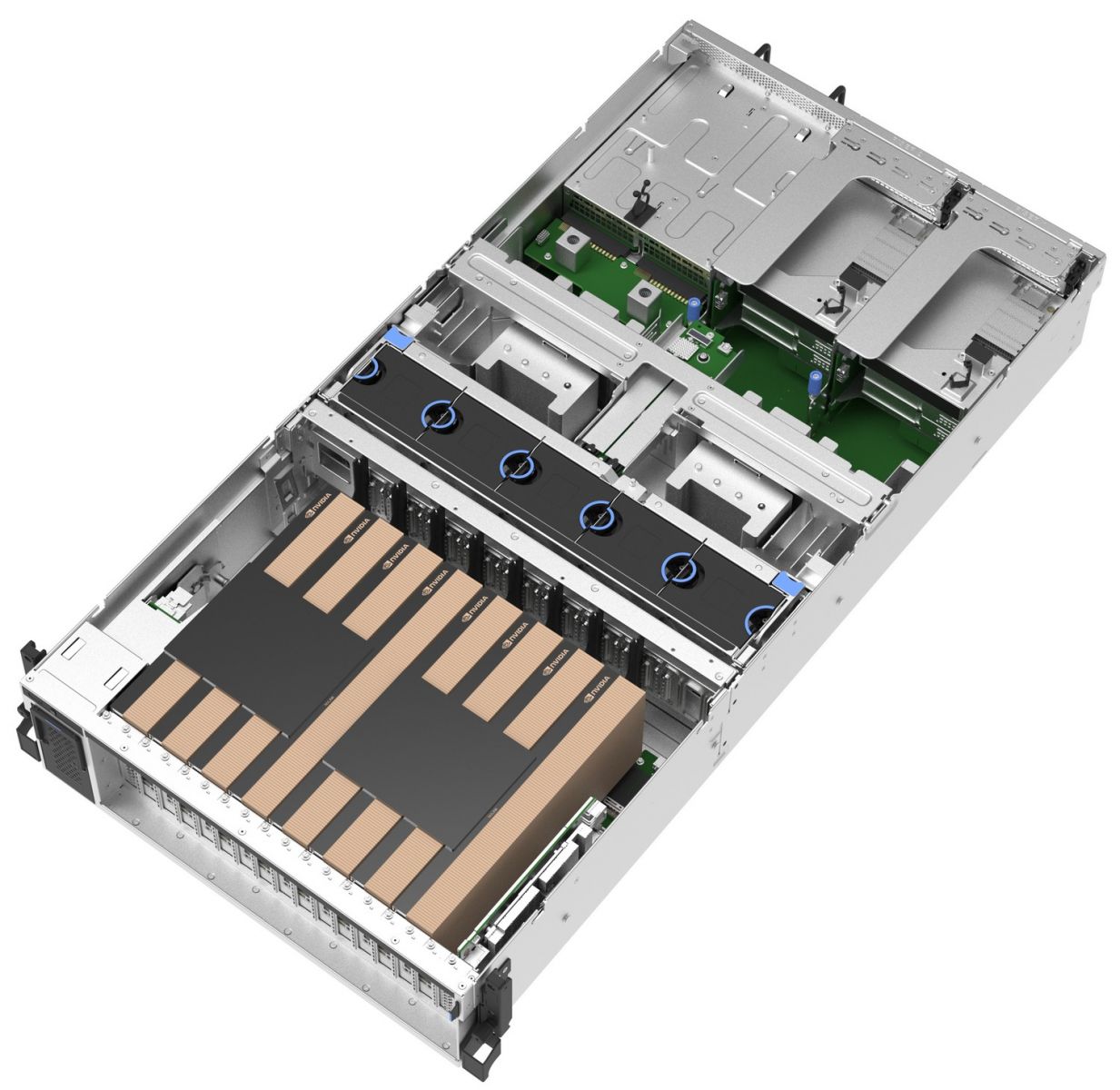
Figure 6. Lenovo ThinkSystem SR675 V3 in 8DW PCIe Setup
This configuration is NVIDIA-certified for Enterprise as well as Spectrum-X and an evolution of the Lenovo EveryScale OVX 3.0 setup which NVIDIA also deployed based on the Lenovo ThinkSystem SR675 V3 within NVIDIA Omniverse Cloud on Microsoft Azure.
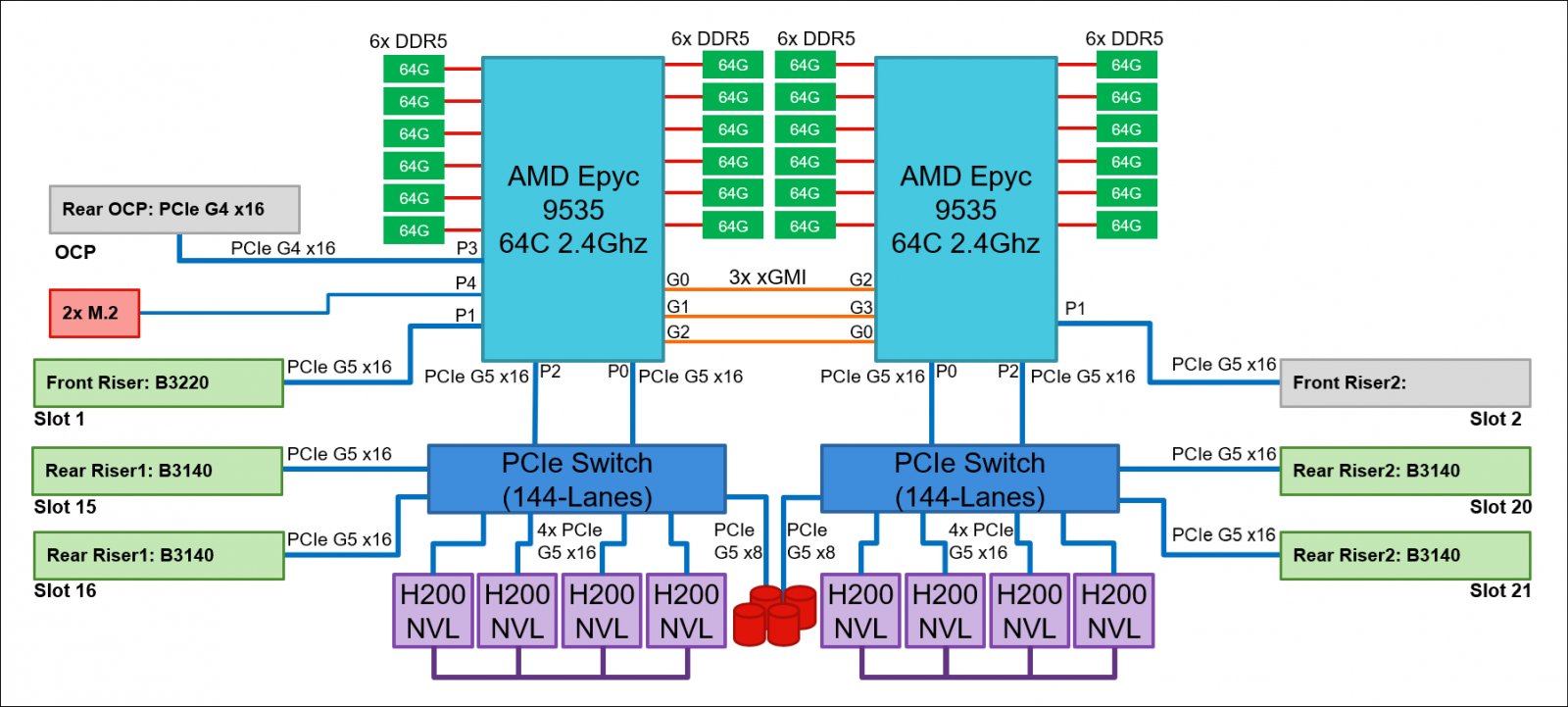
Figure 7. AI Compute Node Block Diagram
The AI Compute node is configured with two AMD EPYC 9535 64 Core 2.4 GHz processors with an all-core boost frequency of 3.5GHz. Besides providing consistently more than 2GHz frequency this ensures that with 7 Multi Instance GPUs (MIG) on 8 physical GPUs there are 2 Cores available per MIG plus a few additional Cores for Operating System and other operations.
With 12 Memory Channels per processor socket the AMD based server provides superior Memory bandwidth versus computing Intel-based platforms ensuring highest performance. Leveraging 64GB 6400MHz Memory DIMMs for a total of 1.5TB of main memory providing 192GB memory per GPU or a minimum of 1.5X the H200 NVL GPU memory.
The GPUs are connected to the CPUs via two PCIe Gen5 switches, each supporting up to four GPUs. With the NVIDIA H200 NVL PCIe GPU, the four GPUs are additionally interconnected through an NVLink bridge, creating a unified memory space. In an entry configuration with two GPUs per PCIe switch, the ThinkSystem SR675 V3 uniquely supports connecting all four GPUs with an NVLink bridge for maximized shared memory, thereby accommodating larger inference models, rather than limiting the bridge to two GPUs. With the RTX PRO 6000 Blackwell Server Edition, no NVLink bridge is applicable.
In the platforms default configuration, the AI Compute node leverages NVIDIA BlueField technology both for the North-South as well as the East-West communication.
For Converged (North-South) Network an Ethernet adapter with redundant 200Gb/s connections provides ample bandwidth to storage, service nodes and the Enterprise network. The NVIDIA BlueField-3 B3220 P-Series FHHL DPU provides the two 200Gb/s Ethernet ports, a 1Gb/s Management board and a 16-Core ARM chip enabling Cloud Orchestration, Storage Acceleration, Secure Infrastructure and Tenant Networking.
The Ethernet adapters for the Compute (East-West) Network are directly connected to the GPUs via PCIe switches minimizing latency and enabling NVIDIA GPUDirect and GPUDirect Storage operation. For pure Inference workload they are optional, but for training and fine-tuning operation they should provide at least 200Gb/s per GPU.
By using the NVIDIA BlueField-3 B3140H E-Series HHHL DPU in combination with NVIDIA Spectrum 4 networking the East-West traffic can utilize Spectrum X operation.
An additional ThinkSystem Intel I350 1GbE RJ45 4-port OCP Ethernet Adapter, is added to provide Out-of-band management redundancy.
Finally, the system is completed by local storage with two 960GB Read Intensive M.2 in RAID1 configuration for the operating system and four 3.84TB Read Intensive E3.S drives for local application data.
GPU selection
The Hybrid AI 285 platform is designed to handle any of NVIDIA’s DW PCIe form factor GPUs including the new RTX PRO 6000 Blackwell Server Edition, the H200 NVL, L40S and the H100 NVL.
- NVIDIA H200 NVL
The NVIDIA H200 NVL is a powerful GPU designed to accelerate both generative AI and high-performance computing (HPC) workloads. It boasts a massive 141GB of HBM3e memory, which is nearly double the capacity of its predecessor, the H100. This increased memory, coupled with a 4.8 terabytes per second (TB/s) memory bandwidth, enables the H200 NVL to handle larger and more complex AI models, like large language models (LLMs), with significantly improved performance. In addition, the H200 NVL is built with energy efficiency in mind, offering increased performance within a similar power profile as the H100, making it a cost-effective and environmentally conscious choice for businesses and researchers.
NVIDIA provides a 5-year license to NVIDIA AI Enterprise free-of-charge bundled with NVIDIA H200 NVL GPUs.
- NVIDIA RTX PRO 6000 Blackwell Server Edition
Built on the groundbreaking NVIDIA Blackwell architecture, the NVIDIA RTX PRO™ 6000 Blackwell Server Edition delivers a powerful combination of AI and visual computing capabilities to accelerate enterprise data center workloads. Equipped with 96GB of ultra- fast GDDR7 memory, the NVIDIA RTX PRO 6000 Blackwell provides unparalleled performance and flexibility to accelerate a broad range of use cases- from agentic AI, physical AI, and scientific computing to rendering, 3D graphics, and video.
Configuration
The configuration of the AI Compute Node with H200 NVL GPUs or RTX Pro 6000 Blackwell Server edition can be found in Appendix A.
Service Nodes – SR655 V3
When deploying beyond two AI Compute nodes additional Service nodes are needed to manage the overall AI cluster environment.
Two Management Nodes provide a high-availability for the System Management and Monitoring provided through NVIDIA Base Command Manager (BMC) described further in the Hybrid AI Software Platform Product Guide. These are not required for Red Hat OpenShift stack.
For the Container operations three Scheduling Nodes build the Kubernetes control plane providing redundant operations and quorum capability.
One additional service node is recommended for Login node, for management and running XClarity and NetQ VMs.

Figure 8. Lenovo ThinkSystem SR655 V3
The Lenovo ThinkSystem SR655 V3 is an optimal choice for a homogeneous host environment, featuring a single socket AMD EPYC 9335 with 32 cores operating at 3.0 GHz base with an all-core boost frequency of 4.0GHz. The system is fully equipped with twelve 32GB 6400MHz Memory DIMMs, two 960GB Read Intensive M.2 drives in RAID1 configuration for the operating system, and two 3.84TB Read Intensive U.2 drives for local data storage. Additionally, it includes a NVIDIA BlueField-3 B3220L E-Series FHHL DPU adapter to connect the Service Nodes to the Converged Network.
Configuration
The configuration of the Service Nodes can be found in Appendix A.
Networking
The default setup of the Lenovo Hybrid AI 285 platform leverages NVIDIA Networking with the NVIDIA Spectrum-4 SN5610 for the Converged and Compute Network and the NVIDIA SN2201 for the Management Network. For AI Starter Kits the NVIDIA SN4700 will be used.
Hybrid AI 285 System Networking
The Converged (North-South) Network handles storage and in-band management. This involves traffic between Hybrid AI 285 systems and any external resources including cloud management and orchestration systems, remote data storage nodes, and other parts of the data center or the internet.
The Converged Network connects to the Enterprise IT network with up to 40 Ethernet connections at 200Gb/s for up to five Scalable Units (SU) or 64 Ethernet connections at 200Gb/s for up to eight SUs. This setup guarantees a minimum bandwidth of 25Gb/s per GPU.
By integrating the BlueField-3 DPU, the Hybrid AI 285 platform establishes a robust foundation for AI workloads, optimizing resource management, security, and scalability within the datacenter. Operating primarily in Embedded Function (ECPF) mode, the DPU’s Arm subsystem takes full ownership of NIC resources, routing all host network traffic through a virtual switch control plane to ensure a high degree of isolation and control. Management of this ecosystem is further streamlined by an onboard Baseboard Management Controller (BMC), which allows administrators to provision and oversee the platform using standard tools and Redfish APIs. This architecture is anchored by an external Root-of-Trust for firmware integrity and features a dedicated 1GbE out-of-band management port, providing a secure, high-performance gateway for enterprise-level datacenter operations.
In addition to providing access to the AI agents and functions of the AI platform, this network is utilized for all data ingestion from the Enterprise IT data during indexing and embedding into the Retrieval-Augmented Generation (RAG) process. It is also used for data retrieval during AI operations.
The Storage connectivity is exactly half that and described in the Storage Connectivity chapter.
The Compute (East-West) Network facilitates application communication between the GPUs across the Compute nodes of the AI platform. It is designed to achieve minimal latency and maximal performance using a rail-optimized, fully non-blocking fat tree topology with NVIDIA Spectrum-X.
To prevent bottlenecks during massive parallel processing tasks, NVIDIA utilizes the Spectrum-X platform, combining Spectrum-4 switches with BlueField-3 (BF-3) SuperNICs. This architecture is specifically designed to handle the "all-to-all" communication patterns of GPUs. By utilizing technologies like RDMA over Converged Ethernet (RoCE) and GPUDirect, data can move directly from one GPU's memory to another across the network, bypassing the CPU to maintain deterministic performance and ultra-low latency.
Spectrum X reduces latency and increases bandwidth for Ethernet by using advanced functionality that splits network packets, tags them, and allows the switch to balance them across network lanes. The receiving node then reassembles the packets regardless of the order they were received in. This process helps avoid hash collusion and congestion, which often lead to suboptimal performance in low-entropy networks.
To ensure the software stack is fully optimized, NVIDIA recommends maintaining a specific GPU-to-NIC ratio and bandwidth threshold:
- GPU to NIC Ratio: Maximum 2:1 (e.g., one 400G NIC for every two GPUs)
- Minimum Bandwidth per GPU: 200 GB/s (via 4x 200 Gb/s or 2x 400 Gb/s NICs)
Tip: In a pure Inference use case, the Compute Network is typically not necessary, but for training and fine-tuning operations it is a crucial component of the solution.
For cost optimization, alternative networking options can include NVIDIA SN4700 switches for AI Starter Kits or smaller deployments and NVIDIA ConnectX-7 NDR200/200GbE NICs instead of NVIDIA BlueField-3 NICs. Additionally, copper cables can replace optical cables to reduce costs.
For configurations of up to five Scalable Units, the Compute and Converged Network are integrated utilizing the same switches. When deploying more than five units, it is necessary to separate the fabric.
The Out-of-Band (OOB) Management Network provides a dedicated, physically isolated fabric for comprehensive infrastructure oversight. By interconnecting the Baseboard Management Controller (BMC) ports, switch management interfaces, and BlueField-3 DPU management ports, this network ensures that administrative control remains independent of the primary data path. Utilizing cost-effective 1GbE RJ45 switching, the OOB network aggregates management and monitoring traffic, providing secure upstream connectivity to the core infrastructure for centralized service consolidation. Each compute will be configured with 2 x 1GbE connectivity, one from Baseboard Management Controller (BMC) and another from the Intel i350 OCP NIC to provide OOB management network redundancy.
The OOB network provides a "lights-out" management path. It is used for:
- Hardware Control: Powering nodes on/off, resetting systems, and monitoring thermal/power sensors via the Baseboard Management Controller (BMC).
- Infrastructure Provisioning: Deploying OS images and firmware updates using tools like NVIDIA Base Command Manager (BCM).
- Remote Console Access: Accessing the system KVM (Keyboard, Video, Mouse) over the network.
- Switch Management: Connecting to the dedicated management ports of NVIDIA Spectrum Ethernet switches.
Logical Network Design
The Hybrid AI 285 high-level physical network/connectivity design can be seen in Figure 3 and Figure 4 in Overview. This section describes the high-level logical network design.
The dual-fabric NVIDIA Spectrum-X based data center network
- North-South: Provide multi-VRF segmentation, anycast gateways (VRR), external routing in a VRF, and multihomed host connectivity using EVPN multihoming. This fabric supports management, storage, and general compute workloads with external network access.
- East-West: Provide dense GPU-facing access ports in a VLAN and a simplified VRF model focused on GPU traffic. This fabric is optimized for GPU-to-GPU RoCE traffic with no external dependencies.
- Out-Out-Band (OOB) Management: Configured with Layer 2 (withing the rack). All BMCs, switch management ports, and DPU management ports in a single rack are placed on the same Management VLAN. Traffic within this rack stays at Layer 2 (switching). If there are multiple racks, the OOB Leaf switches will have an L3 Uplink to a management spine in this case the SN5610 switches. This allows an administrator sitting in a different building to route into the management subnet. This network depending on the deployment can use simple static routing, OSFP, or BGP. Additional VLANs may also be configured such as for PXE provisioning and host management.
Underlay and Overlay Infrastructure
- Underlay Network (eBGP): The underlay uses eBGP as the routing protocol to provide reachability between VTEP endpoints. This design eliminates the need for complex IGPs like OSPF or IS-IS by using a remote-as external configuration with direct leaf-to-leaf peering.
- Overlay Network (EVPN-VXLAN): Leverages EVPN (RFC 7432) with VXLAN encapsulation to enable Layer 2 and Layer 3 virtualization. Uses Head-end Replication for BUM (Broadcast, Unknown Unicast, and Multicast) traffic to eliminate multicast dependencies, and ARP/ND suppression to reduce network noise.
RoCE Optimization
To support AI/ML training especially for East-West, the network is specifically engineered for "lossless" transport:
- Lossless Fabric: Both fabrics, particularly the East-West, use Priority Flow Control (PFC) and a dedicated RoCE traffic pool (90% buffer allocation) to prevent packet loss during intense GPU synchronization. In East-West RoCE is enabled fabric-wide with lossless mode is enabled across all logical ports. In North-South RoCE is enabled only on Inter-Switch Links (ISLs) and specific server-facing ports, especially the ones connecting to storage.
- PFC Watchdog: Enabled across all ports to prevent "head-of-line blocking" and ensure fabric resilience.
Redundancy
- North-South: EVPN Multihoming (Active/Active) is used as a modern, standards-based replacement for legacy MLAG. A single server is physically connected to two different switches (e.g., ns1 and ns2) simultaneously. Provides high availability; if one switch or link fails, the server maintains connectivity through the other switch with a convergence time of approximately 1–3 seconds. Both links are active, allowing for load balancing and increased aggregate bandwidth for the host. Uses a shared "anycast" MAC address and unique segment identifiers to make the two switches appear as one logical entity to the server.
- East-West: Each NICs used for East-West network from the GPU computes are connected via single-homing to maximize raw performance and port density. Four NICs connect directly to a pair of switches, with two connections per-switch. This setup is optimized for RoCE (RDMA over Converged Ethernet), where low latency and massive bisection bandwidth are more critical than link-level redundancy.
NVIDIA Spectrum-4 SN5610
The SN5610 smart-leaf, spine, and super-spine switch offers 64 ports of 800GbE in a dense 2U form factor. The SN5610 is ideal for NVIDIA Spectrum-X deployments and enables both standard leaf/spine designs with top-of-rack (ToR) switches as well as end-of-row (EoR) topologies. The SN5610 offers diverse connectivity in combinations of 1 to 800GbE and boasts an industry-leading total throughput of 51.2Tb/s.

Figure 9. NVIDIA Spectrum-4 SN5610
The following table lists the configuration of the NVIDIA Spectrum-4 SN5610
| Part Number | Description |
|---|---|
| 7D5FCTOOWW | NVIDIA SN5610 800GbE Managed Switch with Cumulus (oPSE) |
NVIDIA Spectrum SN2201
The SN2201 is ideal as an out-of-band (OOB) management switch or as a ToR switch connecting up to 48 1G Base-T host ports with non-blocking 100GbE spine uplinks. Featuring highly advanced hardware and software along with ASIC-level telemetry and a 16 megabyte (MB) fully shared buffer, the SN2201 delivers unique and innovative features to 1G switching.
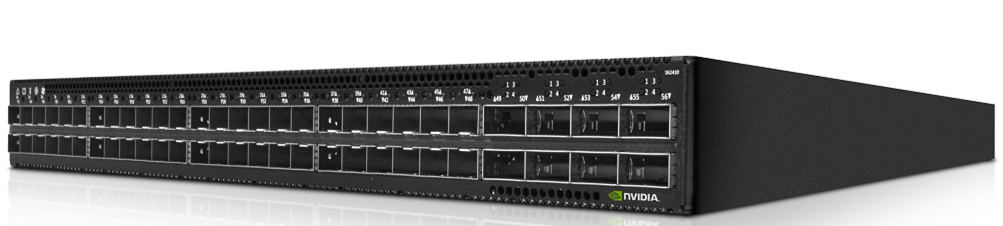
Figure 10. NVIDIA Spectrum SN2201
The Out-of-Band (Management) Network encompasses all AI Compute node and BlueField-3 DPU base management controllers (BMC) as well as the network infrastructure management.
The following table lists the configuration of the NVIDIA Spectrum SN2201.
| Part Number | Description |
|---|---|
| 7D5FCTOGWW-HPC | Nvidia SN2201 1GbE Managed Switch with Cumulus (oPSE) |
NVIDIA Spectrum SN4700
The SN4700 spine/super-spine offers 32 ports of 400GbE in a compact 1U form factor. It enables connectivity to endpoints at varying speeds and carries a throughput of 12.8 terabits per second (Tb/s), with 8.4 billion packets per second (Bpps) processing capacity. As an ideal spine solution, the SN4700 allows maximum flexibility, with port speeds spanning from 1 to 400 Gb/s per port. This switch is applicable to AI Starter Kit deployment.
Figure 11. NVIDIA Spectrum SN4700
The following table lists the configuration of the NVIDIA Spectrum SN4700.
Lenovo EveryScale Solution
The Server and Networking components and Operating System can come together as a Lenovo EveryScale Solution. It is a framework for designing, manufacturing, integrating and delivering data center solutions, with a focus on High Performance Computing (HPC), Technical Computing, and Artificial Intelligence (AI) environments.
Lenovo EveryScale provides Best Recipe guides to warrant interoperability of hardware, software and firmware among a variety of Lenovo and third-party components.
Addressing specific needs in the data center, while also optimizing the solution design for application performance, requires a significant level of effort and expertise. Customers need to choose the right hardware and software components, solve interoperability challenges across multiple vendors, and determine optimal firmware levels across the entire solution to ensure operational excellence, maximize performance, and drive best total cost of ownership.
Lenovo EveryScale reduces this burden on the customer by pre-testing and validating a large selection of Lenovo and third-party components, to create a “Best Recipe” of components and firmware levels that work seamlessly together as a solution. From this testing, customers can be confident that such a best practice solution will run optimally for their workloads, tailored to the client’s needs.
In addition to interoperability testing, Lenovo EveryScale hardware is pre-integrated, pre-cabled, pre-loaded with the best recipe and optionally an OS-image and tested at the rack level in manufacturing, to ensure a reliable delivery and minimize installation time in the customer data center.
Scalability
The descriptions provided above detail the fully expanded Lenovo Hybrid AI 285 platform with configurations of five and eight Scalable Units, respectively. A fundamental principle of the solution design philosophy, however, is its ability to support any scale necessary to achieve a particular objective.
In a typical Enterprise AI deployment initially the AI environment is being used with a single use case, like for example an Enterprise RAG pipeline which can connect a Large Language Model (LLM) to Enterprise data for actionable insights grounded in relevant data.
In its simplest form, leveraging the NVIDIA Blueprint for Enterprise RAG pipeline involves three NVIDIA Inference Microservices: a Retriever, a Reranker, and the actual LLM. This setup requires a minimum of three GPUs.
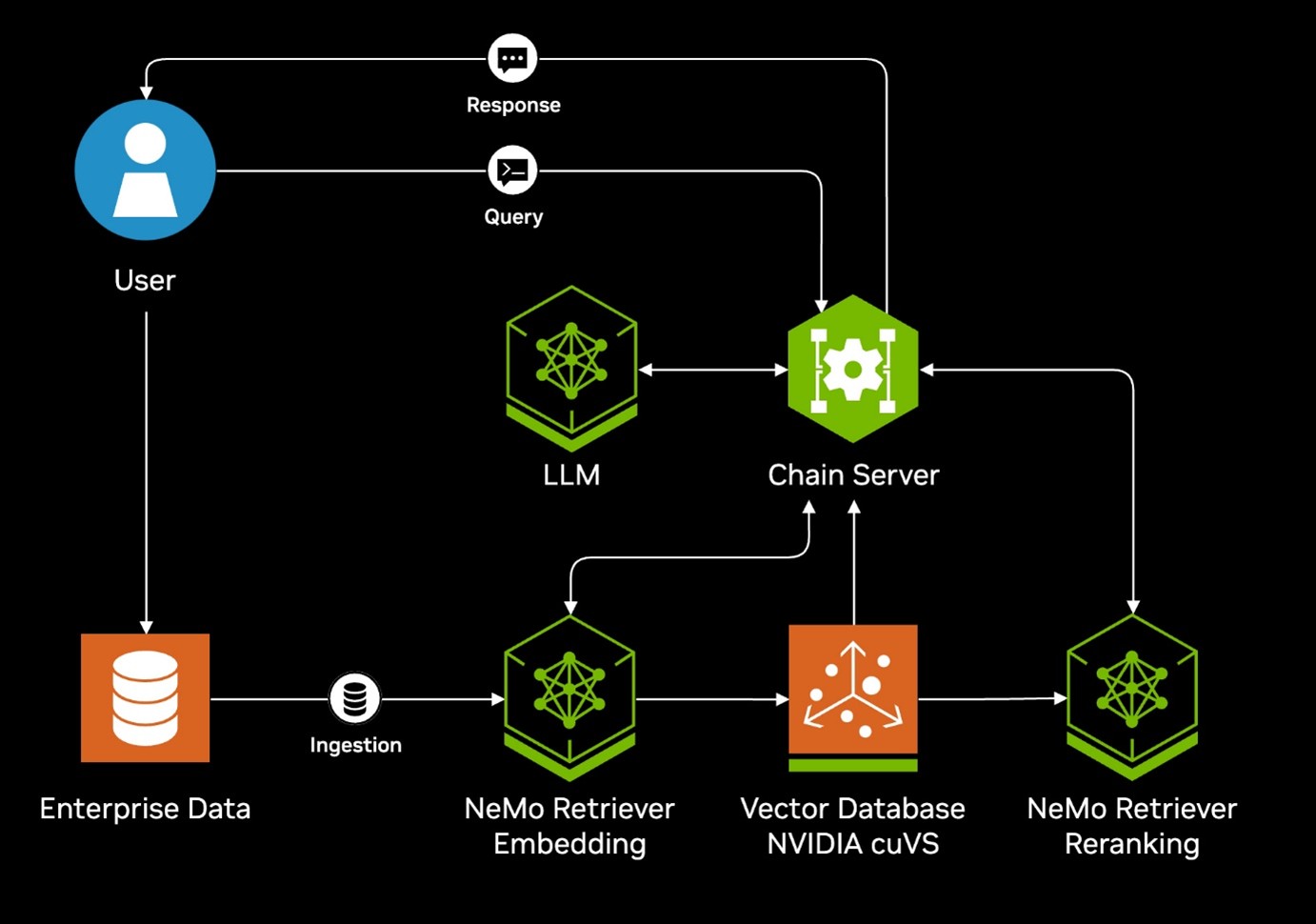
Figure 12. NVIDIA Blueprint Architecture Diagram
As the deployment of AI within the company continues to grow, the AI environment will be adapted to incorporate additional use cases, including Assistants or AI Agents. Additionally, it has the capacity to scale to support an increasing number of Microservices. Ultimately, most companies will maintain multiple AI environments operating simultaneously with their AI Agents working in unison.
The Lenovo Hybrid AI 285 platform has been designed to meet the customer where they are at with their AI application and then seamlessly scale with them through their AI integration. This is achieved through the introduction of the following:
- Single Node and AI Starter Kit Deployments
- Scalable Unit Deployment
- Solution IDs In DCSC
- Custom Deployment
A visual representation of the sizing and scaling of the platform is shown in the figure below.
Single Node and AI Starter Kit Deployments
Single Node and AI Starter Kit Deployments are for customers that want to deploy their initial AI factory with 4-24x GPUs. Smallest deployment starts with a single node SR675 V3 servers, with 4-8x GPUs per server configured in a 281 setup with NVIDIA BlueField-3 or ConnectX-7 adapters. Since there will be no GPU-to-GPU communications, depending on the networking fabric, NVIDIA ConnectX-6 adapters can also be used.
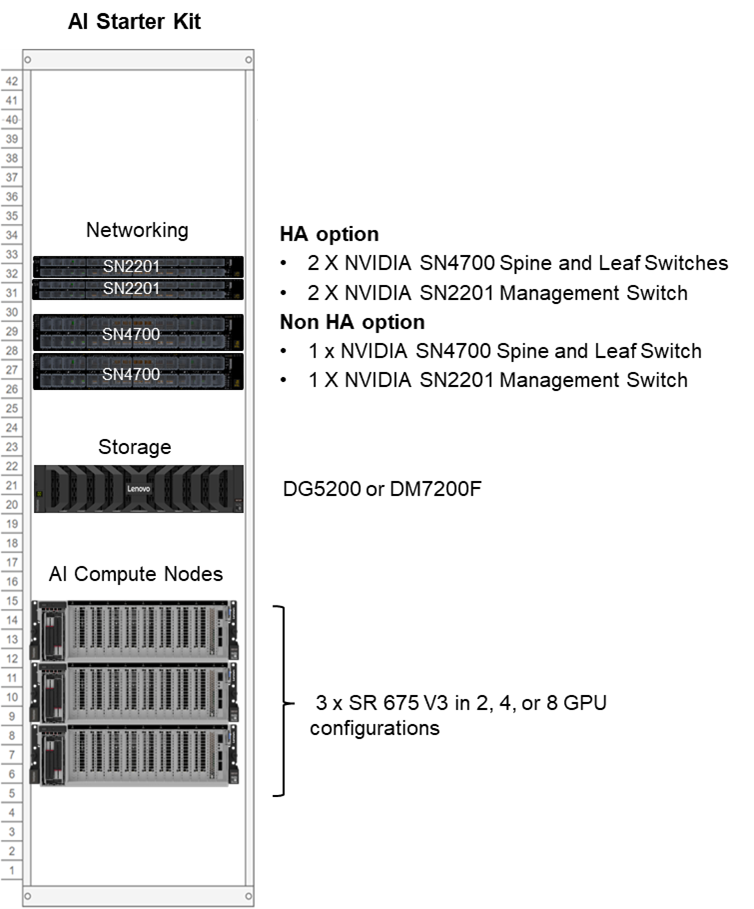
If additional networking is required or additional optional storage is required, then use the AI Starter Kit deployment, which supports up to 3x servers and up to 24x GPUs. The AI Starter Kit uses NVIDIA networking switches with ThinkSystem DM or DG external storage or any other NVIDIA certified storage solutions.
The following sections describe these deployments:
Single Node with Red Hat OpenShift SNO (Single Node OpenShift)
When deploying a Lenovo Hybrid AI 285 in a single node 281 AI compute node for up to 8 GPUs, Red Hat Single Node OpenShift (SNO) provides an exceptionally streamlined foundation. By condensing both the Kubernetes control plane and the compute worker environment into a single physical footprint, SNO allows organizations to immediately stand up an AI factory without the hardware overhead of a traditional, multi-node cluster. Red Hat OpenShift SNO is the recommended option when deploying Hybrid AI 285 in a single node.
Key benefits of a Red Hat OpenShift SNO deployment are:
- Reduced Footprint: It drastically lowers hardware requirements, saving on space, power, and cooling.
- Operational Consistency: Despite being a single node, it provides the exact same developer and administrative experience as a full scale OpenShift cluster running in a central data center or public cloud.
- Cost-Effectiveness: It requires fewer software and hardware to purchase and maintain.
- Simplified Deployment: Red Hat OpenShift SNO effectively reduces cluster deployment time from days or hours down to roughly 30 to 45 minutes. This speed is achieved by radically simplifying the cluster architecture, stripping away external infrastructure dependencies, and utilizing an optimized SNO installer.
Alternatively, for Single Node deployment, Canonical Ubuntu with Canonical Kubernetes can be used.
AI Starter Kits
For customers who want storage and/or networking for smaller configurations, Lenovo has worked to develop AI Starter Kits with 6 up to 24 GPUs across 3 nodes. The 3 nodes are configured as both control plane and master nodes. This sizing is for customers who do not plan to scale above 24 GPUs in the near future but still need an end-to-end solution for compute and storage.
Networking between the nodes is implemented using NVIDIA SN4700 400GbE switches and either NVIDIA BlueField-3 or ConnectX-7 adapters in each server.
Storage is implemented using either ThinkSystem DM or ThinkSystem DG Storage Arrays. Features include:
- Easy to deploy and scale for performance or capacity
- Unified file, object, and block eliminates AI data silos
- High performance NVMe flash and GPUdirect enable faster time to insights
- Confidently use production data to fine tune models with advanced data management features
As with Single Node deployment, it is recommended to use Red Hat OpenShift. Alternatively, Canonical Kubernetes can also be used.
The table and figure below show the hardware involved in AI Starter Kit deployments.
Scalable Unit Deployment
For configurations beyond two nodes, it is advisable to deploy a full Scalable Unit along with the necessary network and service infrastructure, providing a foundation for further growth in enterprise use cases.
The first SU consists of up to four AI Compute nodes, minimum five service nodes, and networking switches. When additional AI Compute Nodes are required, additional SUs of four AI Compute Nodes can be added.
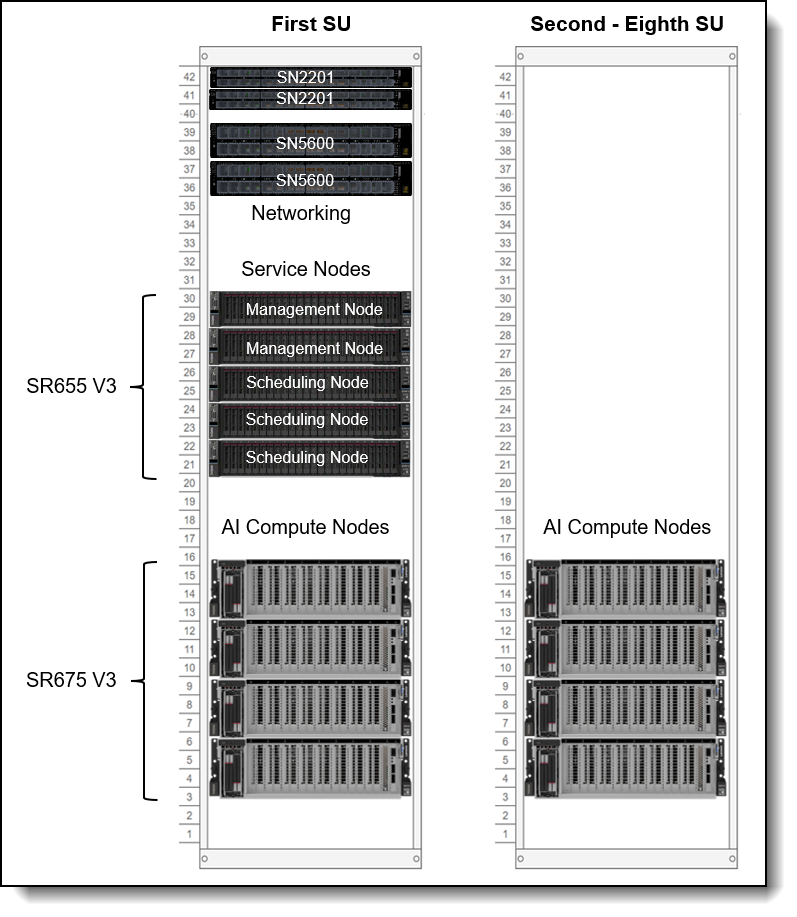
Figure 15. Scalable Unit Deployment
Networking is implemented using NVIDIA SN5600 Spectrum-4 switches and BlueField-3 adapters in the AI Compute Nodes. The combination of these two pieces allows the user to take advantage of NVIDIA’s Spectrum-X networking, an Ethernet platform that delivers the highest performance for AI, machine learning, and natural language processing.
The networking decision depends on whether the platform is designed to support up to five or eight Scalable Units in total, and whether it will handle exclusively inference workloads or also encompass future fine-tuning and re-training activities. Subsequently, the solution can be expanded seamlessly without downtime by incorporating additional Scalable Units, ultimately reaching a total of five or eight as needed.
Solution IDs In DCSC
The Lenovo Hybrid AI 285 is now officially available for configuration and ordering within the Data Center Solution Configurator (DCSC). Please refer to Appendix B for the list of Solution IDs available.
Performance
Performance of the Lenovo Hybrid AI 285 platform is subject to the specific AI model and application used. The following table lists estimates for common Inference Benchmarks and their expected performance per AI Compute node.
The theoretical performance estimates for 8x H200 NVL and 8x RTX Pro 6000 Blackwell Server Edition are listed in the table below.
AI Software Stack
Deploying AI to production involves implementing multiple layers of software. The process begins with the system management and operating system of the compute nodes, progresses through a workload or container scheduling and cluster management environment, and culminates in the AI software stack that enables delivering AI agents to users.
Topics in this section:
- Vanilla Kubernetes with BCM
- Red Hat Stack with Validated Patterns
- Lenovo XClarity One
- Linux Operating System
- Container Orchestration
- NVIDIA AI Enterprise
Vanilla Kubernetes with BCM
NVIDIA Base Command Manager (BCM) streamlines the deployment of Kubernetes clusters by automating the provisioning, configuration, and lifecycle management of GPU-enabled infrastructure, allowing organizations to move quickly from bare metal to production-ready AI platforms. BCM provides integrated support for deploying Kubernetes alongside essential NVIDIA components - such as GPU drivers, the NVIDIA Container Toolkit, and Kubernetes integrations, creating a consistent and validated foundation for containerized AI workloads. It is recommended to use Run:ai with this stack for AI workload scheduling and management. This approach allows data scientists and developers to focus on running and scaling AI workloads rather than assembling and maintaining the underlying infrastructure.
Refer to the Lenovo Hybrid AI Software Platform for a more detailed, component by component breakdown.
Red Hat Stack with Validated Patterns
Reduce your time to first token using Lenovo AI Servers and OpenShift with Validated Patterns.
The combination of Lenovo's AI ready servers and Red Hat's Validated Patterns provides a simple, two-step installation to get from bare metal to a running AI application, reducing time and complexity. Step one is to install Red Hat OpenShift using Red Hat Terraform and Redfish to deploy your whole OpenShift HA cluster in a single click on Lenovo AI servers. Step two is to use Red Hat's GitOps based Validated Patterns to deploy OpenShift AI, its dependencies e.g. NVIDIA's GPU Operators, local storage etc together with a ready-to-run AI application. Everything you need to start running production ready AI workloads is achieved in a fully automated framework using GitOps.
Refer to the Lenovo Hybrid AI Software Platform for a more detailed, component by component breakdown.
In the following sections, we take a deeper dive into some of the common software elements across the software versions.
Lenovo XClarity One
Lenovo XClarity One is a management-as-a-service offering for hybrid-cloud management of on-premises data-center assets from Lenovo. Local management hubs can be installed across multiple sites to collect inventory, incidents, and service data, and to provision resources, creating a bridge between devices and the XClarity One portal. The XClarity One portal provides a modern, intuitive interface that centralizes IT orchestration, deployment, automation, and support from edge to cloud, with enhanced visibility into infrastructure performance, usage metering, and analytics.
The following functions are supported by XClarity One:
- XClarity One dashboard
- Firmware management
- Security
- User Management
- Hardware Monitoring
Linux Operating System
The AI Compute nodes are deployed with Linux. Canonical Ubuntu and Red Hat Enterprise Linux are optimized for Lenovo AI hardware platforms offering 10 years or more of security and maintenance.
Container Orchestration
Red Hat and Canonical both offer a Kubernetes distribution, the leading AI container deployment and workload management tool in the market, which can be used for edge and centralized data center deployments.
Both Red Hat OpenShift and Canonical Kubernetes are used across industries for mission critical workloads. While Canonical offers up to 12 years of security for those customers who cannot, or choose not to upgrade their Kubernetes versions, Red Hat's shorter lifecycle focuses on stabilizing the releasing of the latest industry innovations for customers.
For single node Hybrid AI 285 starter kit deployment, Red Hat OpenShift SNO (Single Node OpenShift) is recommended. Red Hat OpenShift SNO is a deployment configuration that packages the entire OpenShift Kubernetes platform, both the control plane and the worker node, onto a single physical server.
Canonicals’ MicroK8s can provide an easy way to get Kubernetes up and running. With self-healing high availability, transactional OTA updates and secure sandboxed kubelet environments, MicroK8s is recommended for the entry and AI Starter Kit deployments. Red Hat offers MicroShift, OpenShift Local, and Sandbox Operator provides the same capabilities for Red Hat.
When installing on multiple nodes, use Red Hat OpenShift or Ubuntu Canonical Kubernetes for a turn-key and integrated experience. Red Hat offers the Assisted Installer or Installer-Provisioned Infrastructure (IPI) that can provide a fast way to stand up an OpenShift cluster.
Canonical Kubernetes software licenses are already included as part of the Canonical Ubuntu Pro license.
For Red Hat, Red Hat AI Enterprise license can be used. Red Hat AI Enterprise is a comprehensive, integrated software bundle designed to provide a full-stack environment for developing, deploying, and managing AI models at scale. It includes Red Hat Enterprise Linux AI (RHEL AI), Red Hat OpenShift Container Platform, and Red Hat OpenShift AI. A separate RHEL license for the OS is not needed when using this bundle. Think of it as the "all-in-one" SKU that combines Red Hat's specialized AI tools with the underlying infrastructure platform.
NVIDIA AI Enterprise
The Lenovo Hybrid AI 285 platform is designed for NVIDIA AI Enterprise, which is a comprehensive suite of artificial intelligence and data analytics software designed for optimized development and deployment in enterprise settings.
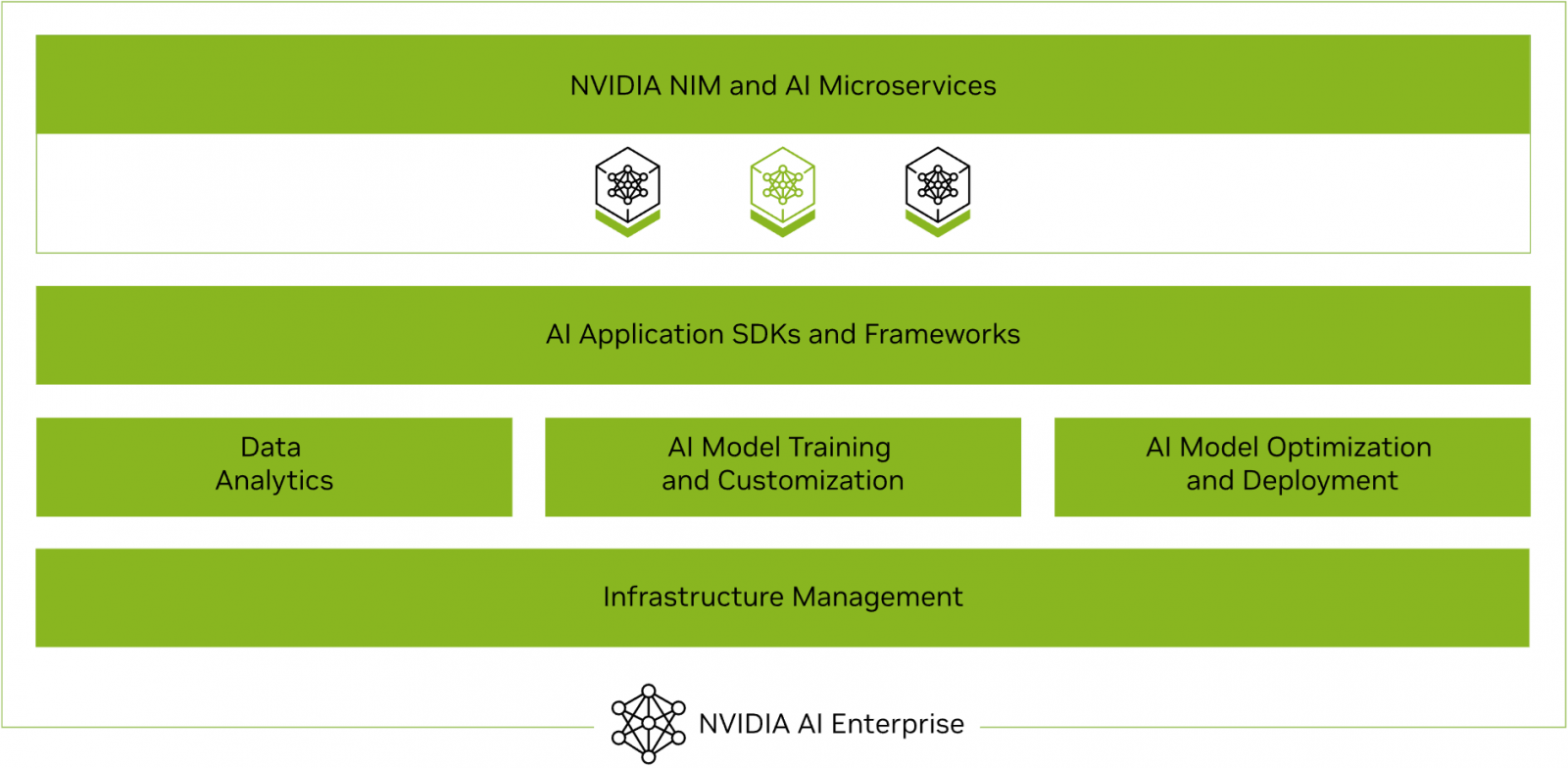
Figure 16. NVIDIA AI Enterprise software stack
NVIDIA AI Enterprise includes workload and infrastructure management software known as Base Command Manager. This software provisions the AI environment, incorporating the components such as the Operating System, Kubernetes (K8S), GPU Operator, and Network Operator to manage the AI workloads.
Additionally, NVIDIA AI Enterprise provides access to ready-to-use open-sourced containers and frameworks from NVIDIA like NVIDIA NeMo, NVIDIA RAPIDS, NVIDIA TAO Toolkit, NVIDIA TensorRT and NVIDIA Triton Inference Server.
It also provides full access to the NVIDIA NGC catalogue, a collection of tested enterprise software, services and tools supporting end-to-end AI and digital twin workflows and can be integrated with MLOps platforms such as ClearML, Domino Data Lab, Run:ai, UbiOps, and Weights & Biases.
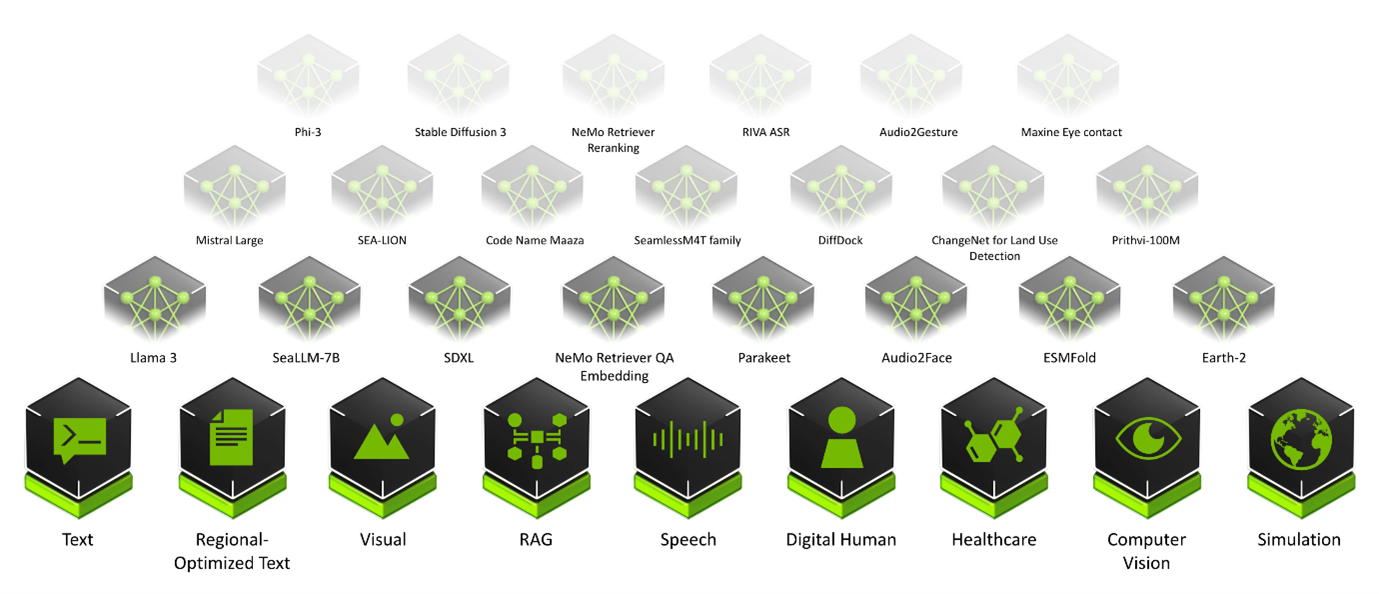
Finally, NVIDIA AI Enterprise introduced NVIDIA Inference Microservices (NIM), a set of performance-optimized, portable microservices designed to accelerate and simplify the deployment of AI models. Those containerized GPU-accelerated pretrained, fine-tuned, and customized models are ideally suited to be self-hosted and deployed on the Lenovo Hybrid AI platform.
The ever-growing catalog of NIM microservices contains models for a wide range of AI use cases, from chatbot assistants to computer vision models for video processing. The image below shows some of the NIM microservices, organized by use case.
Storage Connectivity
Lenovo Hybrid AI platforms do not include storage but do interface with any storage technology that is validated by NVIDIA for NVIDIA OVX or certified by the NVIDIA Certified program.
Lenovo Storage validated by NVIDIA includes: Lenovo DM Series, Lenovo DG Series, Lenovo ThinkAgile HX series with Nutanix and ThinkAgile VX series with VMware, and Lenovo DSS-G for IBM Storage Scale. Lenovo is a qualified hardware platform for Cloudian, DDN, and WEKA.
The storage directly attached to the AI platform primarily hosts the vector database supporting data retrieval for Retrieval-Augmented Generation (RAG) applications. Additionally, it functions as high-performance storage for retraining or fine-tuning models.
The Converged Network connects to the Storage with up to 20 Ethernet connections at 200Gb/s for up to five Scalable Units (SU) or 32 Ethernet connections at 200Gb/s for up to eight SUs. This setup guarantees a minimum bandwidth of 12.5Gb/s per GPU. The connected storage system should be configured to support this bandwidth requirement per GPU accordingly.
Tip: For Enterprise environments that currently utilize NetApp, a leading provider in Enterprise Storage, the Lenovo Hybrid AI platforms offer the perfect compatible compute environment for Netapp AIPod™ as referenced by the NetApp Verified Architecture “NetApp AI Pod with Lenovo”
ThinkSystem DM & DG Series Storage
For enterprise organizations AI applications are treated as any other workload and require the same data management and enterprise data security features. The new DM7200F and DG5200 platforms provide all flash storage that prepares your infrastructure and data for AI workloads and are included as the storage layer in the AI Starter Kits.
Benefits of DM & DG storage for GenAI & RAG:
- Enterprise Security features including autonomous ransomware protection
- Deduplication and compression
- All flash performance
- Flexible scaling
- Unified file, object, and block eliminates data silos
Content-Aware IBM Storage Scale
Lenovo Hybrid AI platforms will integrate with Content-Aware IBM Storage Scale (CAS) to enhance the value of GenAI applications by enabling semantic understanding of data at the storage layer.
Frontier large language models have incorporated most of the world’s publicly available data, but less than 1% of enterprise data are represented in them. RAG is a popular technique for vectorizing data so that it can be used by these models, but it has limitations. Most RAG implementations suffer from stale data, high costs, security issues, and operational complexity. These challenges are addressed by CAS though the deep integration of the vector processing pipeline within the parallel file system, minimizing data movement and latency, resulting in efficiency gains.
CAS provides automated processing of unstructured data for use in RAG applications using NVIDIA NIMs and the NVIDIA Multi-Modal PDF Data Extraction blueprint. The Storage Scale parallel file system provides shared storage optimized for NVIDIA NIM inferencing operations facilitating scale out processing with extreme efficiency.
CAS runs on the 2-8-5 AI compute nodes and uses IBM Storage Scale Container Native (CNSA) to attach to an external IBM Storage Scale SDS file system like Lenovo Distributed Storage Solution for IBM Storage Scale (DSS-G)
IBM Storage Scale Active File Manager (AFM) may be used to ingest data from external S3 data sources into the RAG pipeline, and in future releases integrate with most any 3rd party storage system, bringing data vectorization to a client’s existing environment without the need for an expensive rip and replace. Customers may also ingest data residing on the Storage Scale filesystem into the RAG pipeline. In addition, CAS leverages AFM for incremental data ingest, CNSA for scale out, load balancing, and redundancy. The vector database and other data derivatives are contained within the storage layer, greatly reducing infrastructure requirements when compared to the current industry practice of maintaining the vectors in memory.
These and other innovations provide customers with faster time to insights, reduced costs, improved performance, and simplified operations. Combining the benefits of CAS with Lenovo EveryScale delivers a comprehensive, storage and compute optimized, turnkey solution for enterprises to extract value from GenAI and Agentic AI applications leveraging the latent power of their unique enterprise data.
AI Services
The services offered with the Lenovo Hybrid AI platforms are specifically designed to enable broad adoption of AI in the Enterprise. This enables both Lenovo AI Partners and Lenovo Professional Services to accelerate deployment and provide enterprises with the fastest time to production.
The Lenovo AI services offered alongside the Lenovo Hybrid AI platforms enable customers to overcome the barriers they face in realizing ROI from AI investments by providing critical expertise needed to accelerate business outcomes and maximum efficiency. Leveraging Lenovo AI expertise, Lenovo’s advanced partner ecosystem, and industry leading technology we help customers realize the benefits of AI faster. Unlike providers that tie GPU services to proprietary stacks, Lenovo takes a services-first approach, helping enterprises maximize existing investments and scale AI on their own terms.
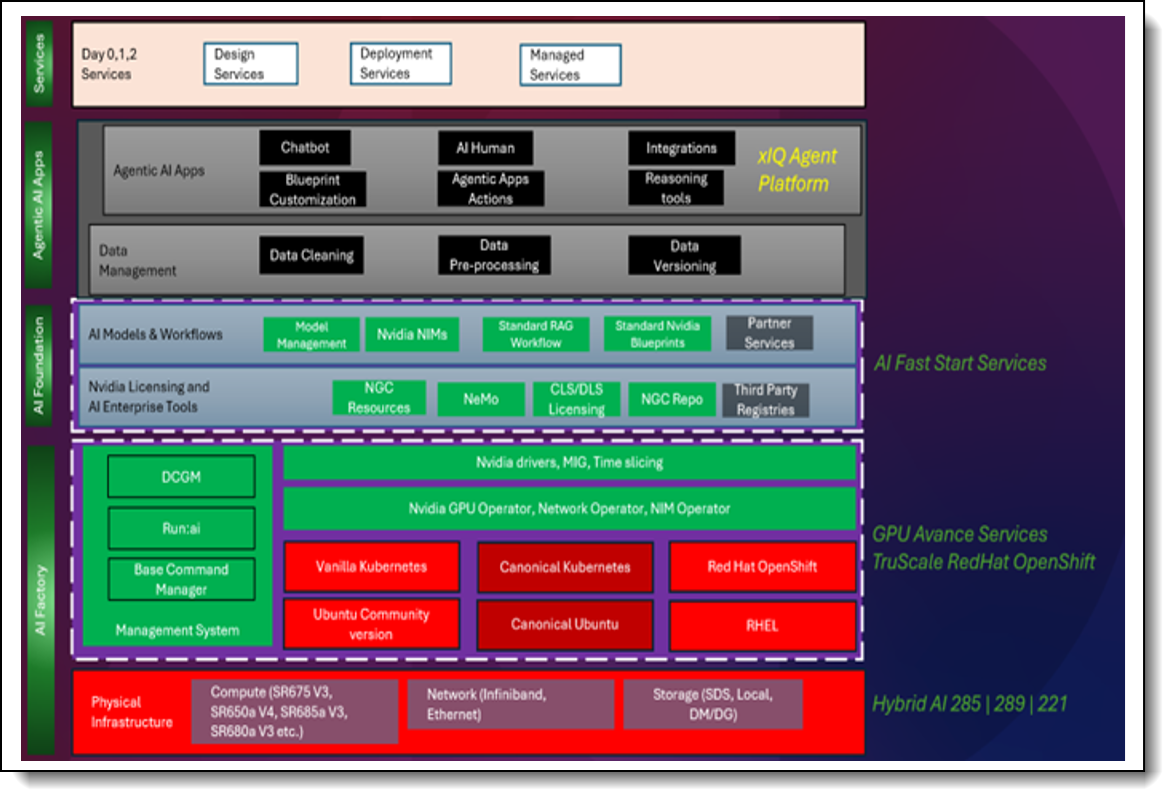
The two current services offerings broken down to the right of the AI Factory and AI Foundation layers found in Figure 25 below. AI Fast Start Services provide use case development and validation for agentic AI and GenAI applications. The GPU Advance Services provide the foundation needed for AI use case development, including AI factory design, deployment of the software and firmware stack, and setup of orchestration software. Optionally, TruScale RedHat OpenShift service can be added for those wanting to use OpenShift on RHEL. All services are flexible to meet the unique needs of different organizations while adhering to Lenovo's Reference Architectures and Platform Guides. Figure 25 shows some of the possible combinations of software and orchestration that are found in this Reference Architecture.
Topics in this section:
Service & Support Offerings
The following table lists the Service and support offerings
GPU Plan & Design Services
Lenovo offers advisory services to support organizations in planning and optimizing high-performance GPU workloads, including assessment of current infrastructure and identifying intended use cases.
This service helps customers with:
- Planning for optimal GPU utilization
- Aligning business and tech strategy
- Workload assessment
- Deployment strategy
- Architecture and design
- Solution sizing and technology selection
- High-level architecture
The outcomes of the GPU Plan & Design Services are reduced risk and access to proven best practices. Improved performance and an optimized infrastructure at the outset build a solid base that is future-proofed to accommodate growth.
GPU Configuration and Deployment Services
Configuration and deployment services help organizations accelerate their timeline. By providing installation and setup for the complete Lenovo recommended software stack for AI, this service acts as the engine of the solution, significantly accelerating the time to value.
Lenovo deployment services help provide the fastest time to first token for an enterprise building their Hybrid AI factory. The GPU advanced configuration and deployment services provide expert guidance on software and hardware components to get your AI factory up and running, including:
- Operating system
- Kubernetes
- GPU configuration
- DDN storage configuration
With this service Lenovo enables deployment of the Lenovo Hybrid AI configurations, from a single node to multi-node, with customizable AI software stack and services. Leveraging our deep relationship with NVIDIA, we can fine-tune the GPU performance to precisely match the customer’s workload requirements.
Lenovo enables customers to overcome skills gaps to fully utilize their GPU configurations and boost the performance of their most challenging workloads. Lenovo also helps upskill a diverse customer team with knowledge transfer from Lenovo experts, working within the framework of our scalable, customizable Lenovo Hybrid AI architectures deliver end-to-end solutions designed to accelerate enterprise AI adoption.
Customers will receive a low-level design of the configuration as well as knowledge transfer from Lenovo’s experts.
GPU Managed Services
Lenovo provides managed NVIDIA-based GPU systems that can address customer needs on an ongoing basis. This includes support, security & compliance, and business functions.
Customers can consistently maintain peak performance of their GPU infrastructure through the following support:
- L1 support for the GPU and NVIDIA AI Enterprise software (if applicable)
- Security and compliance verification
- Ongoing GPU performance monitoring and tuning with logging and alerts
- Backup and restore of the management components and configuration
GPU Managed Services seamlessly scales with the organization and giving greater visibility and monitoring of performance. Additionally these services provide vulnerability patching to stay ahead of risks which helps free up developers and data scientists to focus on innovation.
Lenovo AI Center of Excellence
In addition to the choice of utilizing Lenovo EveryScale Infrastructure framework for the Enterprise AI platform to ensure tested and warranted interoperability, Lenovo operates an AI Lab and CoE at the headquarters in Morrisville, North Carolina, USA to test and enable AI applications and use cases on the Lenovo EveryScale AI platform.
The AI Lab environment allows customers and partners to execute proof of concepts for their use cases or test their AI middleware or applications. It is configured as a diverse AI platform with a range of systems and GPU options, including NVIDIA L40S and NVIDIA HGX8 H200.
The software environment utilizes Canonical Ubuntu Linux along with Canonical MicroK8s to offer a multi-tenant Kubernetes environment. This setup allows customers and partners to schedule their respective test containers effectively.
Lenovo AI Innovators
Lenovo Hybrid AI platforms offer the necessary infrastructure for a customer’s hybrid AI factory. To fully leverage the potential of AI integration within business processes and operations, software providers, both large and small, are developing specialized AI applications tailored to a wide array of use cases.
To support the adoption of those AI applications, Lenovo continues to invest in and extend its AI Innovators Program to help organizations gain access to enterprise AI by partnering with more than 50 of the industry’s leading software providers.
Partners of the Lenovo AI Innovators Program get access to our AI Discover Labs, where they validate their solutions and jointly support Proof of Concepts and Customer engagements.
LAII provides customers and channel partners with a range of validated solutions across various vertical use cases, such as for Retail or Public Security. These solutions are designed to facilitate the quick and safe deployment of AI solutions that optimally address the business requirements.
The following is a selection of case studies involving Lenovo customers implementing an AI solution:
- Kroeger (Retail) – Reducing Customer friction and loss prevention
- Peak (Logistics) – Streamlining supply chain ops for fast and efficient deliveries
- Bikal (AI at Scale) – Delivering shared AI platform for education
- VSAAS (Smart Cities) – Enabling accurate and effective public security
Lenovo Validated Designs
Lenovo Validated Designs (LVDs) are pre-tested, optimized solution designs enabling reliability, scalability, and efficiency in specific workloads or industries. These solutions integrate Lenovo hardware like ThinkSystem servers, storage, and networking with software and best practices to solve common IT challenges. Developed with technology partners such as VMware, Intel, and Red Hat, LVDs ensure performance, compatibility, and easy deployment through rigorous validation.
Lenovo Validated Designs are intended to simplify the planning, implementation, and management of complex IT infrastructures. They provide detailed guidance, including architectural overviews, component models, deployment considerations, and bills of materials, tailored to specific use cases such as artificial intelligence (AI), big data analytics, cloud computing, virtualization, retail, or smart manufacturing. By offering a pretested solution, LVDs aim to reduce risk, accelerate deployment, and assist organizations in achieving faster time-to-value for their IT investments.
Lenovo Hybrid AI platforms act as infrastructure frameworks for LVDs addressing data center-based AI solutions. They provide the hardware/software reference architecture, optionally Lenovo EveryScale integrated solution delivery method, and general sizing guidelines.
Lenovo TruScale
Lenovo TruScale XaaS is your set of flexible IT services that makes everything easier. Streamline IT procurement, simplify infrastructure and device management, and pay only for what you use – so your business is free to grow and go anywhere.
Lenovo TruScale is the unified solution that gives you simplified access to:
- The industry’s broadest portfolio – from pocket to cloud – all delivered as a service
- A single-contract framework for full visibility and accountability
- The global scale to rapidly and securely build teams from anywhere
- Flexible fixed and metered pay-as-you-go models with minimal upfront cost
- The growth-driving combination of hardware, software, infrastructure, and solutions – all from one single provider with one point of accountability.
For information about Lenovo TruScale offerings that are available in your region, contact your local Lenovo sales representative or business partner.
Lenovo Financial Services
Why wait to obtain the technology you need now? No payments for 90 days and predictable, low monthly payments make it easy to budget for your Lenovo solution.
- Flexible
Our in-depth knowledge of the products, services and various market segments allows us to offer greater flexibility in structures, documentation and end of lease options.
- 100% Solution Financing
Financing your entire solution including hardware, software, and services, ensures more predictability in your project planning with fixed, manageable payments and low monthly payments.
- Device as a Service (DaaS)
Leverage latest technology to advance your business. Customized solutions aligned to your needs. Flexibility to add equipment to support growth. Protect your technology with Lenovo's Premier Support service.
- 24/7 Asset management
Manage your financed solutions with electronic access to your lease documents, payment histories, invoices and asset information.
- Fair Market Value (FMV) and $1 Purchase Option Leases
Maximize your purchasing power with our lowest cost option. An FMV lease offers lower monthly payments than loans or lease-to-own financing. Think of an FMV lease as a rental. You have the flexibility at the end of the lease term to return the equipment, continue leasing it, or purchase it for the fair market value. In a $1 Out Purchase Option lease, you own the equipment. It is a good option when you are confident you will use the equipment for an extended period beyond the finance term. Both lease types have merits depending on your needs. We can help you determine which option will best meet your technological and budgetary goals.
Ask your Lenovo Financial Services representative about this promotion and how to submit a credit application. For the majority of credit applicants, we have enough information to deliver an instant decision and send a notification within minutes.
Appendix A: Reference Bill of Materials
This section provides an example Bill of Materials (BoM) for the components described in this document.
- Lenovo ThinkSystem SR675 V3 with 8 × NVIDIA H200 NVL
- Lenovo ThinkSystem SR675 V3 with 8 × RTX Pro 6000 Blackwell Server Edition
- Lenovo ThinkSystem SR655 V3
- NVIDIA SN5610
- NVIDIA SN2201
- NVIDIA SN4700
- XClarity One
- Linux Operating Systems
- Red Hat AI Enterprise
- NVIDIA AI Enterprise
- ThinkSystem DG5200
- ThinkSystem DM7200F
Topics in this section:
- ThinkSystem SR675 V3 with 8 x NVIDIA H200 NVL
- ThinkSystem SR675 V3 with 8 x NVIDIA RTX PRO 6000 Blackwell Server Edition GPUs
- ThinkSystem SR655 V3
- NVIDIA Spectrum-4 SN5610
- NVIDIA SN2201
- NVIDIA SN4700
- XClarity One
- Linux Operating Systems
- Red Hat AI Enterprise
- NVIDIA AI Enterprise
- ThinkSystem DG5200
- ThinkSystem DM7200F
ThinkSystem SR675 V3 with 8 x NVIDIA H200 NVL
ThinkSystem SR675 V3 with 8 x NVIDIA RTX PRO 6000 Blackwell Server Edition GPUs
ThinkSystem SR655 V3
ThinkSystem DG5200
ThinkSystem DM7200F
Appendix B: Solution IDs in DCSC
- SID0000859: 2-8-5 Hybrid AI Starter Kit - H200 NVL Copper - DG5200 Storage
- The AI starter kit sizing includes between 3 SR675 V3s outfitted with between 6 to 24 NVIDIA DW PCIe GPUs, ideal for customers who don't plan to scale beyond 24 GPUs within their application and want to include external storage in their deployed solution. The starter kits leverage the newly released ONTAP storage products: DM and DG series
- SID0000970: Hybrid AI 285 Single Compute Node RTX Pro 6000
- The SR675 V3 is a 2-socket 5th Gen AMD EPYC 9005 server supporting up to 8 PCIe DW GPUs with up to 5 network adapters in a 3U rack server chassis. This makes it the ideal choice for NVIDIA’s 2-8-5 configuration requirement. This configuration includes 8 RTX Pro 6000s.
- SID0001056: Hybrid AI 2-4-3 Compute Node RTX Pro 6000
- An underpopulated version of a Hybrid AI 285 Compute Node meant for entry-level deployments. This node is well suited for inference and simulation use cases.
- The SR675 V3 is a 2-socket 5th Gen AMD EPYC 9005 server supporting up to 8 PCIe DW GPUs with up to 5 network adapters in a 3U rack server chassis. This configuration includes 4 RTX Pro 6000s.
- SID0001091: Hybrid AI 285 Scalable Units
- Lenovo Hybrid AI 285 is a platform that enables enterprises of all sizes to quickly deploy hybrid AI factory infrastructure, supporting Enterprise AI use cases as either a new, greenfield environment or an extension of their existing IT infrastructure. The offering is based on the NVIDIA 2-8-5 PCIe-optimized configuration — 2x CPUs, 8x GPUs, and 5x network adapters — and is ideally suited for medium (per GPU) to large (per node) Inference use cases, and small-to-large model training or fine-tuning, depending on chosen scale.
- This solution contains the networking (including cabling), support, and compute infrastructure for a 285 deployment between 1 and 5 SUs. This SID defaults to 1 SU. In order to add additional SUs, add 4 SR675s per SU
- SID0001092 Hybrid AI 285 1 Scalable Unit
- This solution contains only the AI compute nodes and corresponding cabling for 1 Scalable Unit (SU) of a 285 deployment. Therefore, 1 285 Scalable Central Rack (SID0001091) is also needed to have a full Hybrid AI 285 platform. 1 Scalable Central Rack can have up to 5 Scalable Units
Appendix C: Related publications and links
For more information, see these resources:
- Lenovo EveryScale support page: https://datacentersupport.lenovo.com/us/en/solutions/ht505184
- x-config configurator: https://lesc.lenovo.com/products/hardware/configurator/worldwide/bhui/asit/x-config.jnlp
- Implementing AI Workloads using NVIDIA GPUs on ThinkSystem Servers: https://lenovopress.lenovo.com/lp1928-implementing-ai-workloads-using-nvidia-gpus-on-thinksystem-servers
- Making LLMs Work for Enterprise Part 3: GPT Fine-Tuning for RAG: https://lenovopress.lenovo.com/lp1955-making-llms-work-for-enterprise-part-3-gpt-fine-tuning-for-rag
- Lenovo to Deliver Enterprise AI Compute for NetApp AIPod Through Collaboration with NetApp and NVIDIA https://lenovopress.lenovo.com/lp1962-lenovo-to-deliver-enterprise-ai-compute-for-netapp-aipod-nvidia
Seller training courses
The following sales training courses are offered for employees and partners (login required). Courses are listed in date order.
-
VTT: Building Solutions with Hybrid AI Factory Platforms
2026-10-22 | 57 minutes | Employees Only
DetailsVTT: Building Solutions with Hybrid AI Factory Platforms
Watch this webinar as Hapsara Sukasdadi, Sr AI/HPC Solution Architect, Connor Blumsack, AI/HPC Solution Architect and Abed Islam, AI/HPC Solution Architect explaing the Hybrid AI Factory platforms.
Published: 2026-10-22
Topics include:
Review of the 201, 221, 285 & 289 platforms
Learn how to build & scale solutions as customer requirements grow
Evaluate alternative networking considerations for successful deployments
Match target workloads to practical customer use cases
Length: 57 minutes
Course code: DVAI235Start the training:
Employee link: Grow@Lenovo
-
Partner Technical Webinar - AI Stories - Part 1
2026-09-04 | 60 minutes | Employees and Partners
DetailsPartner Technical Webinar - AI Stories - Part 1
In this 60 minute replay, John Encizo’s AI team joined us to share some AI Stories: from Requirements to Architecture. Part 1
Published: 2026-09-04
Length: 60 minutes
Course code: AUG2826Start the training:
Employee link: Grow@Lenovo
Partner link: Lenovo 360 Learning Center
-
Lenovo Enterprise AI セールスアセスメント
2026-09-02 | 45 minutes | Employees and Partners
DetailsLenovo Enterprise AI セールスアセスメント
このラーニングパスに取り組む前に、「Lenovo for Hybrid AI」を修了することをお勧めします。
Published: 2026-09-02
本プログラムは、「Lenovo Enterprise AI Sales Certification Assessment(LenovoエンタープライズAIセールス認定試験)」に向けた準備を行い、該当する認定資格を取得できるように設計されています。
Length: 45 minutes
Course code: LENA-ENTAI-126A-JPNStart the training:
Employee link: Grow@Lenovo
Partner link: Lenovo 360 Learning Center
-
VTT: Architecting Outcomes - How Lenovo SSG Enhances Infrastructure, Edge, and Cloud Solutions
2026-05-14 | 54 minutes | Employees Only
DetailsVTT: Architecting Outcomes - How Lenovo SSG Enhances Infrastructure, Edge, and Cloud Solutions
Join Adam Mandelbloom Lenovo Technical Activation Engineer, SSG Hybrid Cloud & AI Technical Enablement and the SSG Team for an overview and introduction to Lenovo Solutions & Services Group (SSG). Discover how SSG supports customer solution design and sales engagements.
Published: 2026-05-14
This session will discuss how Lenovo SSG complements Lenovo infrastructure and client offerings with services, solutions, and lifecycle capabilities that help customers modernize IT, reduce operational complexity, and accelerate business outcomes. You will learn how SSG extends Lenovo’s hardware and platform portfolio with services and consumption models that address real customer requirements across data center, edge, and hybrid cloud environments.
Topics covered:
Lenovo SSG at a glance
- Mission, scope, and how SSG fits into Lenovo’s end to end portfolio
Core SSG service categories
- TruScale (as a Service)
- Professional Services
- Managed Services
- Support & Lifecycle Services
Technical value propositions
- Where and how SSG integrates with data center, edge, cloud, and AI solutions
Pre sales alignment
- How to position SSG in technical discussions
- Common customer use cases
Partnering with SSG
- How to engage with SSG resources during the sales cycle
Tags: SSG, Hybrid Cloud, Cloud, SSG Engagement, AI Library, xIQ
Length: 54 minutes
Course code: DVCLD232Start the training:
Employee link: Grow@Lenovo
-
Lenovo VTT Cloud Architecture: Empowering AI Innovation with NVIDIA RTX Pro 6000 and Lenovo Hybrid AI Services
2025-09-18 | 68 minutes | Employees Only
DetailsLenovo VTT Cloud Architecture: Empowering AI Innovation with NVIDIA RTX Pro 6000 and Lenovo Hybrid AI Services
Join Dinesh Tripathi, Lenovo Technical Team Lead for GenAI and Jose Carlos Huescas, Lenovo HPC & AI Product Manager for an in-depth, interactive technical webinar. This session will explore how to effectively position the NVIDIA RTX PRO 6000 Blackwell Server Edition in AI and visualization workflows, with a focus on real-world applications and customer value.
Published: 2025-09-18
We’ll cover:
- NVIDIA RTX PRO 6000 Blackwell Overview: Key specs, performance benchmarks, and use cases in AI, rendering, and simulation.
- Positioning Strategy: How to align NVIDIA RTX PRO 6000 with customer needs across industries like healthcare, manufacturing, and media.
- Lenovo Hybrid AI 285 Services: Dive into Lenovo’s Hybrid AI 285 architecture and learn how it supports scalable AI deployments from edge to cloud.
Whether you're enabling AI solutions or guiding customers through infrastructure decisions, this session will equip you with the insights and tools to drive impactful conversations.
Tags: Industry solutions, SMB, Services, Technical Sales, Technology solutions
Length: 68 minutes
Course code: DVCLD227Start the training:
Employee link: Grow@Lenovo
-
VTT AI: Introducing the Lenovo Hybrid AI 285 Platform April 2025
2025-04-30 | 60 minutes | Employees Only
DetailsVTT AI: Introducing the Lenovo Hybrid AI 285 Platform April 2025
The Lenovo Hybrid AI 285 Platform enables enterprises of all sizes to quickly deploy AI infrastructures supporting use cases as either new greenfield environments or as an extension to current infrastructures. The 285 Platform enables the use of the NVIDIA AI Enterprise software stack. The AI Hybrid 285 platform is the perfect foundation supporting Lenovo Validated Designs.
Published: 2025-04-30
• Technical overview of the Hybrid AI 285 platform
• AI Hybrid platforms as infrastructure frameworks for LVDs addressing data center-based AI solutions.
• Accelerate AI adoption and reduce deployment risks
Tags: Artificial Intelligence (AI), Nvidia, Technical Sales, Lenovo Hybrid AI 285
Length: 60 minutes
Course code: DVAI215Start the training:
Employee link: Grow@Lenovo
Trademarks
Lenovo and the Lenovo logo are trademarks or registered trademarks of Lenovo in the United States, other countries, or both. A current list of Lenovo trademarks is available on the Web at https://www.lenovo.com/us/en/legal/copytrade/.
The following terms are trademarks of Lenovo in the United States, other countries, or both:
Lenovo®
From Exascale to EveryScale®
Lenovo Hybrid AI Advantage™
Lenovo TruScale®
ThinkAgile®
ThinkSystem®
TruScale®
XClarity®
The following terms are trademarks of other companies:
AMD®, AMD EPYC®, and EPYC® are trademarks of Advanced Micro Devices, Inc.
Intel®, the Intel logo is a trademark of Intel Corporation or its subsidiaries.
Linux® is the trademark of Linus Torvalds in the U.S. and other countries.
Microsoft® and Azure® are trademarks of Microsoft Corporation in the United States, other countries, or both.
IBM® and Terraform® are trademarks of IBM in the United States, other countries, or both.
NVIDIA®, NGC®, NVIDIA Base Command, NVIDIA Hopper, NVIDIA Omniverse®, NVIDIA RAPIDS®, NVIDIA RTX®, NVIDIA Spectrum®, NVIDIA Spectrum-X, NVIDIA Triton®, and NVLink® are trademarks of NVIDIA Corporation.
Other company, product, or service names may be trademarks or service marks of others.
Configure and Buy
Please select a locale
Full Change History
Changes in the June 11, 2026 update:
- Updated text details and images under the Overview section
- Single Node with Red Hat OpenShift SNO (Single Node OpenShift)
- Added the following under Components section
- Networking sub-section
- NVIDIA Spectrum SN4700
- NVIDIA SN5610
- Added the following new sections
- Appendix A: Reference Bill of Materials
- Appendix B: Solution IDs in DCSC
Changes in the May 20, 2026 update:
- Added the following deployment under Scalability section
- Single Node with Red Hat OpenShift SNO (Single Node OpenShift)
- Updated table with new descriptions under AI Software Stack section
Changes in the May 19, 2025 update:
- Added NVIDIA RTX PRO 6000 Blackwell Server Edition GPU
- Added AI Starter Kit sizing including description of the ThinkSystem DM and ThinkSystem DG products
Changes in the April 30, 2025 update:
- Added Seller Training Courses
First published: March 19, 2025
Course Detail
Employees Only Content
The content in this document with a is only visible to employees who are logged in. Logon using your Lenovo ITcode and password via Lenovo single-signon (SSO).
The author of the document has determined that this content is classified as Lenovo Internal and should not be normally be made available to people who are not employees or contractors. This includes partners, customers, and competitors. The reasons may vary and you should reach out to the authors of the document for clarification, if needed. Be cautious about sharing this content with others as it may contain sensitive information.
Any visitor to the Lenovo Press web site who is not logged on will not be able to see this employee-only content. This content is excluded from search engine indexes and will not appear in any search results.
For all users, including logged-in employees, this employee-only content does not appear in the PDF version of this document.
This functionality is cookie based. The web site will normally remember your login state between browser sessions, however, if you clear cookies at the end of a session or work in an Incognito/Private browser window, then you will need to log in each time.
If you have any questions about this feature of the Lenovo Press web, please email David Watts at dwatts@lenovo.com.


