

Top
Author
Updated
8 May 2026Form Number
LP2364PDF size
13 pages, 527 KBSubscribed to LP2364.
Thank you for your feedback.
Abstract
The ThinkSystem NVIDIA RTX PRO 6000 Blackwell Max-Q Workstation Edition 96GB PCIe Gen5 Active GPU is a powerful Blackwell platform delivering breakthrough AI and neural rendering capabilities. The GPU combines the latest RTX technology with 96 GB of memory to accelerate AI development, data science, and immersive content creation.
This product guide provides essential presales information to understand the RTX PRO 6000 Blackwell Max-Q GPU and its key features, specifications, and compatibility. This guide is intended for technical specialists, sales specialists, sales engineers, IT architects, and other IT professionals who want to learn more about the RTX PRO 6000 Blackwell Max-Q GPU and consider its use in IT solutions.
Change History
Changes in the May 8, 2026 update:
- Removed the NVIDIA vGPU Software part numbers since the GPU does not support vGPUs - NVIDIA GPU software section
Introduction
The NVIDIA RTX PRO 6000 Blackwell Max-Q Workstation Edition is designed for professionals tackling the most demanding AI, data science, and creative workflows. Built on the NVIDIA Blackwell architecture, this GPU delivers groundbreaking AI and neural rendering capabilities, combining the latest RTX technology with 96 GB of memory to accelerate AI development, data science, and immersive content creation.
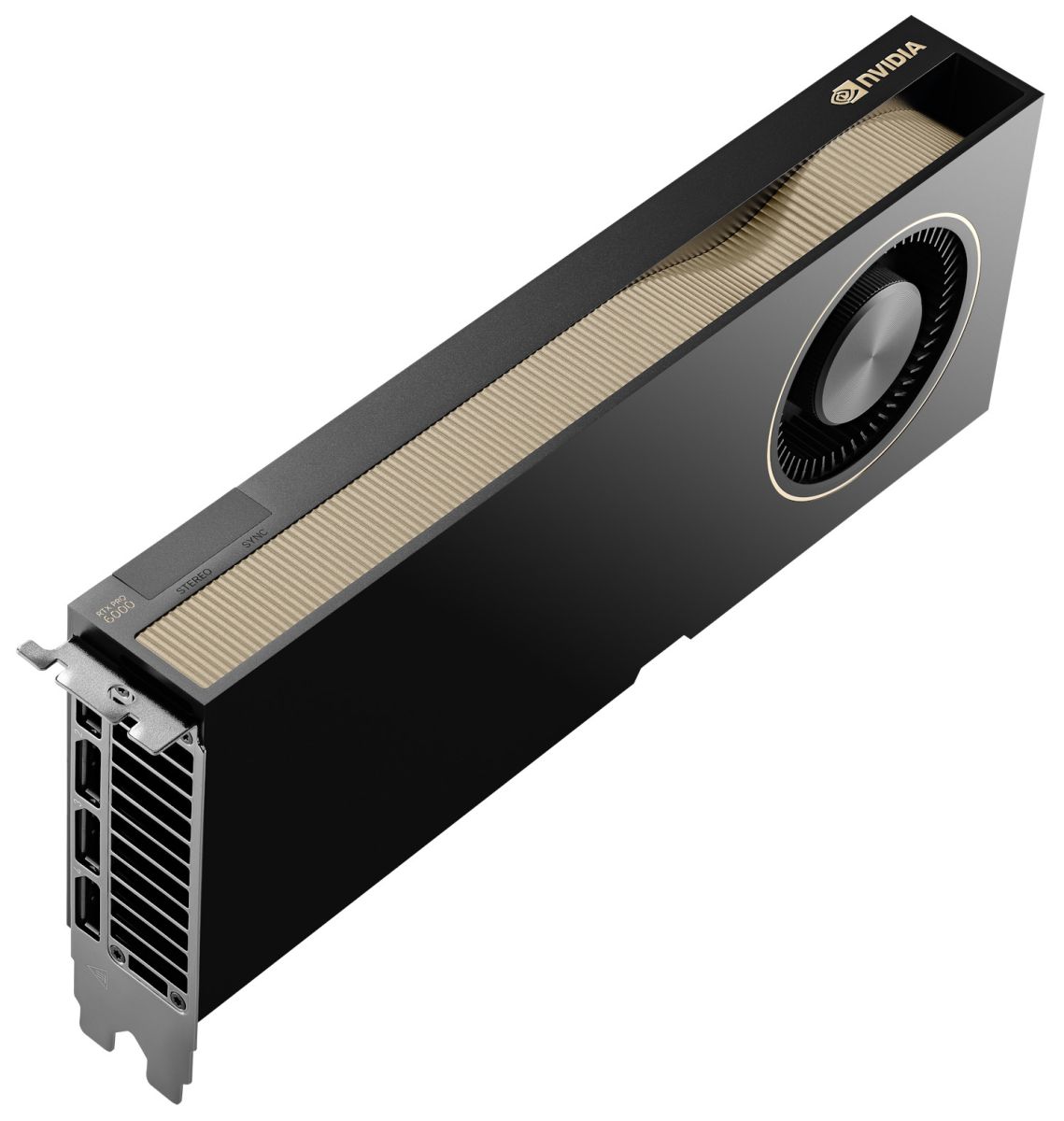
Figure 1. ThinkSystem NVIDIA RTX PRO 6000 Blackwell Max-Q Workstation Edition 96GB PCIe Gen5 Active GPU
Did you know?
As part of the NVIDIA OVX server platform, RTX PRO 6000 Blackwell Max-Q GPU delivers the highest level of graphics, ray tracing, and simulation performance for NVIDIA Omniverse. With 96 GB of GDDR7 memory, even the most intense graphics applications run at the highest level of performance.
Part number information
The following table shows the part numbers for the RTX PRO 6000 Blackwell Max-Q GPU.
The RTX PRO 6000 Blackwell Max-Q GPU is Controlled which means the GPU is not offered in certain markets, as determined by the US Government.
The PCIe option part numbers includes the following:
- One RTX PRO 6000 Blackwell Max-Q GPU with full-height (3U) double-wide adapter bracket attached
- Documentation
Features
The NVIDIA Blackwell architecture combines breakthrough AI, ray tracing, and neural rendering technology, with massive performance and memory improvements to drive cutting-edge professional creative, design, and engineering workflows and power the next decade of innovation.
Key features include:
- NVIDIA Blackwell Streaming Multiprocessor: The new SM features increased processing throughput, and new neural shaders that integrate neural networks inside of programmable shaders to drive the next decade of AI-augmented graphics innovations.
- 5th Gen Tensor Cores: Deliver up to 3X the performance of the previous generation and support for FP4 precision for faster AI model processing times with reduced memory usage, enabling local fine-tuning of LLMs and generative AI.
- 4th Gen Ray Tracing Cores: Double the ray-triangle intersection rate of the previous generation to create photoreal, physically accurate scenes and immersive 3D designs with RTX Mega Geometry, which enables up to 100X more ray-traced triangles.
- Next-Gen Video Engines: Enhance video conferencing, video production, and streaming workflows with real-time AI processing. Ninth-generationNVENC and the sixth-generation NVDEC engines provide support for 4:2:2 encoding and decoding to explore a new realm of high-resolution video workflows.
- GDDR7 Memory: New and improved GDDR7 memory significantly boosts bandwidth and capacity, empowering your applications to run faster, and work with larger, more complex datasets. With 96 GB of GPU memory and 1.8 TB/s bandwidth, tackle massive 3D and AI projects, fine-tune AI models locally, explore large-scale VR environments, and drive larger multi-app workflows.
- DLSS 4: Multi Frame Generation ensures ultra-smooth frame pacing for lifelike simulations. Experience up to 3X faster frame rates and stunning image quality in supported game engines and 3D rendering applications for smoother, more responsive performance.
- PCIe Gen 5: Support for PCIe Gen 5 provides double the bandwidth of PCIe Gen 4, improving data-transfer speeds from CPU memory and unlocking faster performance for data-intensive tasks like AI, data science and 3D modeling.
- DisplayPort 2.1: Achieve unparalleled visual clarity and performance, driving highresolution displays at up to 8K at 240 Hz and 16K at 60 Hz. Increased bandwidth enables seamless multi-monitor setups, ideal for multitasking and collaboration, while HDR and higher color depth support ensures superior color accuracy for precision work, such as video editing, 3D design, and live broadcasting.
- Universal MIG: Split a single RTX PRO 6000 Max-Q into multiple isolated instances, each with its own resources, allowing for concurrent execution of multiple workloads, optimized GPU utilization, and secure isolation of different applications or users.
Technical specifications
The following table lists the specifications of the RTX PRO 6000 Blackwell Max-Q GPU.
** To enable the DisplayPort ports, see https://developer.nvidia.com/displaymodeselector
Server support
The following tables list the ThinkSystem servers that are compatible.
Operating system support
The following table lists the supported operating systems:
Tip: These tables are automatically generated based on data from Lenovo ServerProven.
NVIDIA GPU software
This section lists the NVIDIA software that is available from Lenovo.
NVIDIA Enterprise Software
Lenovo offers the NVIDIA Enterprise cloud-native enterprise software, comprised of NVIDIA AI Enterprise (NVAIE) and NVIDIA Omniverse Enterprise. NVIDIA Enterprise is an end-to-end, cloud-native suite of AI and data analytics software, optimized, certified, and supported by NVIDIA to run on VMware vSphere and bare-metal with NVIDIA-Certified Systems™. It includes key enabling technologies from NVIDIA for rapid deployment, management, and scaling of AI workloads in the modern hybrid cloud.
NVIDIA Enterprise is licensed on a per-GPU basis. NVIDIA Enterprise products can be purchased as either a perpetual license with support services, or as an annual or multi-year subscription.
- The perpetual license provides the right to use the NVIDIA Enterprise software indefinitely, with no expiration. NVIDIA Enterprise with perpetual licenses must be purchased in conjunction with one-year, three-year, or five-year support services. A one-year support service is also available for renewals.
- The subscription offerings are an affordable option to allow IT departments to better manage the flexibility of license volumes. NVIDIA Enterprise software products with subscription includes support services for the duration of the software’s subscription license
The following table lists NVIDIA Enterprise license part numbers and feature codes.
For more information, see the NVIDIA Enterprise Sizing Guide.
NVIDIA Run:ai
NVIDIA Run:ai is an enterprise platform for AI workloads and GPU orchestration, accelerating AI operations with dynamic orchestration across the AI life cycle, maximizing GPU efficiency, and integrating seamlessly into hybrid AI infrastructure. The platform provides features such as AI-native workload orchestration, unified AI infrastructure management, flexible AI deployment, and open architecture, supporting public clouds, private clouds, hybrid environments, and on-premises data centers.
For more information, see the NVIDIA Run:ai product page:
https://www.nvidia.com/en-us/software/run-ai/
NVIDIA HPC Compiler Software
Auxiliary power cables
The RTX PRO 6000 Blackwell Max-Q GPU option part number does not ship with auxiliary power cables. Cables are server-specific due to length requirements. For CTO orders, auxiliary power cables are derived by the configurator. For field upgrades, cables will need to be ordered separately as listed in the table below.
.png "Click to show a larger version of the image")
Regulatory approvals
The RTX PRO 6000 Blackwell Max-Q GPU has the following regulatory approvals:
- RCM
- BSMI
- CE
- FCC
- ICES
- KCC
- cUL, UL
- VCCI
Operating environment
The RTX PRO 6000 Blackwell Max-Q GPU has the following operating characteristics:
- Ambient temperature
- Operational: 0°C to 50°C (-5°C to 55°C for short term*)
- Storage: -40°C to 75°C
- Relative humidity:
- Operational: 5-85% (5-93% short term*)
- Storage: 5-95%
* A period not more than 96 hours consecutive, not to exceed 15 days per year.
Warranty
One year limited warranty. When installed in a Lenovo server, the GPU assumes the server’s base warranty and any warranty upgrades.
Related publications
For more information, refer to these documents:
- ThinkSystem and ThinkAgile GPU Summary:
https://lenovopress.lenovo.com/lp0768-thinksystem-thinkagile-gpu-summary - ServerProven compatibility:
https://serverproven.lenovo.com/ - RTX PRO 6000 Blackwell Max-Q GPU product page:
http://nvidia.com/rtx-pro-6000-max-q/
Trademarks
Lenovo and the Lenovo logo are trademarks or registered trademarks of Lenovo in the United States, other countries, or both. A current list of Lenovo trademarks is available on the Web at https://www.lenovo.com/us/en/legal/copytrade/.
The following terms are trademarks of Lenovo in the United States, other countries, or both:
Lenovo®
ServerProven®
ThinkAgile®
ThinkSystem®
The following terms are trademarks of other companies:
AMD® is a trademark of Advanced Micro Devices, Inc.
Intel®, the Intel logo is a trademark of Intel Corporation or its subsidiaries.
Linux® is the trademark of Linus Torvalds in the U.S. and other countries.
Microsoft®, DirectX®, Windows 11™, Windows Server®, and Windows® are trademarks of Microsoft Corporation in the United States, other countries, or both.
NVIDIA®, CUDA®, NVIDIA Omniverse®, NVIDIA RTX®, and NVLink® are trademarks of NVIDIA Corporation.
Other company, product, or service names may be trademarks or service marks of others.
Configure and Buy
Please select a locale
Full Change History
Changes in the May 8, 2026 update:
- Removed the NVIDIA vGPU Software part numbers since the GPU does not support vGPUs - NVIDIA GPU software section
Changes in the March 5, 2026 update:
- Added OS support - Operating system support section
First published: January 20, 2026
Course Detail
Employees Only Content
The content in this document with a is only visible to employees who are logged in. Logon using your Lenovo ITcode and password via Lenovo single-signon (SSO).
The author of the document has determined that this content is classified as Lenovo Internal and should not be normally be made available to people who are not employees or contractors. This includes partners, customers, and competitors. The reasons may vary and you should reach out to the authors of the document for clarification, if needed. Be cautious about sharing this content with others as it may contain sensitive information.
Any visitor to the Lenovo Press web site who is not logged on will not be able to see this employee-only content. This content is excluded from search engine indexes and will not appear in any search results.
For all users, including logged-in employees, this employee-only content does not appear in the PDF version of this document.
This functionality is cookie based. The web site will normally remember your login state between browser sessions, however, if you clear cookies at the end of a session or work in an Incognito/Private browser window, then you will need to log in each time.
If you have any questions about this feature of the Lenovo Press web, please email David Watts at dwatts@lenovo.com.


