

Top
Authors
Updated
19 Mar 2026Form Number
LP2385PDF size
9 pages, 801 KBSubscribed to LP2385.
Thank you for your feedback.
Table of Contents
Abstract
This solution brief provides an overview of Lenovo ThinkSystem DM Series Storage and its integration with Lenovo ThinkAgile MX solutions, delivering a highly available, scalable, and efficient data platform for Microsoft Azure Local environments. As SAN support for Azure Local is currently a preview feature, this document highlights the validation testing performed to confirm that the integration behaves as expected and that the feature operates reliably under real‑world conditions.
This document is intended for IT architects, infrastructure engineers, and technical decision‑makers evaluating hybrid storage options.
Change History
Changes in the March 19, 2026 update:
- Updated the solution to include the DM7200F SAN Storage Array
- New section: Supported storage
- Updated the BOM to include the following Fibre Channel adapter - Bill of Materials section:
- ThinkAgile Emulex LPe37102 32Gb 2-port SecureHBA PCIe Fibre Channel Adapter, C5FC
Overview
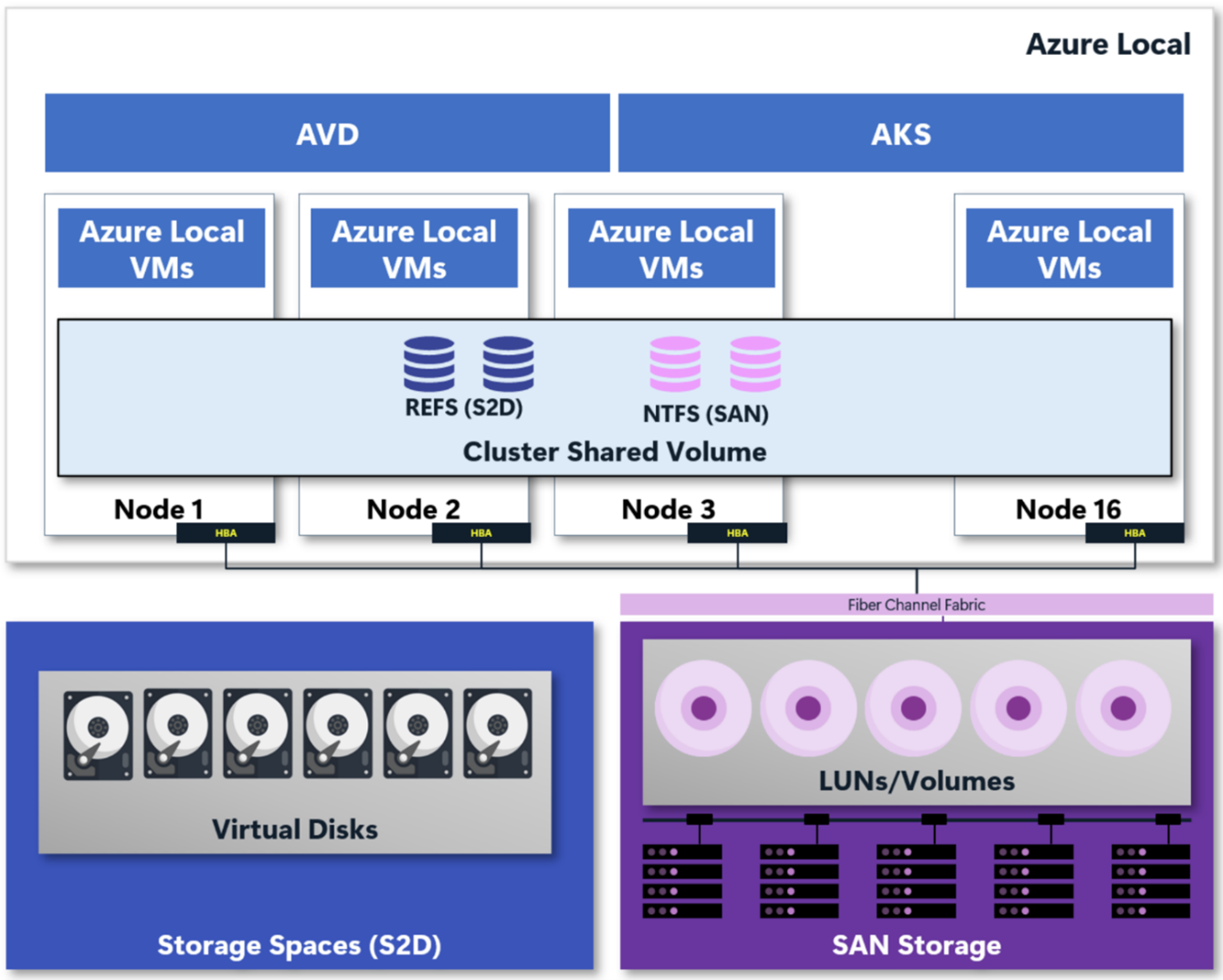
Microsoft Storage Spaces Direct (S2D) is a high-performance low-cost solution to the more traditional SAN environments. For clients that either did not have a SAN solution deployed, or this was not in their immediate plan, this was the perfect solution. But to have the best of both worlds Microsoft released in preview the support for external storage. This means that a client can use, side by side, S2D storage and external storage.
The Lenovo ThinkAgile MX650 V4 is a high‑performance, dual‑socket 2U hyperconverged platform engineered for Microsoft Azure Local deployments, delivering fully validated and integrated hardware certified for Azure Local solutions. Powered by Intel Xeon 6 processors, the MX650 V4 supports large core counts and advanced memory technologies, offering high‑bandwidth DDR5 memory and compatibility with PCIe 5.0 NVMe SSDs.
On the storage side, it supports up to 40x 2.5-inch NVMe drives (including 24 front-accessible, 8 mid-bay, and 8 rear-accessible bays), 32x E3.S 1T NVMe drives, or 16x 3.5-inch bays for high-capacity HDD storage. It also supports M.2 drives, which can be used for operating system boot or data storage. These drives can be internally mounted or installed as hot-swap drives at the front or rear of the server. Optional RAID-0 or RAID-1 configurations are supported.
Designed for scalable, software‑defined infrastructure, the MX650 V4 combines compute density, next‑generation storage performance, and robust integration with Microsoft’s hybrid cloud stack to support modern virtualization, data‑intensive applications and Azure‑aligned operations.
In this document we have used the DM7200F for demonstrating hybrid storage that can be used with Azure Local. The Lenovo ThinkSystem DM7200F is a scalable, unified, all-flash storage system that is designed to provide performance, simplicity, capacity, security, and high availability for large enterprises. Powered by the ONTAP software, ThinkSystem DM7200F delivers enterprise-class storage management capabilities with a wide choice of host connectivity options, flexible drive configurations, and enhanced data management features, including end-to-end NVMe support (NVMe over Fabrics and NVMe drives). The DM7200F is a perfect fit for a wide range of enterprise workloads, including big data and analytics, artificial intelligence, engineering and design, hybrid clouds, and other storage I/O-intensive applications.
Azure Local also supports other Fibre Channel SAN platforms, including the Lenovo DS and DG series, NetApp systems running ONTAP, and arrays from other vendors that are enabled for Azure Local. DS Series provides dual‑controller, block‑only SAN storage with straightforward management and lower entry cost, targeting mid‑range workloads. DG Series storage offers capacity‑optimized all‑flash storage and a simple deployment model for environments that need reliable block performance without the full ONTAP feature set.
Optimizing Business Operations with Unified SAN and HCI Storage
A fast‑growing enterprise might deploy a ThinkSystem DM7200F alongside local Storage Spaces Direct to balance performance, scalability, and cost across different workload tiers. In this scenario, the business runs its mission‑critical databases, analytics services, and latency‑sensitive applications on the DM7200F, taking advantage of its all‑flash, unified storage architecture, high throughput, and enterprise data management capabilities to guarantee predictable performance and strong data protection.
At the same time, the company uses local S2D storage inside its Azure‑integrated ThinkAgile MX environment to cost‑effectively support general virtualization workloads, test/dev environments, and scalable application clusters that benefit from S2D’s hyperconverged design.
By combining both storage layers, the organization gains the agility of software‑defined storage for flexible expansion while leveraging the DM7200F’s reliability and advanced data services for its most demanding workloads, creating a hybrid, resilient, and future‑proof infrastructure that maximizes operational efficiency without sacrificing performance or control.
Azure Local with external storage support
When using Azure Local with Storage Spaces Direct and external storage, all the benefits of standard Azure Local deployment still apply, while adding flexibility in how organizations design their hybrid infrastructure. Lenovo ThinkAgile MX continues to provide validated hardware for Azure Local, running the Azure Stack HCI operating system and the Hyper‑V hypervisor to host Windows and Linux virtual machines as Arc‑enabled servers, while also supporting Azure Virtual Desktop, Azure Kubernetes Service through Azure Arc, and a wide range of AI and machine learning workloads. Management is done through the Azure portal, Azure Resource Manager with Bicep templates, and the Azure CLI.
By combining S2D‑based virtualized local storage with external enterprise storage arrays, businesses can tier workloads efficiently, using S2D for highly integrated, cost‑efficient hyperconverged workloads and external storage for scenarios requiring higher performance, specialized data services, or independent scaling. This hybrid storage approach ensures that Azure Local can be used in almost any scenario.
Hardware components
Key hardware components of the solution are:
ThinkAgile MX650 V4
For this testing two ThinkAgile MX650 V4 servers are configured with Azure Local. The configuration used is the following:
- Server: Lenovo ThinkSystem MX650 V4
- Processor: 2x Intel Xeon 6737P processors up to 4GHz (2.9 GHz base), each with 32 cores and 64 threads
- Memory: 1024GB of DDR5 6400 MT/s memory
- Storage pool: 6x ThinkSystem 7500 PRO NVMe drives 3.8TB NVMe SSDs PCIe 4.0
- OS Storage: 2x 960GB M.2 NVMe SSDs PCIe 4.0 for the operating system (RAID 1)
- OS: Azure Stack HCI 24H2
- FC adapter: Emulex LPe32002-M2-L PCIe 32Gb 2-Port SFP+

ThinkSystem DM200F all-flash storage array
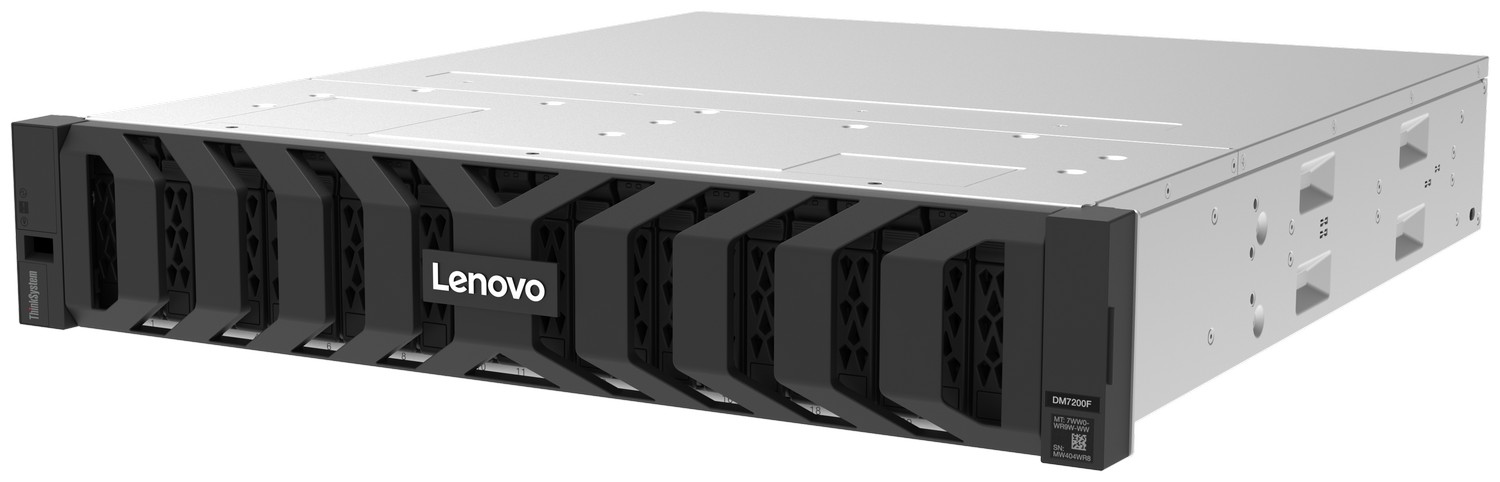
The Lenovo ThinkSystem DM7200F is a unified, all‑NVMe flash storage array built for high performance, high availability, and low latency. It runs ONTAP software and supports block, file, and object protocols in a single platform. A DM7200F high‑availability pair supports up to 120 NVMe SSDs, a maximum raw capacity of 1.8 PB, and an effective capacity of up to 6.8 PiB assuming 5:1 efficiency. It offers connectivity options including 10/25 GbE, 40/100 GbE, 16/32/64 Gb Fibre Channel, and NVMe/FC. The controller enclosure is a 2U, 24‑bay NVMe chassis, with 256 GB memory per HA pair and up to 8 expansion slots
The system scales out to 12 HA pairs for NAS clusters and 6 HA pairs for SAN clusters. It supports DM240N and DM242N shelves for NVMe expansion.
In our environment, the DM7200F was paired with a Lenovo ThinkSystem DM242N NVMe expansion enclosure. The DM242N is a 2U, 24‑bay NVMe shelf supporting up to 24 NVMe SSDs per enclosure and a maximum raw capacity of 368 TB. A DM7200F system supports up to two directly attached DM242N units; scaling to four requires a 100 GbE‑capable switch. The enclosure provides 2 x 100 GbE expansion ports for shelf connectivity. To facilitate communication over Fibre Channel, a Lenovo ThinkSystem DB620S 32 Gb FC SAN switch was used.
Storage configuration
With the physical cabling completed and the Fibre Channel adapters connected to the Lenovo ThinkSystem DB620S 32 Gb SAN switch, the next steps involve configuring the external Lenovo DM7200F storage array for use with the Azure Local instance. The configuration process can be done before the cluster is formed or after the nodes have already been deployed.
In general terms, the storage needs to have the storage array prepared, the SAN zoning needs to be configured on the Fibre Channel switch, Logical Unit Number (LUNs) need to be provisioned and some configuration is required on the host side. Always refer to the official guides for the storage cabling and the ONTAP documentation for configuration.
Supported storage
Microsoft has only recently begun offering Fibre Channel and external SAN storage with Azure Local in a preview state. This capability was not part of the original Azure Stack HCI design, which prioritized a fully hyperconverged model.
The use of external SAN storage in Windows and Hyper‑V environments has a long history. Microsoft and major SAN vendors have supported block‑level storage for many years, and the underlying technologies, including Fibre Channel, are mature and well understood. Because of this long history, a wide range of SAN systems can operate reliably if they can present stable LUNs to the hosts. This includes Lenovo storage systems that support Fibre Channel, such as DM, DS and DG series, NetApp platforms running ONTAP, and SAN products from other established vendors. The architecture does not depend on features unique to a single storage line; what matters is the ability to expose block storage over supported protocols and maintain consistent behavior under load.
This long‑standing ecosystem gives organizations confidence that most enterprise‑grade SAN arrays should function correctly when integrated with Azure Local.
Functionality testing
To validate the integration of external SAN storage within the Azure Local environment, a series of basic functionality checks were performed. After the storage was configured and the LUNs were presented to the hosts, the cluster successfully detected and utilized the external storage without any errors. All hosts have showed the multipath connectivity, and the volumes from the SAN functioned as expected when added to the cluster.
To confirm that the environment operated reliably under load, performance validation was conducted using VMFleet 2.0, a tool commonly used to generate synthetic I/O for testing Storage Spaces Direct. In our tests we used only 16 NVMe SSDs in the DM242N shelf. During these tests, the configuration sustained was approximately 230,000 IOPS, showing that the SAN storage is fully operational and capable of supporting demanding workloads.
Overall, the functionality testing confirms that the SAN storage integrates correctly, performs consistently, and provides a solid foundation for a wide range of virtualized workloads in Azure Local deployments.
Conclusion
Adopting SAN storage as part of an Azure Local deployment delivers significant flexibility and operational advantages for data center architectures. By integrating external Fibre Channel storage with Lenovo ThinkAgile MX650 V4, organizations can scale compute and storage independently, ensuring that infrastructure growth aligns with changing workload requirements. This approach optimizes resource utilization while enabling high‑performance applications to run on dedicated storage tiers optimized for throughput, latency, and data services.
SAN‑based storage also strengthens resiliency and data protection strategies by offering advanced capabilities such as multipathing, synchronous replication, and non‑disruptive operations. These capabilities allow enterprises to maintain consistent performance under load, simplify lifecycle management, and have high uptime.
Most importantly, incorporating SAN into an Azure Local hybrid environment offers flexibility. Organizations can place workloads on the storage platform that best suits their performance, capacity, or compliance needs.
Bill of Materials
The table below lists the components of the MX650 V4 server.
For More Information
To learn more about Lenovo MX solution contact your Lenovo Business Partner or visit:
https://www.lenovo.com/au/en/servers-storage/sdi/thinkagile-mx-series/
References:
- Azure Virtual Desktop on Azure Local
https://lenovopress.lenovo.com/lp2131 - Lenovo ThinkSystem MX650 V4:
https://lenovopress.lenovo.com/lp2137-lenovo-thinkagile-mx650-v4-hyperconverged-system - DM7200F product guide
https://lenovopress.lenovo.com/lp2074-lenovo-thinksystem-dg5200-and-dg7200-unified-storage-arrays - ONTAP 9 documentation:
https://docs.netapp.com/us-en/ontap/ - VMFleet 2.0
https://github.com/microsoft/diskspd/wiki/VMFleet
Authors
Laurentiu Petre is a Lenovo solutions engineer working in Bucharest, Romania. He has over 10 years of experience in the IT field being accustomed with large scale deployments of Microsoft Exchange and other Microsoft products. Before Lenovo, he managed the infrastructure of key players in telecommunications and petroleum exploitation companies. Laurentiu is currently working on SQL performance and Microsoft cloud solutions such as Edge Cloud.
Vinay Kulkarni is a Principal Technical Consultant in the Software and Solutions Development group at ISG, Lenovo. His current focus is on solution architectures in the areas of cloud, database analytics and AI. Vinay has more than 20 years’ experience with Lenovo, and IBM. During this time, Vinay has led diverse projects ranging from performance benchmark publications to solutions development, as well as business and technical strategy.
Trademarks
Lenovo and the Lenovo logo are trademarks or registered trademarks of Lenovo in the United States, other countries, or both. A current list of Lenovo trademarks is available on the Web at https://www.lenovo.com/us/en/legal/copytrade/.
The following terms are trademarks of Lenovo in the United States, other countries, or both:
Lenovo®
ThinkAgile®
ThinkSystem®
XClarity®
The following terms are trademarks of other companies:
Intel®, the Intel logo and Xeon® are trademarks of Intel Corporation or its subsidiaries.
Linux® is the trademark of Linus Torvalds in the U.S. and other countries.
Microsoft, Arc, Azure, and Windows are trademarks of Microsoft Corporation in the United States, other countries, or both.
Other company, product, or service names may be trademarks or service marks of others.
Configure and Buy
Please select a locale
Full Change History
Changes in the March 19, 2026 update:
- Updated the solution to include the DM7200F SAN Storage Array
- New section: Supported storage
- Updated the BOM to include the following Fibre Channel adapter - Bill of Materials section:
- ThinkAgile Emulex LPe37102 32Gb 2-port SecureHBA PCIe Fibre Channel Adapter, C5FC
First published: March 4, 2026
Course Detail
Employees Only Content
The content in this document with a is only visible to employees who are logged in. Logon using your Lenovo ITcode and password via Lenovo single-signon (SSO).
The author of the document has determined that this content is classified as Lenovo Internal and should not be normally be made available to people who are not employees or contractors. This includes partners, customers, and competitors. The reasons may vary and you should reach out to the authors of the document for clarification, if needed. Be cautious about sharing this content with others as it may contain sensitive information.
Any visitor to the Lenovo Press web site who is not logged on will not be able to see this employee-only content. This content is excluded from search engine indexes and will not appear in any search results.
For all users, including logged-in employees, this employee-only content does not appear in the PDF version of this document.
This functionality is cookie based. The web site will normally remember your login state between browser sessions, however, if you clear cookies at the end of a session or work in an Incognito/Private browser window, then you will need to log in each time.
If you have any questions about this feature of the Lenovo Press web, please email David Watts at dwatts@lenovo.com.


