

Top
Author
Published
27 Mar 2026Form Number
LP2410PDF size
11 pages, 1005 KBSubscribed to LP2410.
Thank you for your feedback.
Abstract
The Lenovo zero-U (0U) Monitored power distribution units (PDUs) are the ideal solutions when you need flexible, reliable, easy-to-deploy power distribution with branch circuit protection to minimize downtime. The 0U PDUs are designed to be installed vertically in a Lenovo rack, thereby not consuming any horizontal rack space.
This product guide provides essential presales information to understand the 0U Monitored PDUs and their key features, specifications, and compatibility. This guide is intended for technical specialists, sales specialists, sales engineers, IT architects, and other IT professionals who want to learn more about the 0U Monitored PDUs and consider their use in IT solutions.
Introduction
The Lenovo zero-U (0U) Monitored power distribution units (PDUs) are the ideal solutions when you need flexible, reliable, easy-to-deploy power distribution with branch circuit protection to minimize downtime. These rack-dense units distribute power to up to 48 outlets and 42 outlets. 0U PDUs are designed to be installed vertically in the rear channel of a Lenovo rack, thereby not consuming any horizontal rack space that otherwise be used by servers, storage and network switches (hence the term 0U).
The following figure displays the Lenovo zero-U (0U) Monitored PDU.

Figure 1. Lenovo 0U Monitored PDU
Did you know?
With ever growing power densities in today’s rack environments, it is all too easy to add load in the wrong place and trigger an overload event. The 0U Monitored PDU offerings can minimize this impact, providing the ability to quickly recover with resettable circuit breakers for each designated bank of receptacles, referred to as load groups. Breakers are color coded to the receptacles in a particular load group to aid in configuration, installation, and maintenance. Furthermore, the Monitored PDUs offer inlet and breaker metering, which allow for power distribution and further helping to prevent unintended PDU overloading.
Introduction to PDUs
A power distribution unit (PDU) is a highly reliable, multiple outlet power strip designed to consolidate line cords within the rack and distribute conditioned power from an uninterruptible power supply (UPS) or utility power to servers and other IT equipment. The PDU efficiently distributes power within the rack and provides fault-tolerant power redundancy for high availability requirements.
The following 0U PDUs are available from Lenovo. The PDUs covered in this document are:
- Basic PDUs: The simplest and most cost-effective power distribution. Available with various outlet configurations and line cord options to support different systems and load requirements.
- Monitored PDUs: Easily configured in minutes. Available with various outlet configurations and line cord options to support different systems and load requirements. Supporting various environmental sensors.
- Switched & monitored PDUs: These are advanced power management solutions, providing power monitoring at the outlet level, with increased accuracy at low amperages, for more precise views of power consumption down to the individual server level instead of at the consolidated load group. These PDUs also offer management via a web-based interface which includes individual outlet switching (on/off). Outlet switching allows for remote power sequencing and helps prevent unintended PDU overloading.
Refer to Power Distribution Units available at Lenovo
Monitored PDUs
The following tables provide the ordering part numbers for the 0U Monitored PDUs.
| Part number |
Feature code |
Description |
ANZ
|
ASEAN
|
Brazil
|
EET
|
MEA
|
RUCIS
|
WE
|
HTK
|
INDIA
|
JAPAN
|
LA
|
NA
|
PRC
|
|---|---|---|---|---|---|---|---|---|---|---|---|---|---|---|---|
| 4PU7B08148 | CD15 | 0U 3 C13 and 18 C19 Monitored 48A 3 Phase WYE PDU | N | N | N | N | N | N | N | N | N | N | N | Y | N |
| 4PU7B08149 | CD16 | 0U 3 C13 and 18 C19 Monitored 63A 3 Phase WYE PDU | N | N | N | Y | N | N | Y | N | N | N | N | N | N |
Included with the PDUs
The PDU unit is delivered in a corrugated box and contains:
- One Power Distribution Unit with an attached power cord
- Cable retention clips for the inlet and/or outlets (for some models only)
- iX7 PDU Controller / Front panel display
- X3-iX7 (16 MB Flash/128 MB RAM/ARM Cortex A5 500 MhZ)
- Mounting Screws, brackets and/or buttons for Zero U
- Quick start guide
- Safety information sheet
The following figure displays the 0U Monitored PDUs.
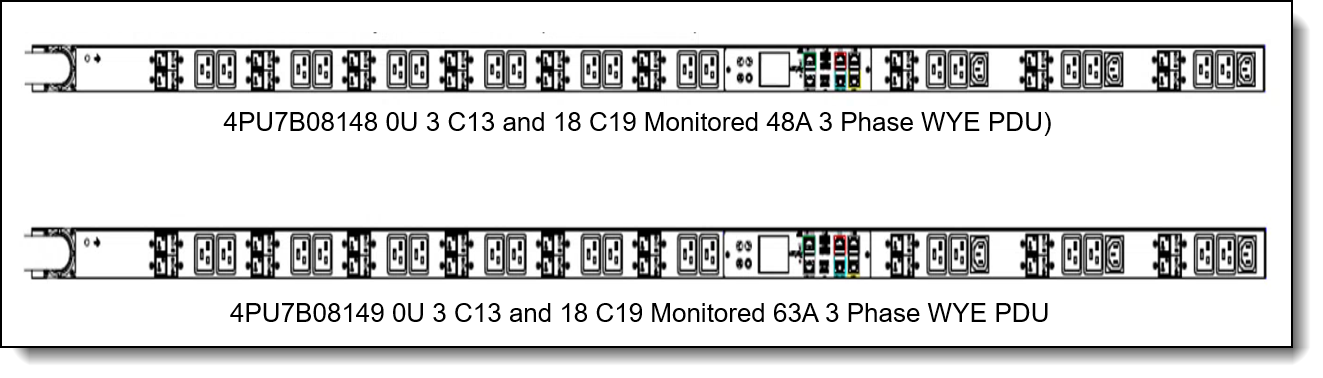
Figure 2. Lenovo 0U Monitored PDUs
Features and specifications monitored PDUs
The 0U Monitored PDUs have the following common and intelligent features like:
- Advanced features, such as color LCD screen and color-coded ports in the controller
- Raritan's standard low-profile design
- Toolless mounting
- Operate reliably in high temperature environments.
- Sleek and space saving unit with low profile circuit breakers
- Support Network Management Module and alerting capabilities supporting HTTPS, SSH, SNMP, and SCP.
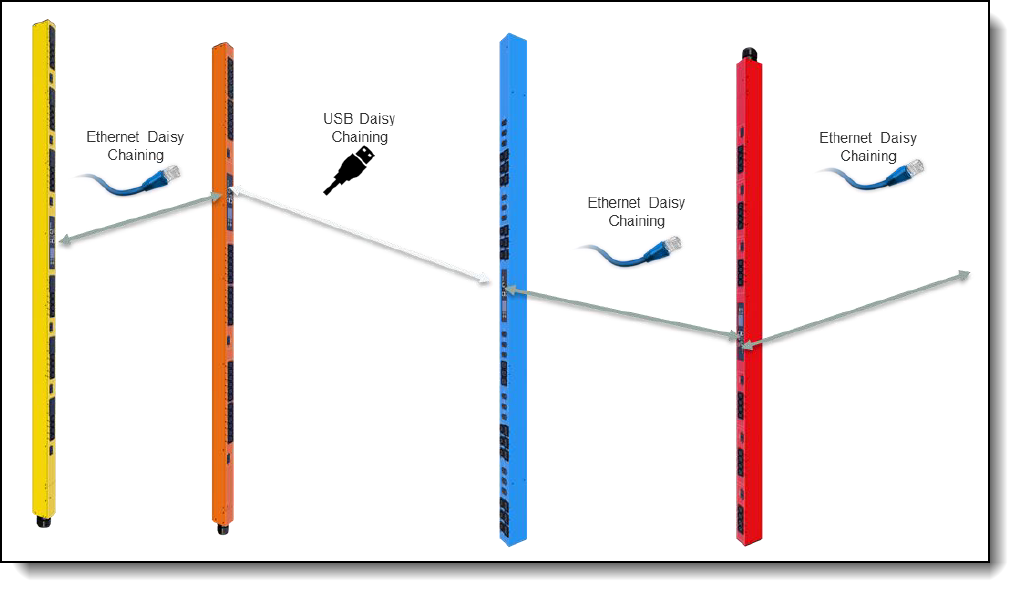
- Physically cascade 32 PDUs under one ethernet port or 16 PDUs with USB using bridging mode
- Supports environmental sensors: temperature, humidity, air flow, differential pressure, water leak, and contact closure (sensors are optional)
- Power Sharing feature that allows the data of the PDU to be recorded even during a Power Failure.
- The Monitored PDUs also provide both current options with unique features:
- Three-Phase Models:
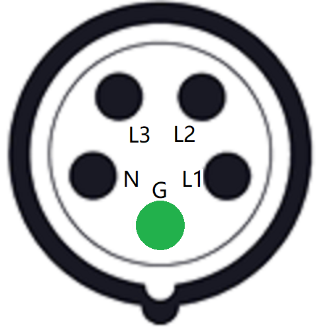
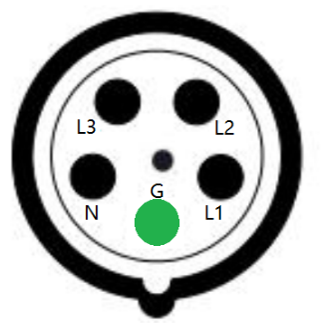
- In standard 415 V Three-Phase (Wye) configurations, the colour of each circuit breaker and outlet correspond to the appropriate input phase. The PDU is labelled to indicate the input-phase associated with each circuit breaker and outlets.
- Three-Phase Models:
The following tables compare the technical and environmental specifications of the 0U Monitored PDUs.
Note: The 0U Monitored PDUs support inlet and breaker metering
Remote Management
The 0U Monitored PDUs include latest iX7 PDU Controller that provides the interface and connectors to manage the PDU.
Features:
- Network Connectivity: Dual ports: 1x Gigabit Ethernet (10/100/1000 Mbps) and 1x (10/100 Mbps) connection/IP address
- Cascading: a physical connection of PDUs by either Ethernet or USB interfaces to share network connectivity
- PDU linking: the logical connection of PDUs.
- A primary PDU can manage up to 7 link units, for a total of 8 PDUs in a linked configuration (refer the User Guide for how-to)
- DC Power Sharing: Each PDU can provide DC power sufficient to power network management electronics and sensors in a neighboring PDU in the event of AC power source loss
- Remote Connectivity: HTTP(s), iPV4, SSH, SNMP and SCP
- Firmware updates:
- USB Stick (Mass Deployment Tool)
- SCP and JSON-API
- DHCP/TFTP
- Power IQ
- Web UI
- Web UI Interface: Maintenance and firmware updates
- Web UI https://pdu.local (or https:// 169.254.x.x addr from front display panel
The following figure shows the iX7 PDU Controller, LCD screen and the supported ports. The LCD interface provides at a glance view of critical data information, identification, and settings.
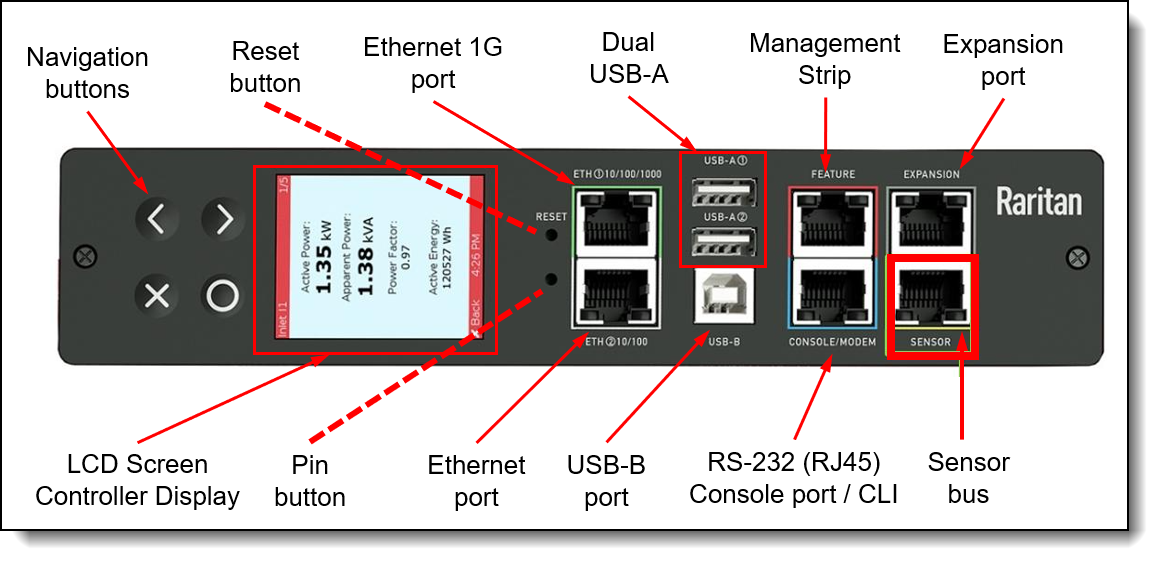
The components of LCD screen / front panel display are as follows:
- LCD screen:
- Screen changes color with thresholds and alerts
- Color, matrix LCD display: Voltage, current, or active power (per line, per breaker, or per receptacle / outlet)
- Configuration information (name, ratings, IP / Networking information)
- Easy navigation buttons for PDU configuration
- Auto-flip orientation
- Buttons:
- Pin button recovery mode.
- Reset button: Use this button to reset the PDU for communication purposes only. Resetting the PDU does not affect the outlets/loads.
- Interface Ports:
- Dual USB-A ports: Use these for cascading / daisy chained using a USB connection. Also used to install updates.
- Ethernet ports: Use for redundancy and cascading (daisy chain)
- 1x Gigabit Ethernet (10/100/1000 Mbps)
- 1x Secondary redundant (10/100 Base T) Ethernet. For extended cascading. Optional WiFi (802.11 a/b/g/n)
- Serial ports:
- Console/Modem port, RS-232 (RJ45). Serial CLI. Use this port to open a serial connection to the PDU from your laptop.
- USB-B port. Serial CLI. USB Driver for USB-B serial port on laptop/PC
- Feature port. Management strip.
- Expansion port. Power sharing.
- Sensor bus port.
- Daisy chain ports:
- Use Ethernet or USB-A ports.
- Physically cascade 32 PDUs under one ethernet port or 16 PDUs with USB using bridging mode, or additionally, save IP addresses using a single IP address with port forwarding
Selecting the right PDU
To avoid over sizing or under sizing power, it is important to understand the power requirements of the hardware that will be powered by the PDU(s). A useful tool to leverage to help calculate overall power usage is the Lenovo Capacity Planner (LCP) https://datacentersupport.lenovo.com/us/en/solutions/lnvo-lcp.
Likewise, to avoid over sizing it is also important to understand the PDU capabilities and capacities.
Consider the following for capabilities:
- Do you require environmental monitoring capabilities? If so, then consider the monitored PDUs described here.
- Does the PDU have the right type of power for your scenario? For example, 16A, 30A, 32A, 63A and single or three phase power?
- Does the PDU have enough of the correct type of outlets for your scenario?
Consider the following for capacities:
- Will each outlet be able to support the load being connected to it? For example, C13 outlets have a 10A limit.
- Will each load group be able to support the hardware being connected to it?
- Will each phase, where applicable, be able to support the hardware being connected to it?
- Is the overall power capacity of the PDU able to support the hardware being connected to it?
- Do you have enough PDUs to be N+N or N+1 redundancy if this is required?
For additional information on selecting the right PDU, load groups, phases, outlets, line cords, plugs and specifications, reference tables above and/or vendor's Raritan site.
Supported rack cabinets
The 0U Monitored PDUs can be installed in the following racks:
- Lenovo ThinkSystem 42U Onyx Heavy Duty Rack Cabinet (7D6D)
- Lenovo ThinkSystem 42U Pearl Heavy Duty Rack Cabinet (7D6D)
- Lenovo ThinkSystem 48U Onyx Heavy Duty Rack Cabinet (7D6E)
- Lenovo ThinkSystem 48U Pearl Heavy Duty Rack Cabinet (7D6E)
For more information, on heavy duty racks, see the Product Guide.
For additional information on racking the 0U monitored PDUs, refer to User’s Guide for the PDUs.
Warranty
The Lenovo zero-U (0U) Monitored power distribution units (PDUs) are offered with a three-year limited warranty. At Lenovo discretion this warranty will be either CRU service (customer replaceable unit) or a Lenovo employee, subcontractor or reseller will be assigned to repair the failing item. Proof and date of purchase is required for warranty claims.
Agency approvals
The Lenovo 0U Monitored PDUs conform to the following standards:
- UL Listed, Canada ICES-003, Part 15 Class A of the FCC rules
- RoHS compliant
Related publications and links
For more information, see the following documents:
- Lenovo Capacity Planner (LCP):
- https://datacentersupport.lenovo.com/us/en/solutions/lnvo-lcp
- Raritan support site:
https://www.raritan.com/support/ - Raritan product release, firmware and documentation:
https://www.raritan.com/support/product/pdu-g2 - Raritan User Guide PX-Series:
https://cdn1.raritan.com/download/pdu-g2/4.3.13/PDU_G2_UG_F1_4.3.11.pdf - Environmental sensors:
https://help.raritan.com/smartsensor/rev-1M/#/home/98469/10/11 - Web Interfece:
https://help.raritan.com/pdu-g2/4.3.0/#/home/102592/10/11
Trademarks
Lenovo and the Lenovo logo are trademarks or registered trademarks of Lenovo in the United States, other countries, or both. A current list of Lenovo trademarks is available on the Web at https://www.lenovo.com/us/en/legal/copytrade/.
The following terms are trademarks of Lenovo in the United States, other countries, or both:
Lenovo®
ThinkSystem®
Other company, product, or service names may be trademarks or service marks of others.
Configure and Buy
Please select a locale
Full Change History
Course Detail
Employees Only Content
The content in this document with a is only visible to employees who are logged in. Logon using your Lenovo ITcode and password via Lenovo single-signon (SSO).
The author of the document has determined that this content is classified as Lenovo Internal and should not be normally be made available to people who are not employees or contractors. This includes partners, customers, and competitors. The reasons may vary and you should reach out to the authors of the document for clarification, if needed. Be cautious about sharing this content with others as it may contain sensitive information.
Any visitor to the Lenovo Press web site who is not logged on will not be able to see this employee-only content. This content is excluded from search engine indexes and will not appear in any search results.
For all users, including logged-in employees, this employee-only content does not appear in the PDF version of this document.
This functionality is cookie based. The web site will normally remember your login state between browser sessions, however, if you clear cookies at the end of a session or work in an Incognito/Private browser window, then you will need to log in each time.
If you have any questions about this feature of the Lenovo Press web, please email David Watts at dwatts@lenovo.com.


