

Top
Author
Published
19 Apr 2026Form Number
LP2424PDF size
10 pages, 486 KBSubscribed to LP2424.
Thank you for your feedback.
Table of Contents
Abstract
With Microsoft Azure Local running on Lenovo ThinkAgile MX Series infrastructure, you gain true control over your hybrid environment, including how it’s licensed. Unlike traditional infrastructure models burdened by rigid contracts, hidden costs, and complex dependencies, Lenovo and Microsoft deliver a transparent, predictable, and flexible Azure Local licensing experience. This approach empowers organizations to align technology investments with business needs, scale with confidence, and avoid unnecessary compromise.
This guide provides essential pre-sales insight into Lenovo’s Azure Local Integrated OEM Licenses on ThinkAgile MX Series, helping customers and partners confidently design, position, and deploy a modern hybrid cloud foundation.
Introduction
For more than 25 years, Microsoft and Lenovo have partnered to deliver trusted, enterprise-grade infrastructure solutions for businesses worldwide. Together, we integrate the latest Microsoft technologies with Lenovo ThinkSystem and ThinkAgile platforms to power secure, resilient, and high-performance datacenters.
Built on proven Lenovo innovation, ThinkAgile MX Series solutions extend Microsoft’s operating systems, virtualization, and hybrid infrastructure platforms, enabling organizations to simplify operations, accelerate deployment, and drive meaningful business outcomes. By combining Azure Local with Lenovo’s worldclass, scalable hardware, customers benefit from a seamless, turnkey experience that unites on-premises control with the agility of the cloud.
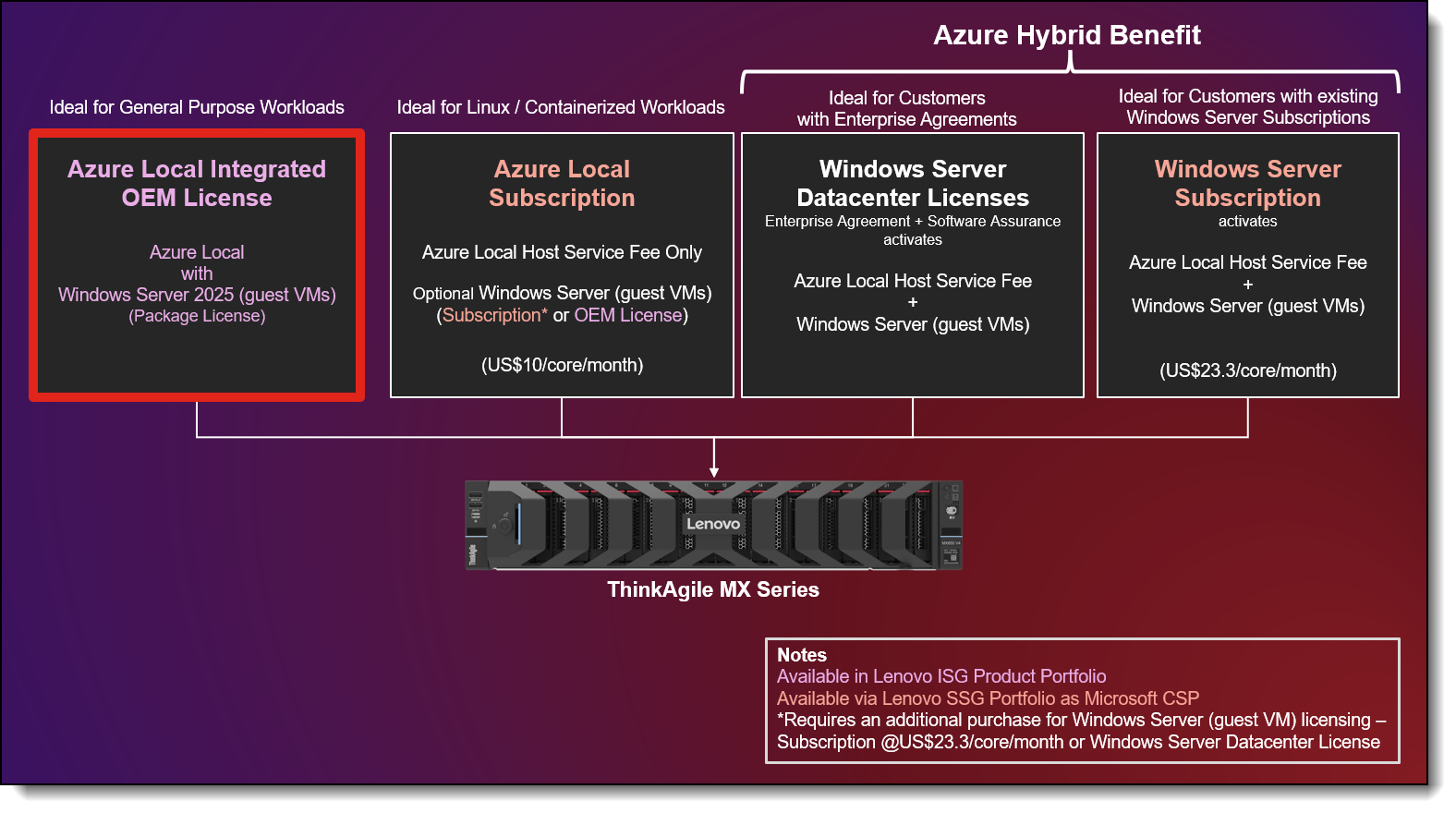
Figure 1. Azure Local Licensing Options on ThinkAgile MX Series
Azure Local licensing options
There are four ways to license Azure Local on ThinkAgile MX Series solutions, as shown in the figure above.
This licensing method is covered in this product guide:
- Azure Local Integrated OEM License – Perpetual, factory-integrated licenses for Azure Local Host Operating System (OS) that includes Windows Server 2025 Datacenter Edition for unlimited guest VMs. These licenses are available at point-of-sale with ThinkAgile MX Series solutions.
These licensing methods are also available but not covered in this product guide:
- Azure Local Subscription – Includes Azure Local Host OS subscription fee only and available via Lenovo as a Microsoft Cloud Solution Provider (CSP) in specific Geos. Outside Lenovo CSP regions, this license can be purchased via other CSPs or directly from the Azure Portal. Windows Server licenses for guest VMs are not included and must be purchased separately.
- Azure Hybrid Benefit (AHB) for Azure Local:
- If you have a Microsoft Enterprise Agreement (EA) including Windows Server Datacenter Edition Licenses and active Software Assurance (SA), you can activate Azure Hybrid Benefit by exchanging Windows Server core licenses equal to the total physical cores in the servers in the Azure Local cluster. This waives the Azure Local Host OS subscription fee and retains Windows Server guest VM license rights with entitlement to future versions of Windows Server.
- If you have an active Windows Server Subscription purchased through a Microsoft Cloud Solution Provider (CSP), you can activate Azure Hybrid Benefit if you allocate enough core licenses equal to the total physical cores in the servers in the Azure Local cluster. This waives the Azure Local Host OS subscription fee and retains Windows Server guest VM license rights with entitlement to future versions of Windows Server.
Product Guide scope - OEM license only: This product guide covers the details of the Azure Local Integrated OEM License. For more information on the other options, please reach out to your Lenovo Sales Representative.
The following table shows a comparison of the key features of the four licensing options.
Table notes:
- Azure Hybrid Benefit → 1-core license of SA-enabled Windows Server Datacenter Edition or Subscription enables 1 physical core of Azure Local Host Service + Windows Server (Guest VMs)
- Azure Local OEM license first contact is your OEM vendor. For additional help, file an Azure support request via the Azure portal
- This license doesn’t require annual renewals or subscriptions. It is a prepaid license that remains valid for the lifetime of the hardware on which it was purchased.
- Requires ongoing Software Assurance (SA) or Azure Local/Windows Server subscription renewals. SA is not available through Lenovo and must be purchased separately from other licenses.
Azure Local Integrated OEM License
The Azure Local Integrated OEM License package is a perpetual, life-of-device, factory-integrated software license option that is bundled with ThinkAgile MX Series systems. It provides customers with access to Azure Local, including Windows Server 2025 Datacenter Edition for Guest VMs through a one‑time, up‑front license purchase.
Azure Local delivered under this license includes features like Azure Stack HCI / Azure Local Host OS and Azure Kubernetes Service (AKS), with continuous access to all the latest updates. Windows Server 2025 Datacenter Edition offered through this license, enables unlimited Windows Server 2025 Guest VMs with all features supported.
Note: This license does not include entitlement to future versions of Windows Server.
These licenses are backed by Lenovo Premier Support, delivering a fully integrated support experience across both ThinkAgile MX Series hardware and Azure Local software—simplifying ownership and accelerating time to value.
This license is ideal for customers who prefer a price-predictable and perpetual license. It is best suited to enterprise and SMB customers deploying Azure Local in remote office/branch office (ROBO) and manufacturing or retail edge environments. It offers a predictable cost structure for their infrastructure investments that will be deployed for at least three years to optimize total cost of ownership, while it grants license rights for the life of the server.
Ordering information
The Azure Local Integrated OEM License needs to be configured in the ThinkAgile MX Series solution, at point-of-sale, using the Lenovo Data Center Solution Configurator (DCSC) and is delivered in a single transaction through Lenovo. The license is configured on a per core basis, with a base license for 16 cores, with 2-core incremental add-on licenses, automatically calculated in DCSC based on choice of hardware configuration.
CTO only: The license is not available as a standalone option for purchase after point-of-sale.
| Part number | Feature code | Description |
|---|---|---|
| CTO only | CD13* | Azure Local - Premier with Integrated OEM Licenses (Azure Local + Windows Server 2025) |
* Available in DCSC in the Base tab in the "HCI Stack Preload" section
Selecting the the above feature code will derive the license components listed in the table below. The number of additional licenses (SEDY) will adjust to match the number of processor cores (number of processors × processor core count) in the server.
Why buy Azure Local Integrated OEM licenses from Lenovo?
The Azure Local Integrated OEM license from Lenovo offers a simple, predictable and operationally efficient way to deploy Azure Local on Lenovo ThinkAgile MX Series solutions. Designed for customers who value rapid time to value, streamlined operations, and end-to-end support, this license option delivers a tightly integrated hardware and software experience, directly from the factory. It is the only Azure Local license option that includes support by default.
Simplicity Through an Integrated License
The Azure Local Integrated OEM license combines Azure Local and Windows Server 2025 Datacenter Edition for guest VMs into a single OEM license, eliminating the need to manage separate host OS subscriptions, guest OS licenses, or hybrid entitlements.
Key benefits include:
- Factory installed and tightly integrated with the ThinkAgile MX Series system
- Automatic license sized based on CPU core counts, with simplified activation and no physical license keys
- Joint validation of hardware and software as a complete system
This integrated approach reduces deployment time and simplifies license management.
Predictable Economics and Lower Operational Overhead
Unlike subscription-only models, the Azure Local Integrated OEM license offers a one-time, upfront purchase with perpetual rights for the life of the server, making it ideal for customers seeking:
- Predictable infrastructure costs
- Simplified procurement and budgeting
- Lower long-term operational overhead, especially for ROBO and edge deployments
Bundling Azure Local and Windows Server guest VM rights further reduces administrative effort.
One Trusted Vendor, One Support Experience
Lenovo provides a single, integrated support model for both infrastructure and platform, including:
- ThinkAgile MX Series hardware support
- Integrated L1/L2 Azure Local software support
- End-to-end case management through Lenovo Premier Support
Customers benefit from a unified support experience that eliminates vendor handoffs and simplifies operations and lifecycle management.
Verifying your license status
This section describes how to verify your Azure Local Integrated OEM License status.
ThinkAgile MX Series systems with Azure Local Integrated OEM licenses do not ship with a physical license key. The keys are pre-installed in the hardware BIOS and automatically activate upon connecting to Azure, removing the need for manual keys. Activation requires an active Azure account, registration of the Azure Local cluster, and internet connectivity.
To verify if you have an active Integrated OEM license for Azure Local, use these steps:
- Go to the Azure portal.
- Search for your Azure Local instance.
- Under your Azure Local instance, select Overview to check the Billing status.
If you have an active OEM license for Azure Local, your billing status should be OEM License, and your OEM license status should be Activated.
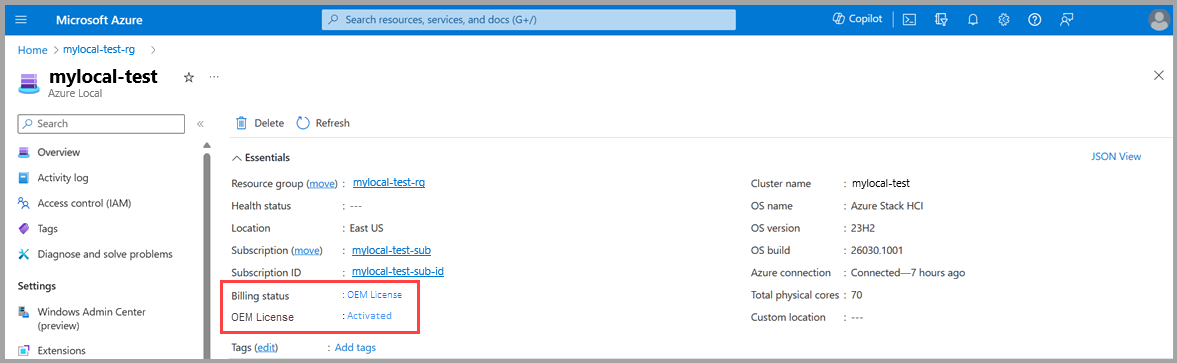
Figure 2. An instance with an active OEM license for Azure Local
If you don't have an active OEM license for Azure Local, you should see a billing status of Billed monthly, and an OEM license status of Not activated.
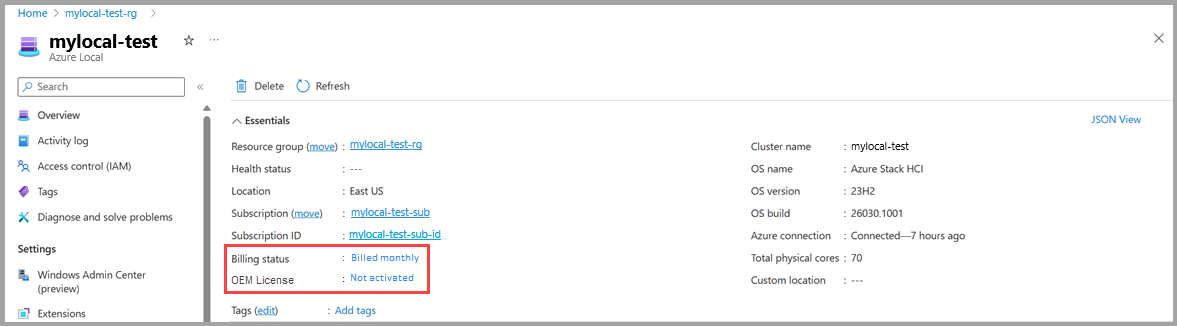
Figure 3. A instance billed monthly, without an active OEM license for Azure Local
Mixed-node scenarios
It is important to plan your licensing for your Azure Local deployments and ensure homogeneity in licensing models in your cluster. All nodes in an Azure Local system require uniformity across the hardware, operating system, and billing treatment.
OEM licenses not recognized with mixed nodes: You cannot mix a node with the Azure Local Integrated OEM Licensing within a cluster with nodes licensed via subscription or any other licensing models. By doing so, your OEM license will not be recognized, and you will be billed monthly for subscription licenses on these nodes.
When an Azure Local instance uses different hardware models, operating system versions, or billing models, it is known as a mixed-node scenario. Specifically for the Azure Local Integrated OEM license, if your instance includes a mixed-node scenario where one or more of your machines don't have the OEM license, a notification in your monthly billing status details appears:
We have detected mixed nodes in your instance. You will be billed monthly for each node in your instance as one or more machines in your instance do not have an OEM license. To see which machines do not have the OEM license, go to Overview > Nodes and check the OEM license column. Learn more.
The following table lists some examples of mixed-mode scenarios that aren't supported.
Activating the Windows Server licenses for guest VMs on Azure Local
You can activate Windows Server VMs on an Azure Local instance using generic Automatic Virtual Machine Activation (AVMA) client keys. You can use either Windows Admin Center or PowerShell. For more information on using AVMA to activate Windows Server VMs, see Activate Windows Server VMs on Azure Local.
Customers may also use Windows Server Azure Edition on Azure Local following these acquisition and deployment steps.
Lenovo Premier Support
All support requests for ThinkAgile MX Series systems with Azure Local Integrated OEM licenses are handled through Lenovo Premier Support, providing end-to-end case management.
To contact support, visit Lenovo Support and enter your product serial number in the search field to find the appropriate support phone number.
For details on service coverage, see the Lenovo ISG Support Plan - ThinkAgile MX Solutions
For questions on Deployment and Hardware Installation, contact Lenovo Professional Services:
- North America: DCG_PS_NA@lenovo.com
- EMEA: DCG_PS_EMEA@lenovo.com
- Asia Pacific: DCG_PS_AP@lenovo.com
Trademarks
Lenovo and the Lenovo logo are trademarks or registered trademarks of Lenovo in the United States, other countries, or both. A current list of Lenovo trademarks is available on the Web at https://www.lenovo.com/us/en/legal/copytrade/.
The following terms are trademarks of Lenovo in the United States, other countries, or both:
Lenovo®
ThinkAgile®
ThinkSystem®
The following terms are trademarks of other companies:
Microsoft®, Azure®, PowerShell®, Windows Server®, and Windows® are trademarks of Microsoft Corporation in the United States, other countries, or both.
Other company, product, or service names may be trademarks or service marks of others.
Configure and Buy
Please select a locale
Full Change History
Course Detail
Employees Only Content
The content in this document with a is only visible to employees who are logged in. Logon using your Lenovo ITcode and password via Lenovo single-signon (SSO).
The author of the document has determined that this content is classified as Lenovo Internal and should not be normally be made available to people who are not employees or contractors. This includes partners, customers, and competitors. The reasons may vary and you should reach out to the authors of the document for clarification, if needed. Be cautious about sharing this content with others as it may contain sensitive information.
Any visitor to the Lenovo Press web site who is not logged on will not be able to see this employee-only content. This content is excluded from search engine indexes and will not appear in any search results.
For all users, including logged-in employees, this employee-only content does not appear in the PDF version of this document.
This functionality is cookie based. The web site will normally remember your login state between browser sessions, however, if you clear cookies at the end of a session or work in an Incognito/Private browser window, then you will need to log in each time.
If you have any questions about this feature of the Lenovo Press web, please email David Watts at dwatts@lenovo.com.


