

Top
Author
Published
15 Sep 2026Form Number
LP2478PDF size
34 pages, 1.8 MBSubscribed to LP2478.
Thank you for your feedback.
Table of Contents
- Operating environment
- Warranty upgrades and post-warranty support
- Services
- Lenovo TruScale
- Regulatory compliance
- Interoperability
- External storage systems
- External backup units
- Rack cabinets
- Power distribution units
- Uninterruptible power supply units
- Seller training courses
- Related publications and links
- Related product families
- Trademarks
Abstract
The Brocade 7850 Extension Switch is an industry-leading Gen 7 cyber-resilient replication connectivity solution designed for enterprise storage environments. It serves to securely and rapidly move large volumes of data over long distances, consolidating high-speed Fibre Channel, FICON, and IP storage replication workloads into a single managed tunnel across WAN connections. Offers up to 100 Gb/s replication performance, built-in technology to mitigate latency and packet loss, and line-rate hardware-based AES 256-bit encryption.
This product guide provides essential technical and pre-sales information on the Brocade 7850 Extension Switch, its key features and specifications, components and options, and configuration guidelines. This guide is intended for technical specialists, sales specialists, sales engineers, IT architects, and other IT professionals who want to learn more about the 7850 Extension Switch and consider its use in IT solutions.
Introduction
The Brocade 7850 Extension Switch is an industry-leading Gen 7 cyber-resilient replication connectivity solution designed for enterprise storage environments. It serves to securely and rapidly move large volumes of data over long distances, consolidating high-speed Fibre Channel, FICON, and IP storage replication workloads into a single managed tunnel across WAN connections. By offering up to 100 Gb/s replication performance, built-in technology to mitigate latency and packet loss, and line-rate hardware-based AES 256-bit encryption, the switch optimizes bandwidth utilization while safeguarding data-in-flight from threats without a performance penalty. This platform is critical for customers because it protects their most valuable asset—their data—from cyber-attacks, WAN disruptions, and unexpected disasters, allowing organizations to achieve strict Recovery Point Objectives (RPOs) and Recovery Time Objectives (RTOs) while ensuring continuous business operations and zero downtime.
The following figure shows the Brocade 7850 Extension Switch.

Did you know?
The Brocade 7850 Extension Switch:
1. Eliminate Security Vulnerabilities and Support Risks: The 7850 natively integrates Gen 7 cyber-resilient features like secure boot, secure licensing, and a hardware-based root of trust to prevent malware hijacking.
2. Achieve Always-On Replication and High Availability: Unlike competing products where a dropped WAN link breaks replication and forces it to restart from scratch, Brocade Extension Trunking automatically retransmits lost packets over surviving links without disruption. If a switch fails, the remaining switch automatically detects the drop and scales up to utilize 100% of the available WAN bandwidth. Plus, Extension Hot Code Load (eHCL) allows you to update firmware and apply critical security patches without dropping the replication tunnel.
3. Boost Performance and Consolidate Infrastructure: Gen 7 provides up to 100Gb/s maximum WAN bandwidth per platform, utilizing 24×64G Fibre Channel ports and 100GbE ports. Standard TCP performance degrades exponentially over distance due to latency. Brocade’s WAN-Optimized TCP terminates flows locally, boosting IP storage speeds up to 50x over long distances. Fabric Consolidation & Compression collapses multiple data replication workloads (such as IBM TS7770 Grid, Global Mirroring, and Remote Tape) onto a single backbone, optimized by built-in 4:1 hardware data compression.
Key features
The 7850 Extension Switch offers the following features and benefits:
- Handles more replication traffic and maximizes modern 25/100GbE WAN connections
- Consolidates high-speed Fibre Channel and IP storage replication workloads
- Secures data flows over distance with strong AES 256-bit hardware encryption without a performance penalty
- Provides load balancing and failover across multiple WAN connections, protecting against WAN link failures
- Ensures always-on storage replication with non-disruptive firmware and security updates
- Pre-validates the WAN infrastructure with a built-in WAN Test Tool (Wtool) to ensure a worry-free deployment
- Detects WAN anomalies and avoid unplanned downtime with proactive monitoring
The Brocade 7850 Extension Switch is an industry-leading Gen 7 solution that provides cyber-resilient replication connectivity for enterprise storage. This powerful platform securely moves more data, faster, over distance for continuous data protection. It is purpose-built to handle the most demanding disaster recovery requirements and the unrelenting growth of data traffic between data centers in Fibre Channel, FICON, and IP storage environments.
Cyber-Resilient Replication Connectivity for Enterprise Storage
As businesses increasingly embrace digital business, data becomes more valuable than ever and users expect that data to be accessible from anywhere, at any time, with uninterrupted service. Any downtime or disruption to that data can result in significant financial losses, damaged reputations, and in some cases, regulatory fines. This puts tremendous pressure on organizations to ensure that critical business operations can continue in the face of adverse events such as natural disasters, ransomware, cyber-attacks, or system failures. Data center outages happen, and organizations need to be prepared for malicious intrusion and unexpected disasters to ensure their valuable information is protected. Data replication between data centers is critical for disaster recovery, but it can also be challenging, particularly when dealing with large volumes of data. Companies need their disaster recovery infrastructure to ensure the fast, continuous, and secure replication of mission-critical data anywhere in the world, to prevent data loss or data breaches when in-flight across the WAN.
The Brocade 7850 Extension Switch addresses these challenges by providing a powerful, reliable, secure solution for disaster recovery. This cyber-resilient replication connectivity solution for enterprise storage securely moves more data, faster, over distance for continuous data protection. With ample replication performance, up to 100Gb/s over distance, and built-in technology that overcomes the inherent challenges of latency and packet loss over long distance, the 7850 Extension Switch provides high-speed connectivity between locations to dramatically speed up replication performance – even over intercontinental distances. This makes it easier for organizations to move large amounts of data quickly and efficiently, to ensure critical data is available in the event of a disaster. In addition, the 7850 Extension Switch includes a suite of features, from pre-deployment validation to advanced network failure recovery technologies, to protect data from WAN disruptions and outages for continuous availability over the WAN. Moreover, data-in-flight security, coupled with the Brocade hardware and software robust security features, secures connections between data centers to safeguard data from threats over the WAN and to protect data from unauthorized access. The Brocade 7850 Extension Switch is an excellent choice for businesses looking to protect their critical data from cyber threats and ensure business continuity in the event of a disaster.
Purpose-Built for Data Replication between Data Centers
The 7850 Extension Switch is purpose-built to handle the replication demands of large enterprise customers. This switch is designed to deliver the most outstanding data protection and performance regardless of distance. With twenty-four 64G Fibre Channel ports, sixteen 1/10/25GbE ports, and two 100GbE ports, data centers can achieve the bandwidth, port density, and throughput needed for maximum replication performance over WAN connections. Industry-leading port density and performance packed into a 1U form factor enables organizations to consolidate high-speed Fibre Channel, FICON, and IP storage replication traffic between data centers while ensuring plenty of headroom for future growth. The Brocade 7850 Extension Switch comes unlocked with full bandwidth and all ports enabled, leaving no limitations on throughput. In addition, it includes an innovative collection of software capabilities that optimize WAN utilization and protect data from WAN disruptions and outages, including Brocade Fabric Vision® technology, Extension Trunking, Adaptive Rate Limiting (ARL), encryption (IPsec), and integrated routing.
The Brocade 7850 Extension Switch is a robust platform for high-scale, multisite data center environments implementing block, file, and tape data protection solutions. It is an ideal platform for building a high-performance data-center-to-data-center infrastructure for multisite asynchronous and synchronous storage replication and centralized tape backup, recovery, and archiving solutions (see figure below). Brocade Extension maximizes replication and backup throughput over distance, using WAN-optimized TCP, disk and tape protocol acceleration, and data compression. Without the use of extension, the long distance required for disaster recovery often makes it impossible or impractical for organizations to achieve sufficient replication throughput to meet their recovery point objectives (RPOs) and recovery time objectives (RTOs). The Brocade 7850 platform offers simultaneous replication from both Fibre Channel and IP storage arrays to consolidate high-speed replication workloads over WAN connections. The consolidation of replication from various heterogeneous FC-based and IP-based storage platforms into a single, managed tunnel between data centers across the WAN has real operational, availability, security, and performance value.
The Brocade 7850 Extension Switch enables High-Scale and Flexible Deployments for Fibre Channel and IP Replication over Long Distance. Whether supporting point-to-point connections, a multisite SAN, or remote offices, the 7850 Extension Switch offers enterprise-class capabilities to meet demanding disaster recovery requirements and improve RPOs and RTOs.
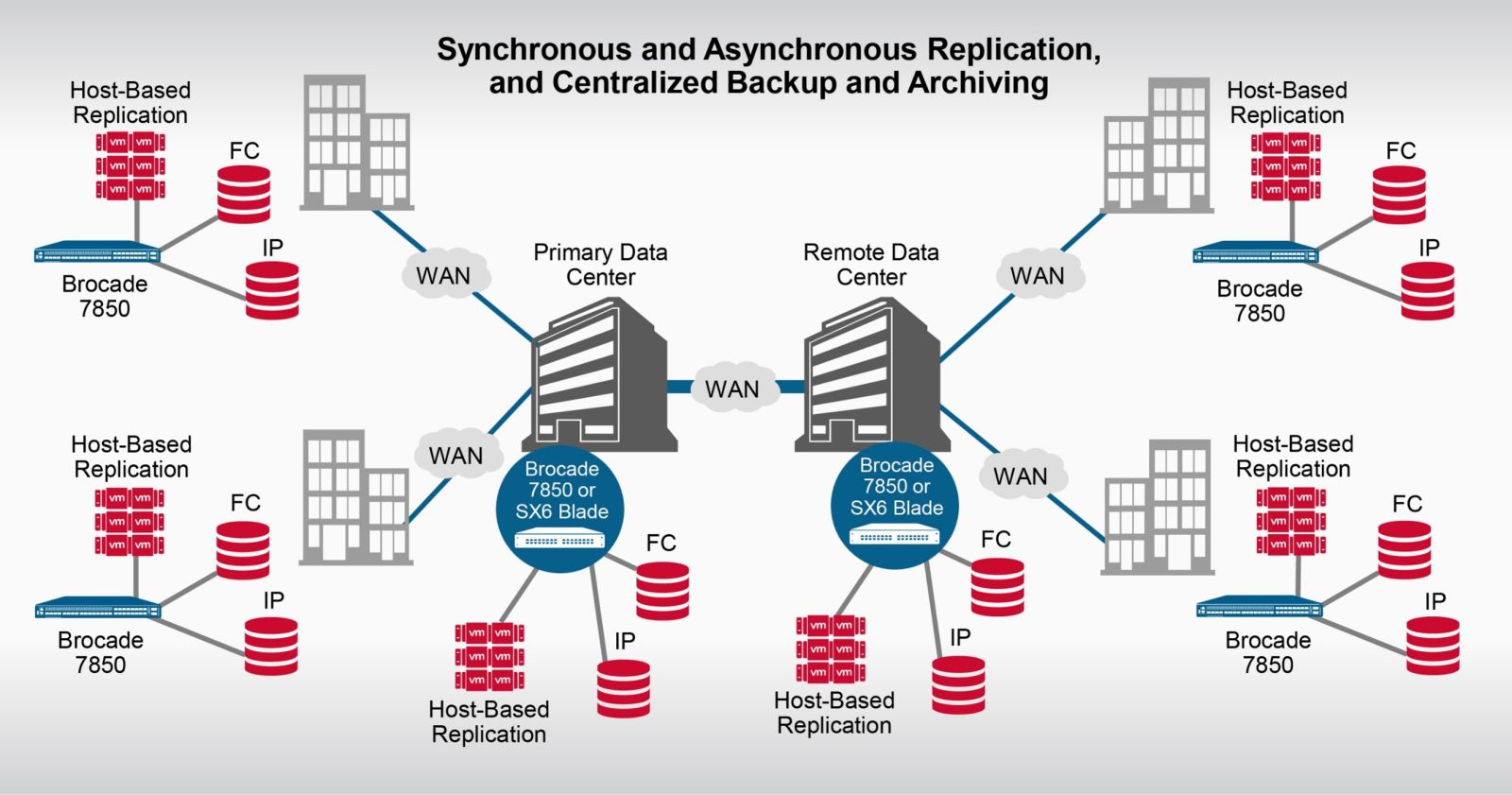
Figure 2. High-Scale and Flexible Deployments
Move More Data, Faster, over Distance
Storage arrays with native replication applications generally do not handle latency and packet loss well. The 7850 Extension Switch provides a robust extension solution that delivers local performance at long distances along with strong encryption—for comprehensive disaster recovery. It leverages Brocade TCP Acceleration to help achieve the fastest replication speeds possible from storage devices, and Brocade WAN-optimized TCP to ensure the in-order, lossless transmission of extension data.
The advanced performance and network optimization features of the 7850 Extension Switch enable replication and backup applications to send more data over metro and WAN links in less time, and to optimize available WAN bandwidth. Brocade FCIP uses high-efficiency encapsulation to encapsulate Fibre Channel into TCP/IP for transport over a long-distance WAN from anywhere, to anywhere—across the state and around the globe. Supporting up to 250-ms round-trip time (RTT) latency, the 7850 Extension Switch enables efficient extension solutions over distances up to 25,500 kilometers (15,845 miles). The actual supported distance may vary depending on service provider.
The 7850 Extension Switch maximizes replication and backup throughput over distance using data compression, disk and tape protocol acceleration, WAN-optimized TCP, and other extension networking technologies. These technologies, combined with the following advanced features, enable the most predictable, stable, and high-performance replication fabrics so organizations can reliably protect their most critical asset, their data:
- Extension Trunking: Combines multiple WAN connections into a single, logical, high-bandwidth trunk, providing active load balancing and network resilience to protect against WAN link failures.
- Lossless Link Loss (LLL): Part of Extension Trunking, provides recovery of data lost in-flight when a link goes offline. From the perspective of the storage applications, nothing ever occurred because all data is delivered and is delivered in order.
- Failover/failback with failover groups: Circuits are assigned metrics and put in a failover group. If all circuits of the lower metric within the failover group go offline, the higher metric circuits take over. This uses LLL, and all data is delivered and delivered in order. The storage application will not know if a failover/failback has occurred.
- ARL: Dynamically adjusts bandwidth sharing between minimum and maximum rate limits to optimize bandwidth utilization and maintain maximum WAN performance during disruptions.
- IPsec: Ensures secure transport of data over WAN links at full line rate. Security is turned on without a performance penalty or excessive added latency. With a hardware-implemented, standard 256-bit AES algorithm, data-in-flight is encrypted.
- Unparalleled, extremely efficient architecture: Uniquely permits the high-speed, low-latency processing of IP datagrams and Fibre Channel, making extension of synchronous applications possible.
- WAN-optimized TCP: An aggressive TCP stack, optimizing TCP window size and flow control and accelerating TCP transport for high-throughput storage applications.
- Streams: A feature of WAN-optimized TCP used with Brocade IP extension to prevent head-of-line blocking.
- Per-priority TCP quality of service: Provides high-priority, medium-priority, and low-priority handling of Fibre Channel and IP extension flows within the same tunnel for transmission over the WAN using autonomous TCP sessions per QoS priority.
- Advanced compression architecture: Provides multiple modes to optimize compression ratios for various throughput requirements.
- FCIP FastWrite: Accelerates SCSI write processing, maximizing performance of synchronous and asynchronous replication applications across high-latency WAN connections over any distance.
- Open Systems Tape Pipelining: Accelerates read and write tape processing over distance, significantly reducing backup and recovery times.
In addition, the 7850 Extension Switch helps significantly increase the performance of IP storage applications across the WAN—even with encryption turned on. The more latency and packet loss between the data centers, the greater the performance gain using these solutions. This Extension switch can move more data than native TCP/IP stacks to meet rigorous recovery objectives. These performance gains enable use cases that were previously unattainable.
Offering more benefits, the 7850 Extension Switch supports and manages Fibre Channel and IP-based data flows, allowing storage administrators to consolidate I/O flows from heterogeneous storage devices and multiple protocols. The consolidation of IP storage flows, or both Fibre Channel and IP storage flows, into a single, managed tunnel between data centers across the WAN has significant operational, availability, security, and performance value. Operational advantages are gained with Fabric Vision, Monitoring Alerting Policy Suite (MAPS), WAN Test Tool (Wtool), and Brocade SAN management software. Using custom, browser-accessible dashboards for IP storage, or combined Fibre Channel and IP storage, empowers storage administrators with a centralized management tool to monitor the health and performance of their networks.
Brocade extension supports a range of common storage applications, including array-native IP remote data replication, IP-based centralized backup, virtual machine replication, host-based and database replication over IP, NAS head replication between data centers, and data migration between data centers.
Protect Data from WAN Disruptions and Outages
Today’s organizations depend on fast, reliable access to data, regardless of location. The ramifications and potential business impact of an unreliable disaster recovery and data protection infrastructure are greater than ever.
The 7850 Extension Switch leverages the core technology of Brocade Gen 7 Fibre Channel platforms, consistently delivering 99.9999% uptime in the world’s most demanding data centers. It combines enterprise-class availability with innovative features and the industry’s only WAN-side, non-disruptive firmware upgrades to achieve always-on business operations and maximize application uptime. The Brocade 7850 provides a suite of features, from pre-deployment validation to advanced network failure recovery technologies, to ensure a high-performance and highly reliable network infrastructure for disaster recovery and data protection.
The 7850 Extension Switch has built-in tools to validate the condition of WAN links and network paths to ensure a worry-free deployment, as well as to validate the proper setup of configurations prior to deployment. Administrators can validate and troubleshoot the physical infrastructure with the built-in Flow Generator and Wtool, thereby easing deployment and avoiding potential issues.
Extension Trunking protects against WAN link failures with tunnel redundancy for lossless path failover and guaranteed in-order data delivery using LLL. It allows multiple network paths to be used simultaneously. When there is a failure for a network path, Extension Trunking retransmits the lost packets to maintain overall data integrity. The storage application is shielded from WAN network problems and experiences no disruption.
With ARL, organizations can optimize bandwidth utilization and maintain full WAN performance of the link during periods when a path is offline by using alternate WAN paths or adapting rate limiting to the existing conditions. ARL uses dynamic bandwidth sharing between floor (minimum) and ceiling (maximum) rate limits to achieve maximum available performance during failure situations.
Brocade Fabric Vision technology extends proactive monitoring between data centers to automatically detect WAN anomalies and avoid unplanned downtime. By utilizing MAPS, administrators can quickly identify and resolve issues, resulting in simpler troubleshooting and quicker resolution.
Utilizing Brocade SANnav™ makes TCP flows visible across the network, providing comprehensive visibility into disaster recovery and business continuity network health and performance conditions. Through a modern graphical user interface (GUI) with investigative capabilities, information about specific flows and TCP statistics are contextualized into visual dashboards, enabling administrators to quickly detect and isolate points of interest for both troubleshooting and performance optimization.
Safeguard Data from Threats over the WAN
Growing concerns about potential damage to brand reputation, class-action lawsuits, and costly downtime cause executives to pay greater attention to the security practices of their organizations. Leaving data exposed in-flight over distance while replicating it to a remote location can result in data breaches and unwanted publicity. With security-related outages on the rise, organizations do not want to leave themselves exposed and must ensure that all data leaving the confines of their data center is secure.
The 7850 Extension Switch uses unbreakable network encryption to ensure that data-in-flight is protected from threats over the WAN. This switch features robust, hardware-based IPsec with AES 256-bit encryption to keep data secure and meet security compliance requirements. In addition, hardware-based IPsec encrypts data flows over distance without a performance penalty.
With Brocade Gen 7 hardware and software, the 7850 Extension Switch offers robust security features to protect against malicious attacks. Brocade Fabric OS® (FOS) adds additional security enhancements to validate the integrity and security of Brocade hardware and software. These features include Secure Boot, Brocade Trusted FOS (TruFOS) Certificates, FOS hardening with removal of root access, and automated distribution of SSL certificates via SANnav Management Portal. Brocade TruFOS Certificates ensure that enterprises running Brocade directors and switches are currently covered with support and securely enabled to perform critical operations without having to worry about whether the operating system has been tampered with. TruFOS, FC optics, and secure EPROMs mitigate security vulnerabilities by automatically validating the integrity of the platform hardware and the operating system. Enterprise LDAP services protect against malicious cyber-attacks with authentication, authorization, and accounting (AAA) and role-based access control (RBAC) integration, allowing only trusted users while maintaining detailed audit logs. Other security features include secure protocols, hardened operating system, IP filters, fabric security policies, TLS services, and password quality enforcement. The 7850 Extension Switch includes IPsec and the Gen 7 integrated security features with no additional cost or license required.
Enterprises using Brocade SANnav Management Portal have the ability to automatically distribute SSL certificates across the SAN to ensure authenticity and encryption settings. In addition, Brocade SANnav Management Portal has built-in security features to help protect the network. With Brocade SANnav, administrators can set up monitoring and alerting for security configuration changes, customize security thresholds, give proper access control to individual admins, and view switch security events.
Simplified Management and Robust Network Analytics
Brocade Fabric Vision technology provides a breakthrough hardware and software solution that helps simplify monitoring, maximize network availability, and dramatically reduce costs. Featuring innovative monitoring, management, and diagnostic capabilities, Fabric Vision technology enables administrators to avoid problems before they impact operations, helping their organizations meet SLAs. The Brocade 7850 Extension Switch supports the following Fabric Vision technology features for storage extension management:
- MAPS
- Fabric Performance Impact Monitoring
- Integrated dashboards
- Configuration and Operational Monitoring Policy Automation Services Suite (COMPASS)
- Brocade ClearLink™ Diagnostics
- Forward Error Correction (FEC)
- Credit Loss Recovery
For disaster recovery, it is important to have visibility and insight for greater control of WAN traffic to guarantee that RPO and RTO are met.
Components and connectors
The following figure shows the port-side view of the 7850 Extension Switch.
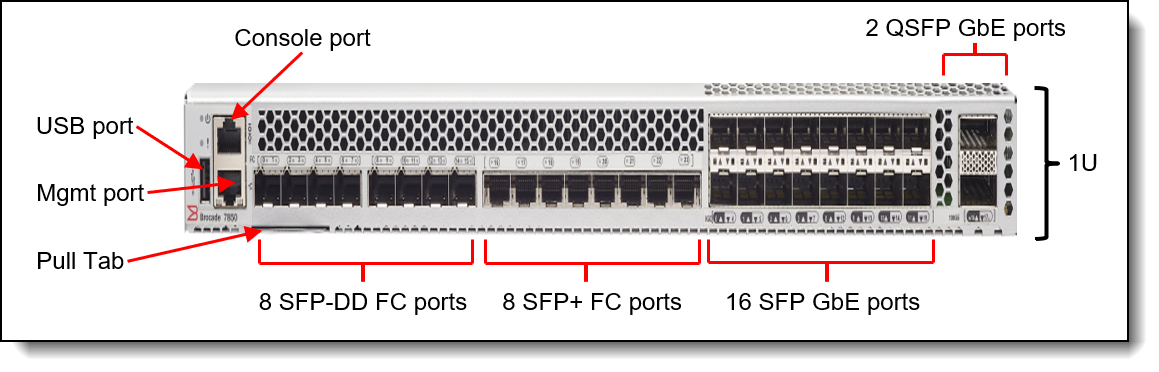
The port-side panel of the 7850 Extension Switch includes the following components:
- 8 SFP-DD FC ports
- 8 SFP+ FC ports
- 16 SFP GbE ports
- Houses an information pull-out tab
- One RJ-45 10/100/1000 Mb Ethernet port for out-of-band management
- One USB port for mass storage devices
The following figure shows the non-port side view of the 7850 Extension Switch:
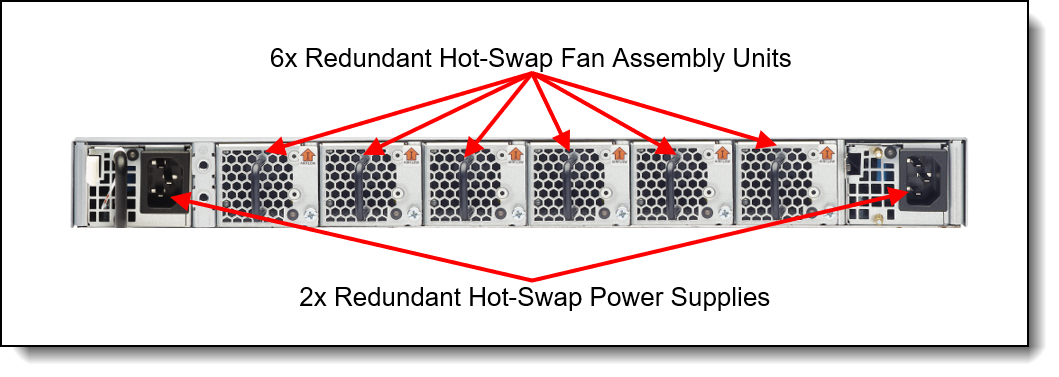
The non-port-side panel of the 7850 Extension Switch includes the following components:
- Two redundant hot-swap power supplies, each with a C14 power connector
- Six redundant hot-swap system fan assembly units, each with integrated fan
System specifications
The following table lists the Brocade 7850 Extension Switch specifications.
Models
The following table lists the Brocade 7850 Extension Switch models.
The Brocade 7850 Extension Switch part numbers include the following items:
- One FC SAN Switch includes all ports activate and with specific transceivers as below
- Open Systems Model: Includes 16x 64G SWL, 4x 10/1G, 4x 25/10G and 2x 100G optics
- Mainframe Model: Includes 16x 64G LWL, 4x 10/1G, 4x 25/10G and 2x 100G optics
- Includes 6 fans and 2 power supplies
- Enterprise software licenses are included. Open System without FICON, Mainframe with FICON.
- Rubber feet for setting up the switch as a standalone unit
- Universal rack mount kit, 4-post
- Serial cable RJ-45 TO DB9F
Note: The switch comes standard without power cords; two power cables must be purchased together with the switch. See the Power supplies and cables section for details.
Transceivers and cables
With the flexibility of the Brocade 7850 Extension Switch, customers can choose the following connectivity technologies:
- SFP+ ports
- For 64 Gb FC links, customers can use 64 Gb FC SFP+ SWL optical transceivers for distances up to 100 meters on OM4/OM5 or up to 70 meters on OM3 50 µ multimode fiber (MMF) optic cables. For longer distances, the 64 Gb FC LW SFP+ optical transceivers can support up to 10 kilometers on 9 µ single-mode fiber (SMF) optic cables. For extended distances, the 64 Gb FC ELW SFP+ optical transceivers can support up to 25 kilometers on 9 µ SMF cables. (These transceivers are only available on FC64-48 Port Blade).
- For 32 Gb FC links, customers can use 32 Gb FC SFP+ SW optical transceivers for distances up to 100 meters on OM4 or up to 70 meters on OM3 50 µ multimode fiber (MMF) optic cables. For longer distances, the 32 Gb FC LW SFP+ optical transceivers can support up to 10 kilometers on 9 µ single-mode fiber (SMF) optic cables. For extended distances, the 32 Gb FC ELW SFP+ optical transceivers can support up to 25 kilometers on 9 µ SMF cables.
- For 16 Gb FC links, customers can use 16 Gb FC SFP+ SW optical transceivers for distances up to 125 meters on OM4 or up to 100 meters on OM3 50 µ MMF cables. For longer distances, the 16 Gb FC LW SFP+ optical transceivers can support up to 10 kilometers on 9 µ SMF cables. For extended distances, the 16 Gb FC ELW SFP+ optical transceivers can support up to 25 kilometers on 9 µ SMF cables. (These transceivers are NOT supported on FC64-48 Port Blade)
- SFP-DD ports
- For 64G FC links, customers can use 64G FC SFP-DD SWL optical transceivers for distances up to 100 meters on OM4 or up to 70 meters on OM3 50 µ MMF cables. These transceivers can operate at 64G, 32G, or 16G speeds.
- Ethernet
- 100G: For 100 GbE links, customers can use the 100GbE SR4 transceivers up to 100 meters over an 8-fiber (or 12-fiber) MPO optical multimode OM4 cable. For longer distances, customers can use the 100GbE LR4 transceivers up to 10 kilometers on 9 µ SMF cables.
- 25G: For 25GbE links, customers can use the 25GbE SR SFP+ transceivers up to 100 meters on OM4/OM5 cables. For longer distances, customers can use the 25GbE LR SFP+ transceivers up to 10 kilometers on 9 µ SMF cables
- 10G: For 10 GbE links, customers can use a 10GBASE-SR transceiver that supports distances up to 300 meters on OM3 or up to 400 meters on OM4 50 µ MMF cables. For longer distances, the 10GBASE-LR transceivers can support distances up to 10 kilometers on 9 µ SMF cables
- 1 GbE RJ-45 management ports on control processor blades: Customers can use UTP cables for distances up to 100 meters
The following table lists the supported transceiver and cable options. Switches come with specific optics included.
The following table lists the cabling requirements for the switch.
| Transceiver | Standard | Cable | Connector |
|---|---|---|---|
| 64G Fibre Channel | |||
| 64G FC SWL SFP+ (4M27A65425, 4M27A65426) | FC-PI-6 | Up to 30 m with LC-LC MMF cables supplied by Lenovo (see Table 4). 850 nm 50 µ MMF cable: 64GFC: Up to 100 m (OM4) or up to 70 m (OM3). 32GFC: Up to 100 m (OM4) or up to 70 m (OM3). |
LC |
| 64G FC LWL SFP+ (4M27A65433, 4M27A65434) | FC-PI-6 | 1310 nm 9 µ SMF cable: 64GFC, 32GFC, 16GFC: Up to 10 km. |
LC |
| 64G FC ELWL SFP+ (4M27A65432) | FC-PI-6 | 1310 nm 9 µ SMF cable: 64GFC, 32GFC, 16GFC: Up to 25 km. |
LC |
| 32G Fibre Channel | |||
| 32G FC SWL SFP+ (4M27A65416, 4M27A65417) | FC-PI-6 | Up to 30 m with LC-LC MMF cables supplied by Lenovo (see Table 4). 850 nm 50 µ MMF cable: 32GFC: Up to 100 m (OM4) or up to 70 m (OM3). 16GFC: Up to 125 m (OM4) or up to 100 m (OM3). 8GFC: Up to 125 m (OM4) or up to 100 m (OM3). |
LC |
| 32G FC LWL SFP+ (4M27A65418, 4M27A65419) | FC-PI-6 | 1310 nm 9 µ SMF cable: 32GFC, 16GFC, 8GFC: Up to 10 km. |
LC |
| 32G FC ELWL SFP+ (4M27A65424) | FC-PI-6 | 1310 nm 9 µ SMF cable: 32GFC, 16GFC, 8GFC: Up to 25 km. |
LC |
| 10G Fibre Channel | |||
| 10 Gb SR SFP+ (4TC7B17223) | 10GBASE-SR | Up to 30 m with LC-LC MMF cables supplied by Lenovo (see Cables). 850 nm 50 µ LC-LC MMF cable up to 400 m (OM4) or up to 300 m (OM3). |
LC |
| Management ports | |||
| Serial console port (mini-USB). | RS-232 | Mini-USB console cable to DB-9/RJ-45 (included with the switch). | RJ45 |
| 10/100/1000 Mb Ethernet port | 1000BASE-T | Up to 25 m with UTP cables supplied by Lenovo (see previous Table) or other UTP Category 5, 5E, and 6 up to 100 meters. | RJ45 |
Firmware
For details on features supported with the Brocade 7850 Extension Switch look for the latest Administration Guide for the latest available Fabric OS version 10.x or higher:
https://www.broadcom.com/products/fibre-channel-networking/software/fabric-operating-system
The following features come standard with the Brocade 7850 Extension Switch:
- Multiple logical tunnels with a maximum tunnel bandwidth up to 50Gb/s allow for scalable connectivity between sites. The Brocade 7850 Extension Switch supports connectivity to the Brocade SX6 Extension blade and the Brocade 7810 Extension switch. The Brocade 7850 Extension Switch does not support tunnel connectivity with any other products including the Brocade 7800, 7840, and FX8-24.
- Extension Trunking allows multiple IP source and destination address pairs (defined as circuits) through multiple 1GbE, 10GbE, 25GbE, and 100GbE interfaces to provide high bandwidth tunnel and lossless failover resiliency. Each FCIP circuit supports four QoS classes (Class-F, High, Medium, and Low Priority), each as a TCP connection. When enabled for IP Extension, the tunnel supports up to seven QoS queues (Class-F, FC-High, FC-Medium, FC-Low, IP-High, IP-Medium, and IP-Low).
- Adaptive Rate Limiting (ARL) provides a minimum bandwidth guarantee for each tunnel while making the full utilization of the available network bandwidth without adverse throughput performance impact at high traffic load. ARL also ensures that the Brocade 7850 Extension Switch can be a good citizen on shared WAN connections, preserving prescribed bandwidth for other workloads when they are active.
- Hardware-based compression delivers the ability to maximize throughput over lower bandwidth links in the wide area network, optimizing the cost efficiencies of FCIP. The Brocade 7850 Extension Switch compresses FC frames before they are encapsulated into FCIP packets. The IP Extension traffic cannot be compressed using hardware-based compression. Only FC traffic over a tunnel can be compressed using hardware-based compression.
- Key protocol features are enabled in the implementation to optimize performance of Extension over IP networks, including WAN Optimized TCP (WO-TCP), 9K jumbo frame, and end-to-end Path MTU auto discovery.
- Hardware-based IPsec supports a mix of secure and non-secure tunnels on the same Ethernet port, jumbo frames, and VLAN tagged connections. The Brocade 7850 Extension Switch IPsec function is capable of supporting both IPv4 and IPv6.
- FastWrite, Open Systems Tape Pipelining, and Advanced Accelerator for FICON (included with the mainframe SKU) mitigate the latency effect of a long distance FCIP distance connection over IP WAN.
- eHCL (Extension Hot Code Load) provides In-service firmware upgrade for supporting 24/7 non-stop business operations.
- Built-in WAN link tester generates traffic over an IP connection to test for maximum throughput, congestion, loss percentage, out of order deliver, latency, and other network conditions. The built-in WAN link tester helps determine the health of a WAN link before deploying it for use.
- Fabric Vision advanced monitoring provides the following functions:
- Policy-based monitoring monitors Extension connectivity and WAN anomalies using multi-layer metrics.
- Flow monitoring reports IOPS and data rate of individual I/O flows of inter-DC replication and tape backup operations.
- Flow generator generates FC frames for a defined flow with default or custom size and pattern and sent across an Extension tunnel to help validate end-to-end network setup and configuration.
- Brocade Fabric OS delivers distributed intelligence throughout the network and enables a wide range of value-added applications.
Management software
Lenovo offers optional Brocade SANnav™ Management Portal and SANnav Global View software license subscriptions that provide comprehensive visibility into the SAN environment, allow administrators to quickly identify, isolate, and correct problems, and accelerate administrative tasks by simplifying and automating workflows.
SANnav Management Portal is a next-generation SAN management application with a simple browser-based user interface (UI) and with a focus on streamlining common workflows, such as configuration, zoning, deployment, monitoring, troubleshooting, reporting, and analytics.
Lenovo offers the following SANnav Management Portal subscriptions:
- SANnav Management Portal Base: Designed for mid-sized SANs to manage up to 600 SAN switch ports only (SAN director ports can only be managed with the Enterprise edition).
- SANnav Management Portal Enterprise: Designed for enterprise-class SANs to manage up to 15,000 SAN switch and director ports.
SANnav Management Portal supports all Brocade SAN switches and platforms that run the Fabric OS® version 7.4 or above, including Lenovo DB610S, DB620S, DB630S, DB400D, DB710S, DB720S, DB730S, DB820S, DB800D, Brocade Directors X7 and X8. SANNav Version 3.X to manage Gen 8 switches.
With SANnav Global View, administrators can quickly visualize the health, performance, and inventory of multiple SANnav Management Portal instances using a simple, intelligent dashboard and can easily navigate from a global view down to local environments to investigate points of interest. SANnav Global View is designed to manage up to 20 SANnav Management Portal instances.
For more information, refer to the SANnav Management Portal documentation:
http://www.broadcom.com/products/fibre-channel-networking/software/sannav-management-portal#documentation
The following table lists ordering information for the optional SANnav Management Portal and SANnav Global View management tools. After a client has an active SANnav license, Lenovo offers a “license extension/renewal”. This offering provides our clients the flexible to extend their subscription down to a specific end date. This allows clients the ability to align to your company’s budget or align with warranty of your FC SAN switches/directors. Please engage directly with your Lenovo sales representative for more details.
The SANnav licenses are subscription-based with 1-year, 3-year, or 5-year software entitlement and support.
Fibre Channel standards
The 7850 Extension Switch supports the standards listed at the following web page:
https://www.broadcom.com/support/fibre-channel-networking/san-standards/standards-compliance
Power supplies and cables
The 7850 Extension Switch ships with two redundant hot-swap 1100 W AC power supplies. Each power supply has an IEC 309-C14 connector.
The switch does not include power cords. Supported power cables and line cords are listed in the following table.
* Available for factory-built custom configurations and solutions only.
Rack installation
The 7850 Extension Switch comes standard with the fixed rack mount kit that can be used for 4-post rack installations. If needed, the switch can be mounted in a 2-post rack cabinet by using the optional mid-mount rack kit that is listed in the following table.
The optional mid-mount rack kit is shown in the following figure.

Physical specifications
The Brocade 7850 Extension Switch has the following dimensions and weight (approximate):
- Height: 4.4 cm (1.73 in.)
- Width: 44 cm (17.32 in.)
- Depth: 59.03 cm (23.24 in.)
- Weight: 12 kg (26.5 lb) with two power supplies and six fans installed, without transceivers
Operating environment
The Brocade 7850 Extension Switch is supported in the following environment:
- Air temperature:
- Operating: 0°C to 40°C (32°F to 104°F)
- Non-operating: -25°C to +70°C (-13°F to 158°F)
- Maximum altitude:
- Operating: 3,000 m (9,842 ft)
- Non-operating: 12,000 m (39,370 ft)
- Humidity:
- Operating: 10% to 85% non-condensing
- Non-operating: 10% to 90% non-condensing
For more details visit Brocade 7850 Extension technical documents.
Warranty upgrades and post-warranty support
The Brocade 7850 Extension Switch, machine type 7DRA, has a three-year warranty.
Our global network of regional support centers offers consistent, local-language support enabling you to vary response times and level of service to match the criticality of your support needs:
- Standard Next Business Day – Best choice for non-essential systems requiring simple maintenance.
- Premier Next Business Day – Best choice for essential systems requiring technical expertise from senior-level Lenovo Engineers.
- Premier 24x7 4-Hour Response – Best choice for systems where maximum uptime is critical.
- Premier Support Plus 24x7 4-Hour Response – Best choice for systems where maximum uptime is critical.
For more information, consult our Lenovo Operational Support Services for Data Centers Services Brochure.
Note: Some warranty upgrades may not be available in all markets or regions. For more information, go to https://lenovolocator.com/. For information about Lenovo warranty upgrade offerings that are available in your region, contact your local Lenovo sales representative or business partner.
Services
Lenovo Infrastructure Services empower you at every stage of your IT lifecycle. From expert advisory and strategic planning to seamless deployment and ongoing support, we ensure your infrastructure is built for success. Our comprehensive services accelerate time to value, minimize downtime, and free your IT staff to focus on driving innovation and business growth.
Note: Some service options may not be available in all markets or regions. For more information, go to https://lenovolocator.com/. For information about Lenovo service upgrade offerings that are available in your region, contact your local Lenovo sales representative or business partner.
In this section:
- Lenovo Advisory Services
- Lenovo Implementation Services
- Infrastructure Deployment Services
- Lenovo Support Services
- Lenovo Managed Services
- Lenovo Sustainability Services
Lenovo Advisory Services
Lenovo Advisory Services simplify the planning process, enabling customers to build future-proofed strategies in as little as six weeks. Consultants provide guidance on projects including VM migration, storage, backup and recovery, and cost management to accelerate time to value, improve cost efficiency, and build a flexibly scalable foundation.
- Assessment Services
An Assessment helps solve your IT challenges through an onsite, multi-day session with a Lenovo technology expert. We perform a tools-based assessment which provides a comprehensive and thorough review of a company's environment and technology systems. In addition to the technology-based functional requirements, the consultant also discusses and records the non-functional business requirements, challenges, and constraints. Assessments help organizations like yours, no matter how large or small, get a better return on your IT investment and overcome challenges in the ever-changing technology landscape.
Lenovo Implementation Services
Optimize your IT operations by shifting labor-intensive functions to Lenovo's skilled technicians for seamless on-site or remote deployment, configuration, and migration. Enjoy peace of mind, faster time to value, and comprehensive knowledge sharing with your IT staff, backed by our best-practice methodology.
Infrastructure Configuration Services
- Factory Integrated Services
A suite of value-added offerings provided during the manufacturing phase of a server or storage system that reduces time to value. These services aim at improving your hardware deployment experience and enhance the quality of a standard configuration before it arrives at your facility.
Infrastructure Deployment Services
Lenovo Infrastructure Deployment Services help you move from hardware delivery toward production with the planning, installation, configuration, integration, validation, documentation, and operational handoff support your project requires. Choose from clearly defined Premier Deploy for Infrastructure options, Specialized Deployment Services, or Hardware Installation Services based on your platform, project complexity, internal IT capabilities, and desired level of assurance.
For more information, consult our Lenovo Infrastructure Deployment Services Catalog.
- Premier Deploy for Infrastructure
Clearly defined deployment options for eligible ThinkSystem servers, ThinkSystem storage arrays, and ThinkAgile solutions.
For more information, see the Premier Deploy for Infrastructure 1-pager.
- Specialized Deployment Services
Focused deployment expertise for specific technologies or project requirements when Premier Deploy for Infrastructure is not supported or is not the right fit for your project. Services can support ThinkSystem storage arrays, ThinkAgile solutions, HPC, liquid cooling, and private cloud environments through activities such as readiness planning, configuration, integration, validation, documentation, knowledge transfer, and operational handoff, as applicable. Availability and scope vary by platform, project requirements, geography, and service scope.
- Hardware Installation Services
Expert physical installation for eligible hardware outside the Premier Deploy for Infrastructure scope, or for projects that require installation only.
- Hardware Installation Plus
Extends Hardware Installation Services with:
- RAID configuration
- Supported operating system installation
- Driver-level verification
Lenovo Support Services
In addition to response time options for hardware parts, repairs, and labor, Lenovo offers a wide array of additional support services to ensure your business is positioned for success and longevity. Our goal is to reduce your capital outlays, mitigate your IT risks, and accelerate your time to productivity.
- Premier Support for Infrastructure
Helps you build business resilience with expert-led support, responsive issue resolution, and coordinated troubleshooting across supported Lenovo server and storage environments. Direct access to Lenovo expertise and accountable end-to-end case ownership help reduce disruption and simplify ongoing infrastructure operations.
- Premier Support Plus for Infrastructure
Gain all the benefits of Premier Support for Infrastructure, with proactive and predictive support capabilities, designated account oversight, preventative maintenance guidance, and Keep Your Drive to help identify potential issues earlier, plan service more effectively, and maintain control of sensitive data.
- Committed Service Repair (CSR)
Our commitment to ensuring the fastest, most seamless resolution times for mission-critical systems that require immediate attention to ensure minimal downtime and risk for your business. This service is only available for machines under the Premier 4-Hour Response SLA.
- Multivendor Support Services (MVS)
Your single point of accountability for resolution support across a vast range of leading Server, Storage, and Networking OEMs, allowing you to manage all your supported infrastructure devices seamlessly from a single source.
- Keep Your Drive (KYD)
Protect sensitive data and maintain compliance with corporate retention and disposal policies to ensure your data is always under your control, regardless of the number of drives that are installed in your Lenovo server.
- Technical Account Manager (TAM)
Your single point of contact to expedite service requests, provide status updates, and furnish reports to track incidents over time, ensuring smooth operations and optimized performance as your business grows.
- Enterprise Software Support (ESS)
Gain comprehensive, single-source, and global support for a wide range of server operating systems and Microsoft server applications.
For more information, consult our Lenovo Operational Support Services for Data Centers Services Brochure.
Lenovo Managed Services
Achieve peak efficiency, high security, and minimal disruption with Lenovo's always-on Managed Services. Our real-time monitoring, 24x7 incident response, and problem resolution ensure your infrastructure operates seamlessly. With quarterly health checks for ongoing optimization and innovation, Lenovo's remote active monitoring boosts end-user experience and productivity by keeping your data center's hardware performing at its best.
- Managed Services
Lenovo Managed Services provides continuous 24x7 remote monitoring (plus 24x7 call center availability) and proactive management of your data center using state-of-the-art tools, systems, and practices by a team of highly skilled and experienced Lenovo services professionals.
Quarterly reviews check error logs, verify firmware & OS device driver levels, and software as needed. We’ll also maintain records of the latest patches, critical updates, and firmware levels, to ensure your systems are providing business value through optimized performance.
Lenovo Sustainability Services
Lenovo Sustainability Services helps you address sustainability priorities across the IT lifecycle, from offsetting emissions associated with device purchases and extending equipment life to securely managing assets at end of life. Together, these services support more circular IT practices while helping you protect data, manage costs, and recover value from technology investments.
- Asset Recovery Services
Lenovo Asset Recovery Services (ARS) provides a secure, seamless solution for managing end-of-life IT assets, ensuring data is safely sanitized while contributing to a more circular IT lifecycle. By maximizing the reuse or responsible recycling of devices, ARS helps businesses meet sustainability goals while recovering potential value from their retired equipment. For more information, see the Simplify IT Asset Recovery page.
- CO2 Offset Services
Lenovo’s CO2 Offset Services offer a simple and transparent way for businesses to take tangible action on their IT footprint. By integrating CO2 offsets directly into device purchases, customers can easily support verified climate projects and track their contributions, making meaningful progress toward their sustainability goals without added complexity.
- Lenovo Certified Refurbished
Lenovo Certified Refurbished offers a cost-effective way to support IT circularity without compromising on quality and performance. Each device undergoes rigorous testing and certification, ensuring reliable performance and extending its lifecycle. With Lenovo’s trusted certification, you gain peace of mind while making a more sustainable IT choice.
Lenovo TruScale
Lenovo TruScale XaaS is your set of flexible IT services that makes everything easier. Streamline IT procurement, simplify infrastructure and device management, and pay only for what you use – so your business is free to grow and go anywhere.
Lenovo TruScale is the unified solution that gives you simplified access to:
- The industry’s broadest portfolio – from pocket to cloud – all delivered as a service
- A single-contract framework for full visibility and accountability
- The global scale to rapidly and securely build teams from anywhere
- Flexible fixed and metered pay-as-you-go models with minimal upfront cost
- The growth-driving combination of hardware, software, infrastructure, and solutions – all from one single provider with one point of accountability.
For information about Lenovo TruScale offerings that are available in your region, contact your local Lenovo sales representative or business partner.
Regulatory compliance
The Brocade 7850 Extension Switch conforms to the following regulations which can be found in the Hardware Installation Guide, available from the following web page:
https://www.broadcom.com/products/fibre-channel-networking/extension/7850-extension-switch
Interoperability
For end-to-end storage configuration support, refer to the Lenovo Storage Interoperation Center (LSIC):
https://datacentersupport.lenovo.com/us/en/lsic
Use the LSIC to select the known components of your configuration and then get a list all other supported combinations, with details about supported hardware, firmware, operating systems, and drivers, plus any additional configuration notes. View results on screen or export them to Excel.
External storage systems
Lenovo offers the ThinkSystem DE Series, ThinkSystem DG Series, ThinkSystem DM Series and ThinkSystem DS Series external storage systems for high-performance storage. See the DE Series, DG Series and DM Series product guides for specific controller models, expansion enclosures and configuration options:
- ThinkSystem DE Series Storage
https://lenovopress.com/storage/thinksystem/de-series#rt=product-guide - ThinkSystem DS Series Storage
https://lenovopress.lenovo.com/storage/thinksystem/ds-series - ThinkSystem DM Series Storage
https://lenovopress.com/storage/thinksystem/dm-series#rt=product-guide - ThinkSystem DG Series Storage
https://lenovopress.com/storage/thinksystem/dg-series#rt=product-guide
External backup units
The following table lists the external backup options that are offered by Lenovo that can be used in Lenovo FC SAN solutions.
Note: Information provided in this section is for ordering reference purposes only. End-to-end LTO Ultrium configuration support for a particular tape backup unit must be verified through the System Storage Interoperation Center (SSIC):
http://www.ibm.com/systems/support/storage/ssic
For more information, see the list of Product Guides in the Tape Autoloaders and Libraries category:
https://lenovopress.com/storage/tape/library
Rack cabinets
The following table lists the supported rack cabinets.
For specifications about these racks, see the Lenovo Rack Cabinet Reference, available from:
https://lenovopress.com/lp1287-lenovo-rack-cabinet-reference
For more information, see the list of Product Guides in the Rack cabinets category:
https://lenovopress.com/servers/options/racks
Power distribution units
The following table lists the power distribution units (PDUs) that are offered by Lenovo.
| Part number |
Feature code |
Description |
ANZ
|
ASEAN
|
Brazil
|
EET
|
MEA
|
RUCIS
|
WE
|
HTK
|
INDIA
|
JAPAN
|
LA
|
NA
|
PRC
|
|---|---|---|---|---|---|---|---|---|---|---|---|---|---|---|---|
| 0U Basic PDUs | |||||||||||||||
| 4PU7A93176 | C0DA | 0U 36 C13 and 6 C19 Basic 32A 1 Phase PDU | Y | Y | Y | Y | Y | Y | Y | Y | Y | N | Y | Y | Y |
| 4PU7A93177 | C0D9 | 0U 24 C13/C15 and 24 C13/C15/C19 Basic 32A 3 Phase WYE PDU v2 | Y | Y | Y | Y | Y | Y | Y | Y | Y | Y | Y | Y | Y |
| 00YJ776 | ATZY | 0U 36 C13/6 C19 24A 1 Phase PDU | N | Y | Y | N | N | N | N | N | N | Y | Y | Y | N |
| 00YJ779 | ATZX | 0U 21 C13/12 C19 48A 3 Phase PDU | N | N | Y | N | N | N | Y | N | N | Y | Y | Y | N |
| 00YJ777 | ATZZ | 0U 36 C13/6 C19 32A 1 Phase PDU | Y | Y | Y | Y | Y | Y | Y | Y | Y | N | N | Y | Y |
| 00YJ778 | AU00 | 0U 21 C13/12 C19 32A 3 Phase PDU | Y | Y | N | Y | Y | Y | Y | Y | Y | N | N | Y | Y |
| 0U Monitored PDUs | |||||||||||||||
| 4PU7B08150 | CD17 | 0U 3 C13 and 18 C19 Monitored 80A 3 Phase WYE PDU | N | N | N | N | N | N | N | N | N | N | N | Y | N |
| 4PU7B08148 | CD15 | 0U 3 C13 and 18 C19 Monitored 48A 3 Phase WYE PDU | N | N | N | N | N | N | N | N | N | N | N | Y | N |
| 4PU7B08149 | CD16 | 0U 3 C13 and 18 C19 Monitored 63A 3 Phase WYE PDU | N | N | N | Y | N | N | Y | Y | N | N | N | N | N |
| 4PU7B08151 | CD18 | 0U 21 Saf-D-Grid 300 Monitored 80A 3 Phase WYE High Voltage PDU | N | N | N | N | N | N | N | N | N | N | N | Y | N |
| 0U Switched and Monitored PDUs | |||||||||||||||
| 4PU7A93181 | C0D5 | 0U 21 C13/C15 and 21 C13/C15/C19 Switched and Monitored 60A 3 Phase Delta PDU v2 | N | Y | N | N | Y | N | N | Y | N | Y | N | Y | N |
| 4PU7A93178 | C0D8 | 0U 20 C13 and 4 C19 Switched and Monitored 32A 1 Phase PDU | Y | Y | Y | Y | Y | Y | Y | Y | Y | N | Y | Y | Y |
| 4PU7A93182 | C0CS | 0U 18 C13/C15 and 18 C13/C15/C19 Switched and Monitored 63A 3 Phase WYE PDU | Y | Y | Y | Y | Y | Y | Y | Y | Y | Y | Y | Y | Y |
| 4PU7A93180 | C0D6 | 0U 18 C13/C15 and 18 C13/C15/C19 Switched and Monitored 32A 3 Phase WYE PDU v2 | Y | Y | Y | Y | Y | Y | Y | Y | Y | Y | Y | Y | Y |
| 4PU7A93179 | C0D7 | 0U 16 C13/C15 and 16 C13/C15/C19 Switched and Monitored 30A 1 Phase PDU v2 | N | Y | N | N | N | N | N | Y | N | Y | Y | Y | N |
| 00YJ783 | AU04 | 0U 12 C13/12 C19 Switched and Monitored 48A 3 Phase PDU | N | N | Y | N | N | N | Y | N | N | Y | Y | Y | N |
| 00YJ781 | AU03 | 0U 20 C13/4 C19 Switched and Monitored 24A 1 Phase PDU | N | N | Y | N | Y | N | Y | N | N | Y | Y | Y | N |
| 00YJ782 | AU02 | 0U 18 C13/6 C19 Switched and Monitored 32A 3 Phase PDU | Y | Y | Y | Y | Y | Y | Y | Y | Y | N | Y | N | Y |
| 00YJ780 | AU01 | 0U 20 C13/4 C19 Switched and Monitored 32A 1 Phase PDU | Y | Y | Y | Y | Y | Y | Y | Y | Y | N | Y | N | Y |
| 4PU7B08152 | CD19 | 0U 21 Saf-D-Grid 300 Switched and Monitored 80A 3 Phase WYE High Voltage PDU | N | N | N | N | N | N | N | N | N | N | N | Y | N |
| 1U Basic PDUs | |||||||||||||||
| 4PU7B12339 | CE6L | 1U Basic 16A 1 Phase PDU | Y | Y | Y | Y | Y | Y | Y | Y | Y | N | Y | Y | Y |
| 1U Switched and Monitored PDUs | |||||||||||||||
| 4PU7B13376 | CJVY | 1U 18 C19/C13 Switched and Monitored 48A 3 Phase WYE PDU v3 | Y | Y | Y | Y | Y | Y | Y | Y | Y | Y | Y | Y | Y |
| 4PU7A90808 | C0D4 | 1U 18 C19/C13 Switched and monitored 48A 3P WYE PDU V2 ETL | N | N | N | N | N | N | N | Y | N | Y | Y | Y | N |
| 4PU7A81117 | BNDV | 1U 18 C19/C13 switched and monitored 48A 3P WYE PDU - ETL | N | N | N | N | N | N | N | N | N | N | N | Y | N |
| 4PU7A90809 | C0DE | 1U 18 C19/C13 Switched and monitored 48A 3P WYE PDU V2 CE | Y | Y | Y | Y | Y | Y | Y | Y | Y | Y | Y | N | Y |
| 4PU7A81118 | BNDW | 1U 18 C19/C13 switched and monitored 48A 3P WYE PDU – CE | Y | Y | Y | Y | Y | Y | Y | Y | Y | Y | Y | N | Y |
| 4PU7A90810 | C0DD | 1U 18 C19/C13 Switched and monitored 80A 3P Delta PDU V2 | N | N | N | N | N | N | N | Y | N | Y | Y | Y | N |
| 4PU7A77467 | BLC4 | 1U 18 C19/C13 Switched and Monitored 80A 3P Delta PDU | N | N | N | N | N | N | N | N | N | Y | N | Y | N |
| 4PU7A90811 | C0DC | 1U 12 C19/C13 Switched and monitored 32A 3P WYE PDU V2 | Y | Y | Y | Y | Y | Y | Y | Y | Y | Y | Y | Y | Y |
| 4PU7A77468 | BLC5 | 1U 12 C19/C13 switched and monitored 32A 3P WYE PDU | Y | Y | Y | Y | Y | Y | Y | Y | Y | Y | Y | Y | Y |
| 4PU7A90812 | C0DB | 1U 12 C19/C13 Switched and monitored 60A 3P Delta PDU V2 | N | N | Y | N | N | N | N | Y | N | Y | Y | Y | N |
| 4PU7A77469 | BLC6 | 1U 12 C19/C13 switched and monitored 60A 3P Delta PDU | N | N | N | N | N | N | N | N | N | N | N | Y | N |
| 46M4002 | 5896 | 1U 9 C19/3 C13 Switched and Monitored DPI PDU | Y | Y | Y | Y | Y | Y | Y | Y | Y | Y | Y | Y | Y |
| 46M4004 | 5894 | 1U 12 C13 Switched and Monitored DPI PDU | Y | Y | Y | Y | Y | Y | Y | Y | Y | Y | Y | Y | Y |
| 46M4003 | 5897 | 1U 9 C19/3 C13 Switched and Monitored 60A 3 Phase PDU | Y | Y | Y | Y | Y | Y | Y | Y | Y | Y | Y | Y | Y |
| 46M4005 | 5895 | 1U 12 C13 Switched and Monitored 60A 3 Phase PDU | Y | Y | Y | Y | Y | Y | Y | Y | Y | Y | Y | Y | Y |
| 1U C13 Enterprise PDUs (12x IEC 320 C13 outlets) | |||||||||||||||
| 39M2816 | 6030 | DPI C13 PDU+ | Y | Y | Y | Y | Y | Y | Y | Y | Y | Y | Y | Y | Y |
| 39Y8941 | 6010 | Enterprise C13 PDU | Y | Y | Y | Y | Y | Y | Y | Y | Y | Y | Y | Y | Y |
| 1U C19 Enterprise PDUs (6x IEC 320 C19 outlets) | |||||||||||||||
| 39Y8948 | 6060 | Enterprise C19 PDU | Y | Y | Y | Y | Y | Y | Y | Y | Y | Y | Y | Y | Y |
| 39Y8923 | 6061 | Enterprise C19 3 phase PDU (60a) | N | N | Y | N | N | N | Y | N | N | N | Y | Y | N |
| 1U Front-end PDUs (3x IEC 320 C19 outlets) | |||||||||||||||
| 39Y8938 | 6002 | DPI 30amp/125V Front-end PDU with NEMA L5-30P | Y | Y | Y | Y | Y | Y | Y | Y | Y | Y | Y | Y | Y |
| 39Y8939 | 6003 | DPI 30amp/250V Front-end PDU with NEMA L6-30P | Y | Y | Y | Y | Y | Y | Y | Y | Y | Y | Y | Y | Y |
| 39Y8934 | 6005 | DPI 32amp/250V Front-end PDU with IEC 309 2P+Gnd | Y | Y | Y | Y | Y | Y | Y | Y | Y | Y | Y | Y | Y |
| 39Y8940 | 6004 | DPI 60amp/250V Front-end PDU with IEC 309 2P+Gnd connector | Y | N | Y | Y | Y | Y | Y | N | N | Y | Y | Y | N |
| 39Y8935 | 6006 | DPI 63amp/250V Front-end PDU with IEC 309 2P+Gnd connector | Y | Y | Y | Y | Y | Y | Y | Y | Y | Y | Y | Y | Y |
| 1U NEMA PDUs (6x NEMA 5-15R outlets) | |||||||||||||||
| 39Y8905 | 5900 | DPI 100-127v PDU with Fixed Nema L5-15P line cord | Y | Y | Y | Y | Y | Y | Y | Y | Y | Y | Y | Y | Y |
| Line cords for 1U PDUs that ship without a line cord | |||||||||||||||
| 40K9611 | 6504 | 4.3m, 32A/380-415V, EPDU/IEC 309 3P+N+G 3ph wye (non-US) Line Cord | Y | Y | Y | Y | Y | Y | Y | Y | Y | Y | Y | Y | Y |
| 40K9612 | 6502 | 4.3m, 32A/230V, EPDU to IEC 309 P+N+G (non-US) Line Cord | Y | Y | Y | Y | Y | Y | Y | Y | Y | Y | Y | Y | Y |
| 40K9613 | 6503 | 4.3m, 63A/230V, EPDU to IEC 309 P+N+G (non-US) Line Cord | Y | Y | Y | Y | Y | Y | Y | Y | Y | Y | Y | Y | Y |
| 40K9614 | 6500 | 4.3m, 30A/208V, EPDU to NEMA L6-30P (US) Line Cord | Y | Y | Y | Y | Y | Y | Y | Y | Y | Y | Y | Y | Y |
| 40K9615 | 6501 | 4.3m, 60A/208V, EPDU to IEC 309 2P+G (US) Line Cord | N | N | Y | N | N | N | Y | N | N | Y | Y | Y | N |
| 40K9617 | 6505 | 4.3m, 32A/230V, Souriau UTG to AS/NZS 3112 (Aus/NZ) Line Cord | Y | Y | Y | Y | Y | Y | Y | Y | Y | Y | Y | Y | Y |
| 40K9618 | 6506 | 4.3m, 32A/250V, Souriau UTG Female to KSC 8305 (S. Korea) Line Cord | Y | Y | Y | Y | Y | Y | Y | Y | Y | Y | Y | Y | Y |
For more information, see the Lenovo Press documents in the PDU category:
https://lenovopress.com/servers/options/pdu
| Supported markets | Unsupported markets |
|---|---|
|
|
| Supported markets | Unsupported markets |
|---|---|
|
(None) |
| Supported markets | Unsupported markets |
|---|---|
|
(None) |
| Supported markets | Unsupported markets |
|---|---|
|
(None) |
| Supported markets | Unsupported markets |
|---|---|
| (None) |
|
| Supported markets | Unsupported markets |
|---|---|
| (None) |
|
| Supported markets | Unsupported markets |
|---|---|
| (None) |
|
| Supported markets | Unsupported markets |
|---|---|
|
|
| Supported markets | Unsupported markets |
|---|---|
|
|
| Supported markets | Unsupported markets |
|---|---|
|
|
| Supported markets | Unsupported markets |
|---|---|
|
|
| Supported markets | Unsupported markets |
|---|---|
|
|
| Supported markets | Unsupported markets |
|---|---|
| (None) |
|
| Supported markets | Unsupported markets |
|---|---|
| (None) |
|
| Supported markets | Unsupported markets |
|---|---|
| (None) |
|
| Supported markets | Unsupported markets |
|---|---|
| (None) |
|
| Supported markets | Unsupported markets |
|---|---|
| (None) |
|
| Supported markets | Unsupported markets |
|---|---|
|
|
| Supported markets | Unsupported markets |
|---|---|
| (None) |
|
| Supported markets | Unsupported markets |
|---|---|
| (None) |
|
| Supported markets | Unsupported markets |
|---|---|
|
|
| Supported markets | Unsupported markets |
|---|---|
| (None) |
|
| Supported markets | Unsupported markets |
|---|---|
|
(None) |
| Supported markets | Unsupported markets |
|---|---|
|
(None) |
| Supported markets | Unsupported markets |
|---|---|
|
(None) |
| Supported markets | Unsupported markets |
|---|---|
|
(None) |
| Supported markets | Unsupported markets |
|---|---|
|
(None) |
| Supported markets | Unsupported markets |
|---|---|
|
(None) |
| Supported markets | Unsupported markets |
|---|---|
| (None) |
|
| Supported markets | Unsupported markets |
|---|---|
| (None) |
|
| Supported markets | Unsupported markets |
|---|---|
| (None) |
|
| Supported markets | Unsupported markets |
|---|---|
|
|
| Supported markets | Unsupported markets |
|---|---|
|
|
| Supported markets | Unsupported markets |
|---|---|
|
|
| Supported markets | Unsupported markets |
|---|---|
|
|
| Supported markets | Unsupported markets |
|---|---|
|
|
| Supported markets | Unsupported markets |
|---|---|
|
|
| Supported markets | Unsupported markets |
|---|---|
|
|
| Supported markets | Unsupported markets |
|---|---|
| (None) |
|
| Supported markets | Unsupported markets |
|---|---|
| (None) |
|
| Supported markets | Unsupported markets |
|---|---|
|
|
| Supported markets | Unsupported markets |
|---|---|
|
|
| Supported markets | Unsupported markets |
|---|---|
|
(None) |
| Supported markets | Unsupported markets |
|---|---|
|
(None) |
| Supported markets | Unsupported markets |
|---|---|
| (None) |
|
| Supported markets | Unsupported markets |
|---|---|
| (None) |
|
| Supported markets | Unsupported markets |
|---|---|
| (None) |
|
| Supported markets | Unsupported markets |
|---|---|
| (None) |
|
| Supported markets | Unsupported markets |
|---|---|
|
|
| Supported markets | Unsupported markets |
|---|---|
|
|
| Supported markets | Unsupported markets |
|---|---|
|
|
| Supported markets | Unsupported markets |
|---|---|
|
|
| Supported markets | Unsupported markets |
|---|---|
| (None) |
|
| Supported markets | Unsupported markets |
|---|---|
| (None) |
|
| Supported markets | Unsupported markets |
|---|---|
| (None) |
|
| Supported markets | Unsupported markets |
|---|---|
| (None) |
|
| Supported markets | Unsupported markets |
|---|---|
|
|
| Supported markets | Unsupported markets |
|---|---|
|
|
| Supported markets | Unsupported markets |
|---|---|
|
|
| Supported markets | Unsupported markets |
|---|---|
|
|
| Supported markets | Unsupported markets |
|---|---|
| (None) |
|
| Supported markets | Unsupported markets |
|---|---|
| (None) |
|
| Supported markets | Unsupported markets |
|---|---|
| (None) |
|
| Supported markets | Unsupported markets |
|---|---|
| (None) |
|
| Supported markets | Unsupported markets |
|---|---|
|
|
| Supported markets | Unsupported markets |
|---|---|
|
|
| Supported markets | Unsupported markets |
|---|---|
|
|
| Supported markets | Unsupported markets |
|---|---|
|
|
| Supported markets | Unsupported markets |
|---|---|
|
|
| Supported markets | Unsupported markets |
|---|---|
|
|
| Supported markets | Unsupported markets |
|---|---|
|
|
| Supported markets | Unsupported markets |
|---|---|
|
|
| Supported markets | Unsupported markets |
|---|---|
|
|
| Supported markets | Unsupported markets |
|---|---|
|
|
| Supported markets | Unsupported markets |
|---|---|
|
|
| Supported markets | Unsupported markets |
|---|---|
|
|
| Supported markets | Unsupported markets |
|---|---|
|
|
| Supported markets | Unsupported markets |
|---|---|
|
|
| Supported markets | Unsupported markets |
|---|---|
| (None) |
|
| Supported markets | Unsupported markets |
|---|---|
|
|
| Supported markets | Unsupported markets |
|---|---|
|
|
| Supported markets | Unsupported markets |
|---|---|
|
|
| Supported markets | Unsupported markets |
|---|---|
|
|
| Supported markets | Unsupported markets |
|---|---|
|
|
| Supported markets | Unsupported markets |
|---|---|
|
|
| Supported markets | Unsupported markets |
|---|---|
|
|
| Supported markets | Unsupported markets |
|---|---|
|
|
| Supported markets | Unsupported markets |
|---|---|
|
|
| Supported markets | Unsupported markets |
|---|---|
|
|
| Supported markets | Unsupported markets |
|---|---|
|
|
| Supported markets | Unsupported markets |
|---|---|
|
|
| Supported markets | Unsupported markets |
|---|---|
|
|
| Supported markets | Unsupported markets |
|---|---|
|
|
| Supported markets | Unsupported markets |
|---|---|
|
|
| Supported markets | Unsupported markets |
|---|---|
|
|
| Supported markets | Unsupported markets |
|---|---|
|
|
| Supported markets | Unsupported markets |
|---|---|
|
|
| Supported markets | Unsupported markets |
|---|---|
|
|
| Supported markets | Unsupported markets |
|---|---|
|
|
| Supported markets | Unsupported markets |
|---|---|
|
|
| Supported markets | Unsupported markets |
|---|---|
| (None) |
|
| Supported markets | Unsupported markets |
|---|---|
|
|
| Supported markets | Unsupported markets |
|---|---|
|
|
| Supported markets | Unsupported markets |
|---|---|
|
|
| Supported markets | Unsupported markets |
|---|---|
|
|
| Supported markets | Unsupported markets |
|---|---|
|
|
Uninterruptible power supply units
The following table lists the uninterruptible power supply (UPS) units that are offered by Lenovo.
† Only available in China and the Asia Pacific market.
For more information, see the list of Product Guides in the UPS category:
https://lenovopress.com/servers/options/ups
Seller training courses
The following sales training courses are offered for employees and partners (login required). Courses are listed in date order.
-
Partner Technical Webinar - DE6500, DE6800 and DB Storage Networking
2026-10-19 | 50 minutes | Employees and Partners
DetailsPartner Technical Webinar - DE6500, DE6800 and DB Storage Networking
In this 50-minute replay, there were two topics. First, Mike Easterly, Broadcom Technical Sales reviewed the Gen6, Gen7 and Gen8 Lenovo Storage networking offering. Then Herb Ducey, Lenovo NA Storage LPM, reviewed the newly announced ThinkSystem DE6500 and DE6800, NVMe Storage arrays.
Published: 2026-10-19
Length: 50 minutes
Course code: PTWOCT1626Start the training:
Employee link: Grow@Lenovo
Partner link: Lenovo 360 Learning Center
-
VTT Data Storage solutions - HPC AI High-End storage products and offerings and New extension switch Update-September 2026
2026-09-25 | 60 minutes | Employees Only
DetailsVTT Data Storage solutions - HPC AI High-End storage products and offerings and New extension switch Update-September 2026
By the end of this call, participants will be able to:
Published: 2026-09-25
Understand the latest updates across the Lenovo DB Series and HPC/AI storage portfolio.
Identify key customer challenges related to performance, scalability, cyber resilience, and AI workloads.
Position the right Lenovo storage solution based on customer requirements and use cases.
Articulate the business value and differentiators of Lenovo storage solutions in customer conversations.
Recognize new opportunities around Fibre Channel, AI storage, data protection, and high-performance computing.
Tags: Storage, HPC/AI, DB series, Brocade, Weka, Cloudian, ddn, Vast, IBM
Length: 60 minutes
Course code: DVDS227Start the training:
Employee link: Grow@Lenovo
-
Lenovoデータセンター技術認定試験学習ガイド(LENU-322C-SG-AJP)
2026-07-13 | 10 minutes | Employees and Partners
DetailsLenovoデータセンター技術認定試験学習ガイド(LENU-322C-SG-AJP)
このガイドには、受験者がLenovoデータセンター技術実技試験および認定試験の準備と登録を行う際に役立つ情報が含まれています。
Published: 2026-07-13
Tags: Data Center
Length: 10 minutes
Course code: LENU-322C-SG-AJPStart the training:
Employee link: Grow@Lenovo
Partner link: Lenovo 360 Learning Center
-
Lenovoデータセンターセールス認定試験学習ガイド
2026-07-13 | 10 minutes | Employees and Partners
DetailsLenovoデータセンターセールス認定試験学習ガイド
このガイドには、データセンターセールスの実技試験および認定試験の準備と登録に役立つ情報が含まれています。
Published: 2026-07-13
Tags: Data Center
Length: 10 minutes
Course code: LENU-122C-SG-AJPStart the training:
Employee link: Grow@Lenovo
Partner link: Lenovo 360 Learning Center
-
Guide d'étude pour l'examen de certification des ventes de Lenovo Data Center
2026-07-13 | 10 minutes | Employees and Partners
DetailsGuide d'étude pour l'examen de certification des ventes de Lenovo Data Center
Ce guide contient des informations destinées à aider les candidats à se préparer et à s'inscrire aux examens pratiques et de certification en vente de centres de données.
Published: 2026-07-13
Tags: Cloud
Length: 10 minutes
Course code: LENU-122C-SG-FRStart the training:
Employee link: Grow@Lenovo
Partner link: Lenovo 360 Learning Center
-
Guide d'étude pour l'examen de certification technique Lenovo Data Center
2026-07-13 | 10 minutes | Employees and Partners
DetailsGuide d'étude pour l'examen de certification technique Lenovo Data Center
Ce guide contient des informations pour aider les candidats à se préparer et à s'inscrire aux examens pratiques et de certification Data Center Technical.
Published: 2026-07-13
Tags: Data Center
Length: 10 minutes
Course code: LENU-322C-SG-FRStart the training:
Employee link: Grow@Lenovo
Partner link: Lenovo 360 Learning Center
-
Family Portfolio Storage Networking
2026-06-18 | 15 minutes | Employees and Partners
DetailsFamily Portfolio Storage Networking
This course will provide you with an overview of the Storage Networking family. After completing this course, you should be able to identify the products in the Storage Networking portfolio and their features, describe product family benefits, and recognize when a specific product should be used.
Published: 2026-06-18
Last update: June 19th 2026
Length: 15 minutes
Course code: SXXW1113r10Start the training:
Employee link: Grow@Lenovo
Partner link: Lenovo 360 Learning Center
-
VTT Data Storage Solutions - ThinkSystem DB Series Updates & Broadcom Insights - February 2026
2026-03-03 | 60 minutes | Employees and Partners
DetailsVTT Data Storage Solutions - ThinkSystem DB Series Updates & Broadcom Insights - February 2026
By the end of the course, you will learn more about:
Published: 2026-03-03
- Market trends and Fiber Channel industry outlook
- Lenovo ThinkSystem DB Series portfolio overview (Gen6, Gen7, Gen8)
- Deep dive into Gen8 enhancements (performance, security, automation)
- SANnav management updates and best practices
- Security requirements and CNSA 2.0 preparedness
- Customer migration & refresh guidance (Gen5 → Gen6/7/8)
- DB Series optics, transceivers, and connectivity updates
- Sales strategies: “Ride the Wire” & identifying FC opportunities
Length: 60 minutes
Course code: DVDS221Start the training:
Employee link: Grow@Lenovo
Partner link: Lenovo 360 Learning Center
-
Lenovo Data Center Product Portfolio
2025-06-11 | 20 minutes | Employees and Partners
DetailsLenovo Data Center Product Portfolio
This course introduces the Lenovo data center portfolio, and covers servers, storage, storage networking, and software-defined infrastructure products. After completing this course about Lenovo data center products, you will be able to identify product types within each data center family, describe Lenovo innovations that this product family or category uses, and recognize when a specific product should be selected.
Published: 2025-06-11
Course objectives:
1.Identify product types within each data center family
2.Describe the features of the product family or category
3.Recognize when a specific product should be selected
Tags: Advanced DataCenter, DataCenter Products, Server, ThinkAgile, ThinkEdge, ThinkSystem
Length: 20 minutes
Course code: SXXW1110r8Start the training:
Employee link: Grow@Lenovo
Partner link: Lenovo 360 Learning Center
-
Simplify Selling Fibre Channel Storage Solutions
2024-04-23 | 45 minutes | Employees and Partners
DetailsSimplify Selling Fibre Channel Storage Solutions
In this session we look at the benefits of Fibre Channel and the benefits to you and your customers of bundling FC networking with your storage arrays.
Published: 2024-04-23
Plus, we will take a closer look at some of the changes Lenovo has made to the Data Center Solutions Configurator to help you and the clients build bundled FC solutions.
Course Objectives:
1.Learn the benefits of Fibre Channel
2.Understand the benefits of bundling FC networking with your storage arrays
3.Discover the latest updates in DCSC (Data Center Solutions Configurator)
Tags: DataCenter Products, Sales, Storage
Length: 45 minutes
Course code: DNFP101Start the training:
Employee link: Grow@Lenovo
Partner link: Lenovo 360 Learning Center
-
VTT Data Management How to sell storage - April 2024
2024-04-10 | 60 minutes | Employees and Partners
DetailsVTT Data Management How to sell storage - April 2024
In this course, you will know:
Published: 2024-04-10
- Why do we sell storage?
- What are the basics you need to get an opportunity rolling?
- Why Lenovo for Storage?
- What is happening in the market today?
- How to determine traction?
Tags: Data Management, Storage
Length: 60 minutes
Course code: DVDS209Start the training:
Employee link: Grow@Lenovo
Partner link: Lenovo 360 Learning Center
Related publications and links
For more information, see the following resources:
- Brocade 7850 Extension Switch Collateral: see the Brocade documentation:
https://www.broadcom.com/products/fibre-channel-networking/extension/7850-extension-switch
Tip: Some of the Fabric OS documents can be accessed via the support portal by validating your serial number for software entitlement
- Hardware Installation Guide
- Fabric OS Access Gateway Administration Guide
- Fabric OS Administration Guide
- Fabric OS Extension Configuration Guide
- Fabric OS Troubleshooting and Diagnostics Guide
- Fabric OS Command Reference
- Fabric OS Message Reference
- Fabric OS MIB Reference
- Web Tools Administration Guide
- Flow Vision Configuration Guide
- Monitoring and Alerting Policy Suite Configuration Guide
- Brocade Software Release Support and Posting Matrices (Brocade Fabric OS and SANnav)::
https://docs.broadcom.com/doc/Brocade-SW-Support-RM - Lenovo SAN Fibre Channel Switches:
https://lenovopress.lenovo.com/storage/switches#sort=relevance
Trademarks
Lenovo and the Lenovo logo are trademarks or registered trademarks of Lenovo in the United States, other countries, or both. A current list of Lenovo trademarks is available on the Web at https://www.lenovo.com/us/en/legal/copytrade/.
The following terms are trademarks of Lenovo in the United States, other countries, or both:
Lenovo®
Lenovo TruScale®
ThinkAgile®
ThinkSystem®
TruScale®
The following terms are trademarks of other companies:
Microsoft® and Excel® are trademarks of Microsoft Corporation in the United States, other countries, or both.
IBM®, FICON®, and ibm.com® are trademarks of IBM in the United States, other countries, or both.
Other company, product, or service names may be trademarks or service marks of others.
Configure and Buy
Please select a locale
Full Change History
Course Detail
Employees Only Content
The content in this document with a is only visible to employees who are logged in. Logon using your Lenovo ITcode and password via Lenovo single-signon (SSO).
The author of the document has determined that this content is classified as Lenovo Internal and should not be normally be made available to people who are not employees or contractors. This includes partners, customers, and competitors. The reasons may vary and you should reach out to the authors of the document for clarification, if needed. Be cautious about sharing this content with others as it may contain sensitive information.
Any visitor to the Lenovo Press web site who is not logged on will not be able to see this employee-only content. This content is excluded from search engine indexes and will not appear in any search results.
For all users, including logged-in employees, this employee-only content does not appear in the PDF version of this document.
This functionality is cookie based. The web site will normally remember your login state between browser sessions, however, if you clear cookies at the end of a session or work in an Incognito/Private browser window, then you will need to log in each time.
If you have any questions about this feature of the Lenovo Press web, please email David Watts at dwatts@lenovo.com.


