

Top
Author
Updated
12 Nov 2026Form Number
LP2567PDF size
19 pages, 1.7 MBSubscribed to LP2567.
Thank you for your feedback.
Table of Contents
Abstract
Azure Local releases through 2608 add capabilities that change how Lenovo ThinkAgile MX systems can be designed, deployed, and secured. This implementation guide covers five of them: external SAN storage and disaggregated infrastructure with Lenovo ThinkSystem DM, DS, and DG Series arrays; enhanced GPU provisioning and mobility; rack-aware clustering; Local Identity with Azure Key Vault; and Confidential Virtual Machines. For each capability, the guide explains how it works on ThinkAgile MX, the release and hardware it requires, the supported deployment models, and the configuration rules to validate before production. It is intended for infrastructure architects, Lenovo Business Partners, and IT administrators planning Azure Local deployments.
Change History
Changes in the November 12, 2026 update:
- Updated the following figure under - Enhanced gpu provisioning and mobility section
- PowerShell output confirming the GPU partition assigned to the VM
Introduction
Organizations want the agility of the cloud without giving up control over where their data lives and how their infrastructure performs. Lenovo ThinkAgile MX with Azure Local delivers that balance: Azure-consistent management and services, running on Lenovo infrastructure that is engineered, validated, and supported for datacenter, edge, and AI workloads.
Azure Local continues to expand the range of infrastructure designs and workloads that organizations can support on-premises while maintaining an Azure-connected operating model. The Azure Local platform provides new options for integrating enterprise storage, deploying GPU-accelerated workloads, improving physical infrastructure resiliency, simplifying identity requirements, and protecting sensitive virtual machines.
For Lenovo customers, these capabilities extend the role of Lenovo ThinkAgile MX beyond a traditional hyperconverged platform. Depending on the selected configuration, ThinkAgile MX systems can provide the compute foundation for disaggregated infrastructure, support enterprise SAN storage through Lenovo ThinkSystem arrays, host GPU-accelerated workloads, span physical rack boundaries, and provide hardware-backed protection for confidential workloads.
This guide focuses on selected capabilities available on the Azure Local platform through release 2608 that have a clear relationship to ThinkAgile MX:
- External SAN storage and disaggregated infrastructure
- Enhanced GPU provisioning and mobility
- Rack-aware clustering
- Local Identity with Azure Key Vault
- Confidential Virtual Machines
Several of these capabilities were delivered in later Azure Local releases rather than in the initial releases. Availability therefore depends on the Azure Local version, the selected ThinkAgile MX model, and the complete hardware and software configuration.
Solution Overview
Lenovo ThinkAgile MX combines validated Lenovo server technology with Azure Local to provide an integrated platform for running virtualized, edge, AI, and hybrid cloud workloads. The solution brings together Lenovo compute, storage, networking, firmware, and lifecycle content with Azure-based deployment and management.
The capabilities discussed in this guide affect different parts of the solution. External SAN support allows ThinkAgile MX compute systems to use validated Lenovo ThinkSystem storage and enables compute and storage to scale independently. GPU enhancements extend the platform to AI inference, visualization, and other accelerated workloads. Rack-aware clustering allows the physical placement of ThinkAgile MX systems to be reflected in the Azure Local resiliency model.
Other capabilities introduce new deployment and security options. Local Identity with Azure Key Vault can reduce the need for Active Directory infrastructure at edge, branch, and operational technology locations. Confidential Virtual Machines use supported processor and firmware security capabilities to protect workload data while it is being processed.
Not every capability is available on every ThinkAgile MX system. The configuration factors to validate are listed in Support and Validation.
Where these capabilities fit
The capabilities in this guide map to familiar business needs:
- Retail and branch locations: Local Identity with Azure Key Vault removes the need for Active Directory at each site, and GPU acceleration brings AI inference close to where data is created.
- Manufacturing and operational technology: Deploy on the plant floor without domain infrastructure, and use rack-aware clustering to keep production systems running through a rack failure.
- Healthcare, financial services, and public sector: Confidential VMs (currently in preview) help protect regulated data while it is in use, and external SAN storage brings enterprise data services to Azure Local.
- Datacenter modernization: Disaggregated designs put existing ThinkSystem SAN capacity to work and let compute and storage scale independently.
Supported ThinkAgile MX Platforms
ThinkAgile MX is a fully engineered, jointly validated, and integrated solution. Customers do not need to design and test complex integrations themselves, which significantly reduces time to value. The following ThinkAgile MX systems are supported:
Rack solutions
The following rack-mount ThinkAgile MX systems support Azure Local:
- ThinkAgile MX V4: MX630 V4, MX650 V4, and MX650a V4
- ThinkAgile MX V3: MX630 V3 and MX650 V3
Edge solutions
For edge and remote locations, the following compact system is supported:
- ThinkAgile MX455 V3 Edge
The following table lists the ThinkAgile MX solutions that support each capability, together with its support status and key requirements.
Why Lenovo ThinkAgile MX
ThinkAgile MX Premier Solutions are built through an engineering collaboration between Lenovo and Microsoft and are continuously tested by both companies. Customers get a dedicated, single point of contact for comprehensive hardware and software support, so there is one call to make when something needs attention.
Key advantages of ThinkAgile MX include:
- Performance: High-performance infrastructure designed for demanding enterprise workloads
- Validated design: Pre-tested configurations reduce risk and deployment complexity
- Integrated lifecycle management: Coordinated updates through Lenovo XClarity and Azure tools
- Faster time to value: Eliminates the need for complex integration and testing
- Enterprise reliability: Built on Lenovo ThinkSystem servers for mission-critical environments
- Single point of support: One Lenovo contact for the complete solution, hardware and software
- Deploy one cluster or a thousand: End-to-end deployment workflows with Lenovo Open Cloud Automation scale from a single site to a large fleet
- Flexible consumption: Purchase outright or consume as a service with Lenovo TruScale
- Lifecycle services: Lenovo Professional Services, Premier Support, and Managed Services cover planning, deployment, and ongoing operations
External SAN Storage and Disaggregated Infrastructure
Business value: Grow compute and storage on their own timelines. Put existing SAN investments to work with Azure Local, and add ThinkAgile MX compute without buying storage you do not need.
Lenovo ThinkAgile MX supports Azure Local deployment options that combine ThinkAgile MX compute systems with validated Lenovo ThinkSystem storage arrays. This extends the available storage beyond the local drives managed by Storage Spaces Direct and enables shared enterprise SAN storage to be used for virtual machines and other supported workloads.
External SAN storage can be used alongside Storage Spaces Direct or as the primary workload storage in a fully disaggregated deployment. In a disaggregated design, compute and storage are separated and can be expanded independently. Because a disaggregated deployment uses SAN storage only, Microsoft supports scaling it beyond the 16-machine limit of a hyperconverged Azure Local instance up to a maximum of 64 machines. Organizations can therefore add ThinkAgile MX compute capacity without increasing storage, or expand ThinkSystem storage without adding compute systems.
The ThinkAgile MX systems connect to the external SAN through either Fibre Channel or iSCSI. Fibre Channel configurations use host bus adapters and a redundant Fibre Channel fabric. Supported Lenovo ThinkSystem DB Series Fibre Channel switches can provide fabric connectivity between ThinkAgile MX systems and validated ThinkSystem DM, DS, or DG Series storage arrays. iSCSI configurations use Ethernet network adapters and dedicated network paths. Multipath I/O provides redundant paths between each cluster node and the storage array, helping maintain storage access if an adapter, switch, or network path becomes unavailable.
Volumes provisioned on the storage array are presented to all nodes in the ThinkAgile MX cluster. Azure Local recognizes these volumes as block storage, and they can then be configured as NTFS-formatted Cluster Shared Volumes and made available as storage paths for supported workloads.
This architecture is particularly useful when compute and storage requirements grow at different rates. It can also help organizations make better use of existing SAN investments, maintain familiar storage management practices, and take advantage of the capacity, performance, resiliency, and data services provided by enterprise storage platforms.
Topics in this section:
- Key benefits
- Lenovo storage portfolio alignment
- Fibre Channel integration
- Supported deployment models
- Configuration and support requirements
Key benefits
External SAN storage gives ThinkAgile MX deployments the following benefits:
- Independent scaling of compute and storage
- Validated Fibre Channel or iSCSI connectivity
- Redundant storage access through multipathing
- Centralized storage management and enterprise storage services
- Better use of existing SAN investments
Support depends on a validated end-to-end configuration, including the ThinkAgile MX systems, ThinkSystem storage array, host bus adapters or Ethernet adapters, switches, multipathing configuration, drivers, and firmware. All cluster nodes must have consistent connectivity and access to the SAN volumes.
Lenovo storage portfolio alignment
Lenovo positions ThinkAgile MX Series compute with ThinkSystem DM, DS, and DG Series storage for Azure Local external SAN designs. The combination supports new deployments and reuse of qualified existing SAN capacity, while allowing compute and storage to scale independently. Table 2 summarizes the positioning of each storage family.
Fibre Channel integration
Fibre Channel SAN integration is generally available for Azure Local 2604 and later. For ThinkAgile MX650 V4, each cluster node requires a supported Windows Server 2025 certified Fibre Channel HBA and driver. The design should use redundant fabrics, consistent HBA configuration and zoning across all nodes, and Multipath I/O. Lenovo ThinkSystem DB Series Fibre Channel switches can be used in Lenovo solution designs with DM, DS, or DG Series storage.
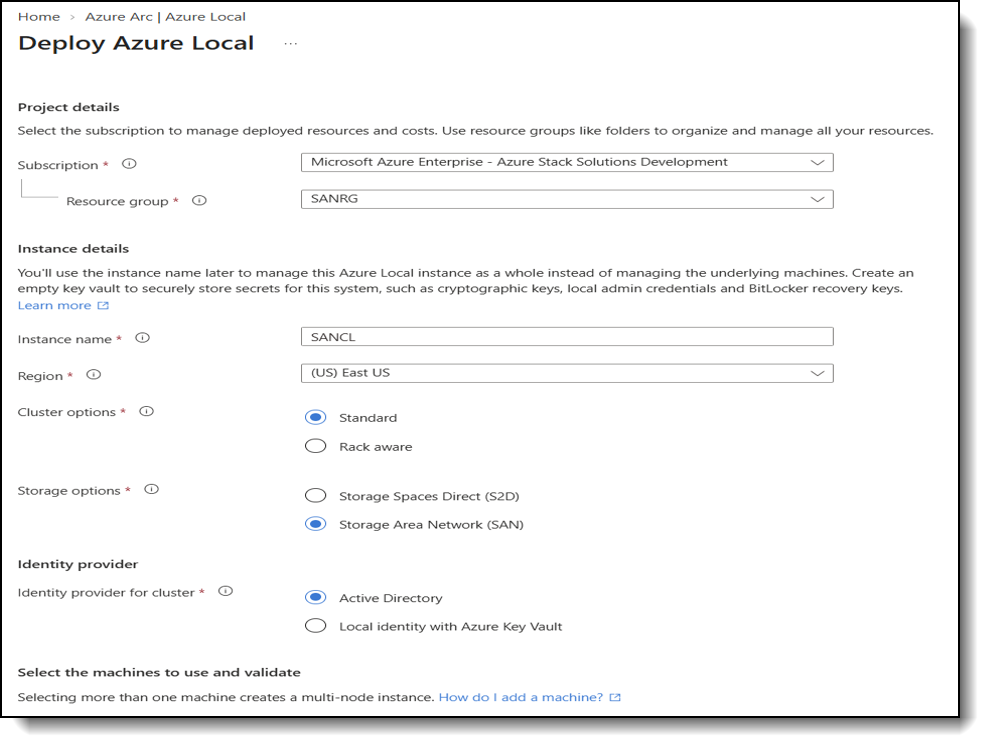
Figure 1. Azure Local deployment wizard with Storage Area Network (SAN) selected as the storage option
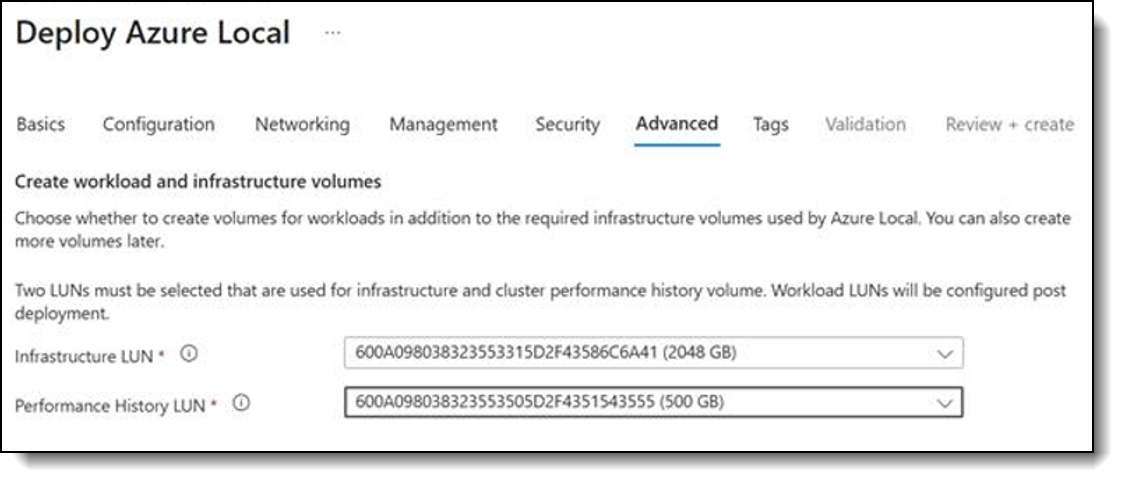
Figure 2. Azure Local portal view of two LUNs presented to the nodes through Fibre Channel
Supported deployment models
ThinkAgile MX and ThinkSystem storage support three deployment models for external SAN storage. Choose the model that matches your existing infrastructure and how you expect compute and storage to grow:
- Hybrid HCI plus SAN: Keep Storage Spaces Direct for selected cluster or workload storage and add DM, DS, or DG Series SAN LUNs as an additional workload storage option.
- Fully disaggregated SAN-only: Use ThinkAgile MX compute nodes with infrastructure and workload storage supplied by external DM, DS, or DG Series SAN arrays. This model allows compute and storage capacity to scale independently.
- Existing SAN investment: Present qualified block storage from an existing array to Azure Local, subject to the supported array, firmware, host adapter, switch, driver, and multipathing combination.
Configuration and support requirements
The following requirements apply to every external SAN deployment, whether it uses Fibre Channel or iSCSI. Confirm each one during design and before the SAN volumes are placed into service:
- Present each SAN LUN to every node in the Azure Local cluster. Partial LUN presentation is not supported.
- Use one dedicated SAN LUN per Cluster Shared Volume and format SAN-backed CSVs with NTFS. ReFS is not supported for SAN-backed volumes.
- Configure Multipath I/O consistently on all nodes before the SAN volumes are placed into service.
- Maintain identical Fibre Channel HBA or iSCSI NIC configurations across cluster nodes and follow the supported Lenovo and Microsoft interoperability requirements.
- For a Lenovo-supported solution, maintain Lenovo Premier Support for the ThinkAgile MX Series compute and Lenovo Premier Enhanced Storage Support for the ThinkSystem DM, DS, or DG Series storage used in the Azure Local solution.
- Validate the exact storage model, controller software, protocol, adapter, switch, firmware, and driver combination against the current Azure Local supported SAN guidance and Lenovo documentation before ordering or deployment.
Recommendations: Use Fibre Channel where the production environment requires a dedicated, fabric-based SAN architecture. Use iSCSI where Ethernet-based block storage aligns with the customer design, while preserving dedicated storage paths and the required Azure Local host network rules. In both cases, treat the SAN, fabric, host adapters, drivers, and Azure Local release as one validated end-to-end configuration.
Enhanced GPU Provisioning and Mobility
Business value: Bring AI to where your data lives. Run AI inference, visualization, and other accelerated workloads on-premises, and manage GPUs from the same Azure experience you use for the rest of your environment.
Azure Local expands the provisioning and management of GPU-accelerated virtual machines. Administrators can assign a supported dedicated GPU or GPU partition while creating an Azure Arc-enabled VM, or attach and remove GPU resources after deployment.
GPU acceleration for Azure Local VMs, using Discrete Device Assignment (DDA) or GPU partitioning (GPU-P), is generally available with Azure Local 2604 and later.
GPU partitioning (GPU-P) also supports live migration between compatible cluster nodes. This capability improves operational flexibility by enabling GPU-accelerated workloads to remain available during planned maintenance and workload balancing operations. Live migration requires a homogeneous GPU configuration, compatible host and guest drivers, supported hardware, and NVIDIA vGPU software version 18 or later drivers. GPU-P live migration was first introduced in Azure Local 2504.
A new feature in the Azure portal, GPU management from Azure (preview), introduces management and monitoring of GPU resources from Azure. The experience includes centralized GPU inventory, GPU partition configuration, assignment of GPUs to workloads, and lifecycle management for GPU-accelerated workloads. This preview capability was introduced with Azure Local 2608.
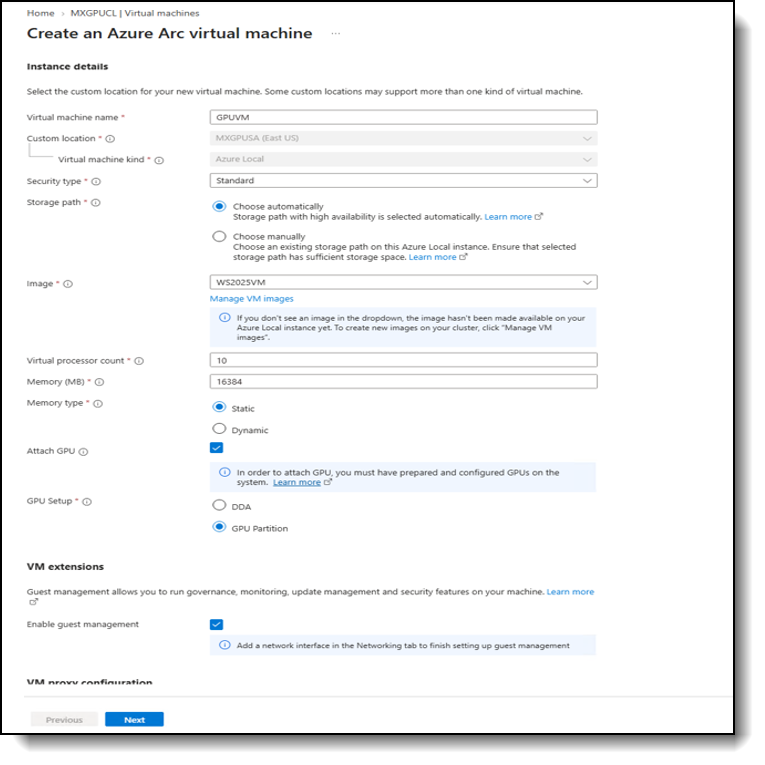
Figure 3. Attaching a GPU during VM creation in the Azure portal
After the GPU is attached, running Get-VMGpuPartitionAdapter on a cluster node confirms the GPU partition assigned to the VM, as shown in the following figure.
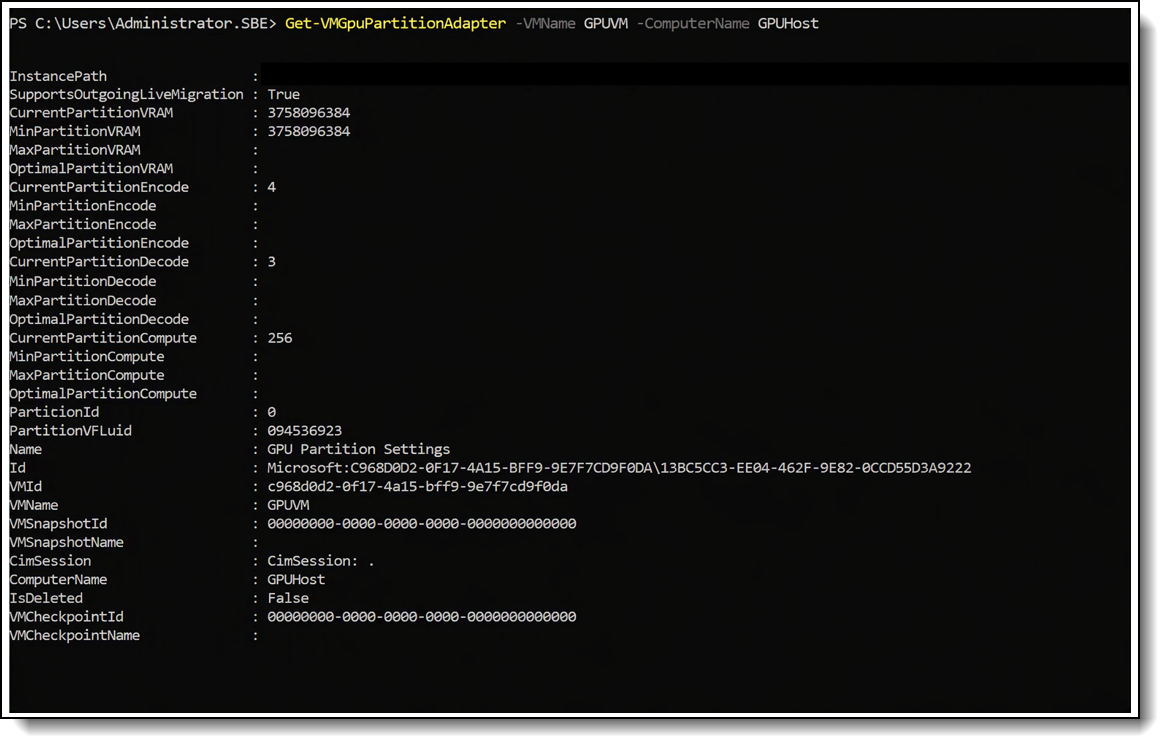
Figure 4. PowerShell output confirming the GPU partition assigned to the VM
Key benefits
Enhanced GPU provisioning and mobility provide the following benefits:
- Assignment of a dedicated GPU or GPU partition during VM creation or after deployment
- Live migration of GPU-P workloads between compatible nodes during planned maintenance
- Centralized GPU inventory, partitioning, and assignment from Azure (preview)
- Support for AI inference, visualization, and other accelerated workloads on-premises
ThinkAgile MX considerations
On ThinkAgile MX systems, GPU support depends on the selected server model and validated GPU configuration. Each participating node must provide the required PCIe capacity, power, cooling, firmware, and driver support. For GPU-P live migration, equivalent supported GPUs and compatible partition configurations must be available across the participating nodes.
Rack-Aware Clustering
Business value: Keep running when a rack goes down. One cluster spread across two racks or rooms protects critical workloads from power, switch, or rack-level failures, without the overhead of managing two clusters.
Rack-aware clustering enables ThinkAgile MX customers to build an Azure Local cluster across two physically separate racks or rooms. Each location is represented as a local availability zone, allowing the infrastructure design to reflect the actual physical boundaries of the datacenter.
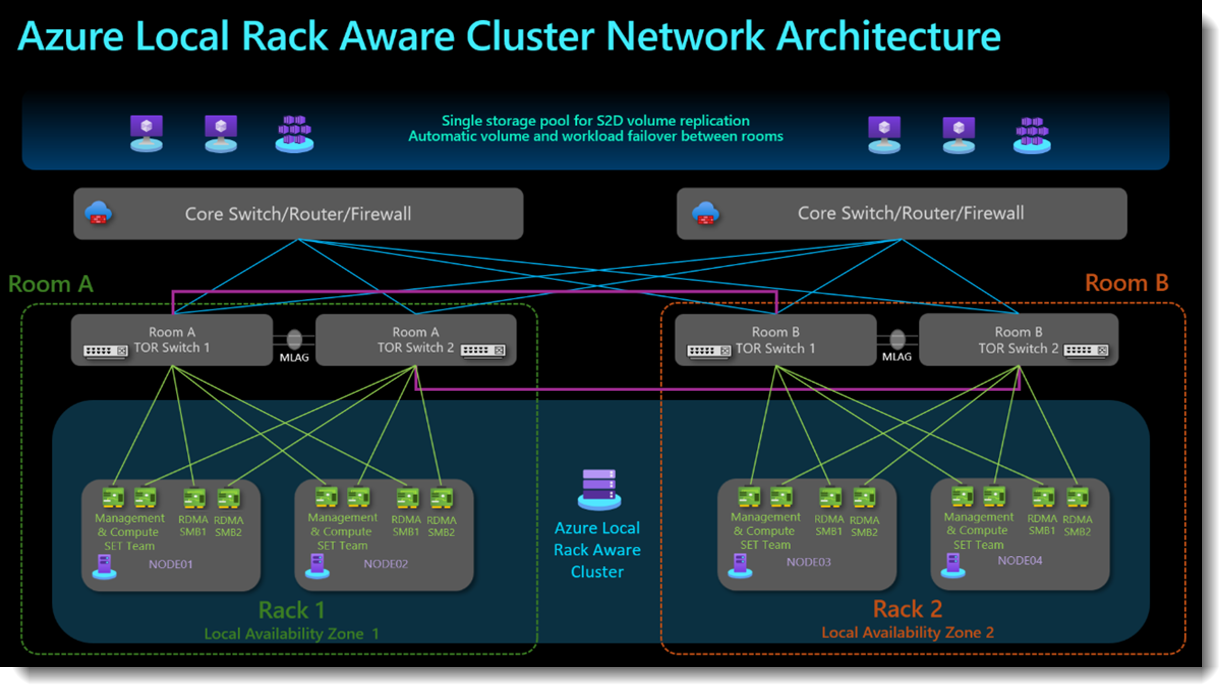
Figure 5. Azure Local rack-aware cluster network architecture (source: Microsoft Learn)
Rack-aware clustering is generally available with Azure Local 2601 and later. Azure Local 2604 added support for rack-aware clusters deployed with Local Identity with Azure Key Vault, and Azure Local 2607 added configuration of local availability zones through PowerShell. By spreading ThinkAgile MX nodes and protected storage data across both locations, the architecture reduces reliance on a single rack. A failure affecting rack power, switching, or other shared infrastructure can therefore be isolated more effectively, helping the environment maintain access to protected data and appropriately placed workloads.
Key benefits
Rack-aware clustering provides the following benefits:
- Extends a ThinkAgile MX cluster across two physical failure domains
- Protects storage data across rack or room boundaries
- Supports placement of Azure Local VMs in designated local availability zones
- Reduces exposure to failures affecting an entire rack
- Aligns the Azure Local configuration with the physical infrastructure
- Provides additional resiliency for demanding edge and datacenter environments
- Maintains a single Azure Local deployment and management experience across both locations
ThinkAgile MX considerations
The physical design remains an important part of the solution. The two locations require suitable network bandwidth and low latency to support storage traffic between them (see Table 3). Power distribution and network connectivity should be kept independent wherever possible, and the ThinkAgile MX systems should use balanced, validated configurations across both racks.
Rack-aware clustering adds another level of resiliency to a ThinkAgile MX solution, but it works together with, rather than replaces, redundant power, networking, switching, and sound datacenter design.
Local Identity with Azure Key Vault
Business value: Deploy at the edge without Active Directory. Stand up Azure Local at stores, branches, and plants with fewer infrastructure dependencies, while credentials and recovery keys stay protected in Azure Key Vault.
Local Identity with Azure Key Vault provides an alternative way to deploy Azure Local on ThinkAgile MX systems without joining the cluster nodes to an Active Directory domain. Generally available with Azure Local 2604 and later, this deployment model uses local administrator accounts and certificate-based authentication to establish secure communication between the cluster nodes.
During deployment, an Azure Key Vault is associated with the Azure Local instance to protect and back up sensitive information, including local credentials, BitLocker recovery keys, and other critical configuration data. A separate Key Vault is required for each Azure Local instance, providing a centralized location for storing and retrieving the information needed for ongoing management and recovery.
For ThinkAgile MX deployments, this option can be particularly useful at edge, branch, and operational technology locations where introducing and maintaining Active Directory infrastructure would add unnecessary complexity. It reduces the infrastructure required at the site while retaining Azure-based management and centralized protection for credentials and recovery information.
The deployment still requires careful preparation. The prerequisites listed below must be in place before deployment. Organizations remain responsible for protecting and rotating the local administrator credentials throughout the lifecycle of the environment.
Management tool compatibility should also be considered. Azure portal, PowerShell, and Azure Monitor are supported, with PowerShell providing the primary interface for administration and automation. Windows Admin Center is not supported in environments using Local Identity with Azure Key Vault, System Center Virtual Machine Manager is expected to have limited or no support, and tools such as Hyper-V Manager and Failover Cluster Manager may not work in all scenarios. Validate important operational workflows before using the feature in production.
Deployment prerequisites
Microsoft documents the following prerequisites for this deployment model:
- Release: Azure Local 2510 or later; the deployment model is generally available with Azure Local 2604 and later.
- Local administrator account: A dedicated account in the local Administrators group with identical credentials on every node. The password must be at least 14 characters and include uppercase, lowercase, numeric, and special characters. The built-in Administrator account cannot be used.
- Networking: Static IP addresses on all nodes; DHCP is not supported.
- DNS: A DNS server with a configured zone and host A records for each node and for the system.
- Remote access: SSH enabled on each node before deployment, for Azure portal access through Azure Arc.
- Key Vault: An Azure Key Vault for the instance, with the Key Vault Secrets Officer and Key Vault Certificates Officer roles assigned to the managed identities of the Azure Arc-enabled nodes.
- Recovery: A RecoveryAdmin account whose password is stored in the Key Vault for recovery operations.
Microsoft also provides the AzureLocal.LocalIdentity.AdminSetup PowerShell module to help create and manage the required accounts and certificates.
Key benefits
Local Identity with Azure Key Vault provides the following benefits:
- Deployment of ThinkAgile MX systems without joining the nodes to an Active Directory domain
- Reduced supporting infrastructure for edge and remote locations
- Certificate-based authentication for secure cluster communication
- Centralized protection of credentials, BitLocker recovery keys, and configuration secrets
- Secure backup and recovery of critical information through Azure Key Vault
- Continued management through Azure portal, PowerShell, and Azure Monitor
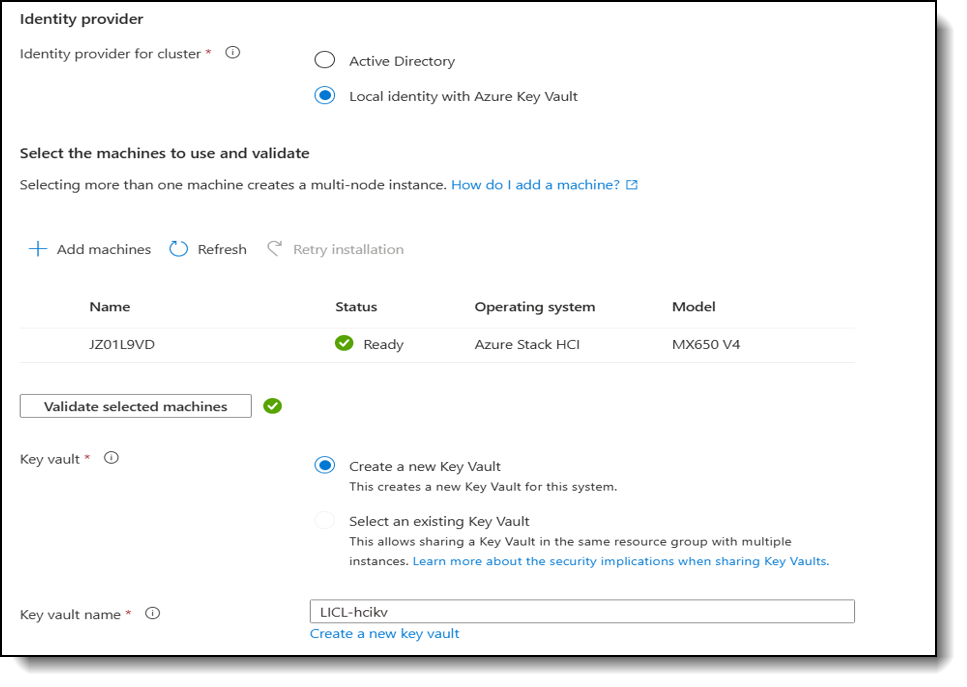
Figure 6. Azure Local deployment wizard with Local identity with Azure Key Vault selected and a new Key Vault created
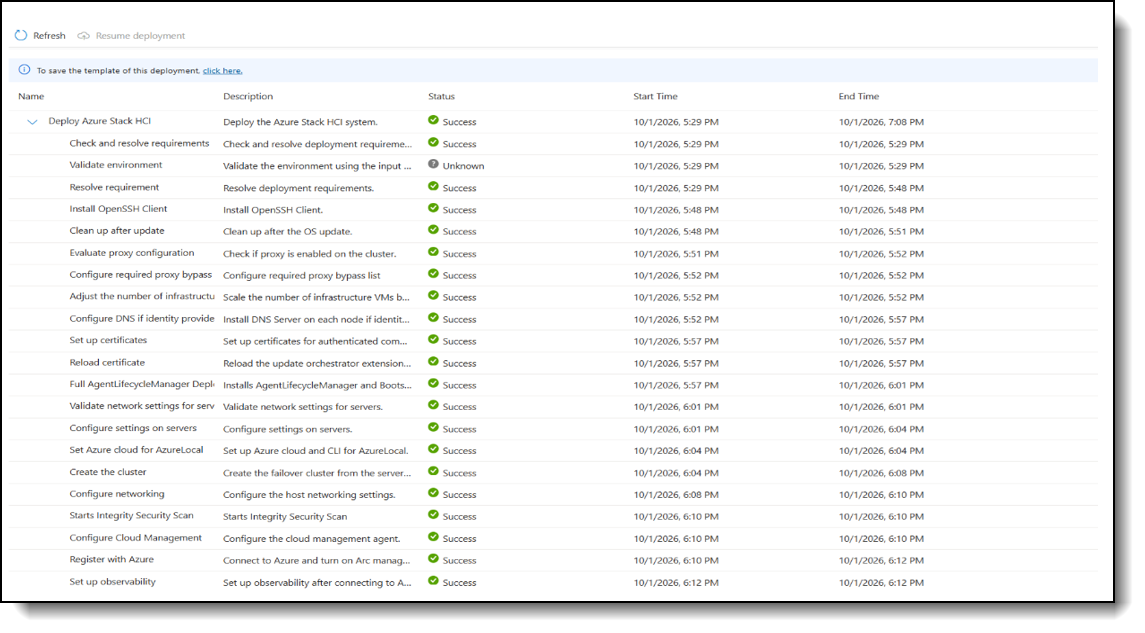
Figure 7. Deployment steps completed successfully for a Local Identity deployment
ThinkAgile MX considerations
The selected ThinkAgile MX configuration must support Azure Local 2604 or later, and the corresponding Lenovo firmware, drivers, networking, and lifecycle management requirements should be validated for that release. The design should also include properly configured DNS, static networking, Azure connectivity, Key Vault permissions, and a process for managing and rotating the local administrator credentials.
Because this identity model changes the tools and authentication methods used for administration, organizations should validate monitoring, maintenance, node repair, and recovery procedures before adopting it in a production ThinkAgile MX environment.
Confidential Virtual Machines
Business value: Protect sensitive data even while it is in use. Keep regulated and confidential workloads on-premises with hardware-based memory encryption that isolates them from the host and its administrators. Currently in preview.
Confidential Virtual Machines (Confidential VMs) provide additional protection for sensitive workloads running on supported ThinkAgile MX systems. Traditional security controls protect data while it is stored and transferred. Confidential VMs extend that protection to data while it is actively being processed in memory.
On Azure Local, this protection is provided by AMD Secure Encrypted Virtualization with Secure Nested Paging (SEV-SNP). The processor encrypts the memory assigned to each Confidential VM and isolates it from the host operating system, hypervisor, and host management software. This creates a stronger boundary between the workload and the underlying infrastructure, helping prevent host administrators or compromised host-level software from accessing protected VM memory.
Confidential VMs can also provide evidence that a workload is running on trusted hardware and firmware. Microsoft Azure Attestation validates this hardware-rooted evidence before sensitive information, such as application secrets or encryption keys, is released to the workload through Azure Key Vault.
Integrity protection can also be applied to the guest operating system image. This helps protect the operating system disk and boot chain against host-side tampering before sensitive information is made available to the workload.
For ThinkAgile MX customers, Confidential VMs can be valuable when sensitive workloads must remain on-premises because of privacy, data sovereignty, or security requirements. Potential use cases include applications that process confidential business information, regulated data, or sensitive AI datasets. The feature provides an additional isolation boundary, but it does not replace the security controls required elsewhere in the infrastructure and application stack.
Key benefits
Confidential VMs provide the following benefits:
- Hardware-based encryption of VM memory
- Isolation from the host operating system, hypervisor, and host management software
- Verification of the workload environment through hardware-rooted attestation
- Controlled release of secrets and encryption keys through Azure Key Vault
- Optional integrity protection for the guest operating system disk and boot chain
- Additional safeguards for sensitive on-premises workloads
Hardware and security requirements
Confidential VM support depends on specific processor and firmware capabilities. The current Azure Local implementation uses AMD SEV-SNP and is therefore limited to validated AMD-based configurations.
The Lenovo ThinkAgile MX455 V3 Edge Premier Solution, equipped with 4th Gen AMD EPYC processors, is the validated platform for Azure Local confidential computing scenarios. Lenovo provides deployment and configuration guidance for the ThinkAgile MX455 V3, including the UEFI settings required to enable the underlying confidential computing capabilities. Before deployment, review the complete configuration, including:
- ThinkAgile MX model and processor generation
- System firmware and required UEFI settings
- Supported Azure Local release
- Azure Local VM extension version
- Guest operating system and image preparation
- Confidential VM security configuration
- Azure connectivity for attestation and secure key release
The Azure Local cluster must be deployed with Confidential VM support enabled, and an integrity-protected VHDX image must be prepared and uploaded to the cluster. Verify additional software prerequisites, including the required Azure Local VM extension version, against the latest Microsoft deployment guidance before implementation.
Availability and limitations
Confidential VMs are currently available as a preview capability with Azure Local 2607 and later. The current implementation supports Ubuntu 24.04 prepared through the Microsoft documented image protection process. Windows guest operating systems are not currently supported.
There are also operational limitations to consider. Guest management is not supported for integrity-protected Confidential VMs, and running Confidential VMs cannot be migrated between hosts; they must be shut down before migration. Cloud connectivity is also required for Microsoft Azure Attestation and secure key release through Azure Key Vault. Because the feature is in preview, it is not recommended for production or business-critical workloads.
Support and Validation
Every capability in this guide depends on a supported end-to-end configuration. Before using any of them in production, validate the complete configuration against the current Microsoft Azure Local documentation and Lenovo ThinkAgile MX support information, including:
- ThinkAgile MX server model
- Processor platform and generation
- GPU type and system configuration
- Storage array and connectivity protocol
- Network adapters, Fibre Channel HBAs, and switches
- System firmware and drivers
- Azure Local release
- Guest operating system and workload requirements
Lenovo delivers validated firmware, drivers, and utilities for ThinkAgile MX through the Lenovo Solution Builder Extension (SBE), aligned with Lenovo Best Recipe releases. Apply the latest SBE package before enabling these capabilities.
Capabilities marked as preview in Table 1, currently GPU management from Azure and Confidential VMs, are subject to the Supplemental Terms of Use for Microsoft Azure Previews and are not recommended for production workloads.
Conclusion
The new capabilities available on the Azure Local platform extend how Lenovo ThinkAgile MX can be designed and used. External SAN integration introduces greater flexibility in scaling compute and storage, GPU enhancements support accelerated workloads, and rack-aware clustering provides additional protection across physical infrastructure boundaries. Local Identity with Azure Key Vault and Confidential Virtual Machines add new options for deployment and workload security.
Support for each capability depends on the selected ThinkAgile MX configuration and Azure Local release. Complete the checks in Support and Validation before production deployment. With the appropriate configuration, ThinkAgile MX provides a strong foundation for adopting these capabilities across datacenter, edge, and AI-focused environments.
Ready to get started? Your Lenovo representative or Lenovo Business Partner can help you map these capabilities to your workloads, choose the right ThinkAgile MX configuration, and plan the deployment with Lenovo Professional Services. ThinkAgile MX is available as a traditional purchase or as a service through Lenovo TruScale.
For More Information
To learn more about implementing Azure Local capabilities on Lenovo ThinkAgile MX, contact your Lenovo representative or Lenovo Business Partner, or visit the resources below.
References:
- Microsoft Learn: Azure Local release information:
https://learn.microsoft.com/en-us/previous-versions/azure/azure-local/release-information - Microsoft Learn: What's new in Azure Local (2608):
https://learn.microsoft.com/en-us/azure/azure-local/whats-new?view=azloc-2608 - Microsoft Learn: Disaggregated deployments overview:
https://learn.microsoft.com/en-us/azure/azure-local/overview/disaggregated-overview?view=azloc-2610 - Microsoft Learn: External storage support:
https://learn.microsoft.com/en-us/azure/azure-local/concepts/external-storage-support?view=azloc-2610 - Microsoft Learn: Local Identity with Azure Key Vault overview:
https://learn.microsoft.com/en-us/azure/azure-local/deploy/deployment-local-identity-with-key-vault-overview?view=azloc-2610 - Microsoft Learn: Deploy Azure Local using Local Identity with Azure Key Vault:
https://learn.microsoft.com/en-us/azure/azure-local/deploy/deployment-local-identity-with-key-vault?view=azloc-2610 - Microsoft Learn: Confidential VMs on Azure Local overview:
https://learn.microsoft.com/en-us/azure/azure-local/manage/confidential-vm-overview?view=azloc-2610 - Lenovo Press: Lenovo Configuration Guide for Confidential Computing and Microsoft CVM:
https://lenovopress.lenovo.com/lp2484-lenovo-configuration-guide-for-confidential-computing-and-microsoft-cvm - Lenovo Press: ThinkSystem DM7200F SAN with ThinkAgile MX650 V4 in Azure Local:
https://lenovopress.lenovo.com/lp2385-solution-brief-dm7200f-san-with-thinkagile-mx650-v4-in-azure-local - Lenovo Press: Lenovo ThinkAgile MX650 V4 Hyperconverged System Product Guide:
https://lenovopress.lenovo.com/lp2137-lenovo-thinkagile-mx650-v4-hyperconverged-system - Lenovo Docs: ThinkAgile MX Solution Builder Extension overview:
https://pubs.lenovo.com/thinkagile-mx/mx_sbe_overview - Microsoft Learn: Rack aware cluster requirements:
https://learn.microsoft.com/en-us/azure/azure-local/concepts/rack-aware-cluster-requirements?view=azloc-2610 - Lenovo Press: ThinkAgile MX650 V3 Premier Solution:
https://lenovopress.lenovo.com/lp2068-thinkagile-mx650-v3-premier-solution
Author
Adelina Onofrei is a Microsoft Solutions Engineer, specializing in Azure Local deployments, Azure Local cluster and LXCI testing. Adelina is dedicated to enabling business success through secure, innovative, and reliable solutions based on Azure Local and enterprise cloud technologies.
Trademarks
Lenovo and the Lenovo logo are trademarks or registered trademarks of Lenovo in the United States, other countries, or both. A current list of Lenovo trademarks is available on the Web at https://www.lenovo.com/us/en/legal/copytrade/.
The following terms are trademarks of Lenovo in the United States, other countries, or both:
Lenovo®
Lenovo TruScale®
ThinkAgile®
ThinkSystem®
TruScale®
XClarity®
The following terms are trademarks of other companies:
AMD®, AMD EPYC®, and EPYC® are trademarks of Advanced Micro Devices, Inc.
Microsoft®, Active Directory®, Azure®, BitLocker®, Hyper-V®, NTFS®, PowerShell®, Windows Server®, and Windows® are trademarks of Microsoft Corporation in the United States, other countries, or both.
NVIDIA® is a trademark of NVIDIA Corporation.
Other company, product, or service names may be trademarks or service marks of others.
Configure and Buy
Please select a locale
Full Change History
Changes in the November 12, 2026 update:
- Updated the following figure under - Enhanced gpu provisioning and mobility section
- PowerShell output confirming the GPU partition assigned to the VM
First published: November 11, 2026
Course Detail
Employees Only Content
The content in this document with a is only visible to employees who are logged in. Logon using your Lenovo ITcode and password via Lenovo single-signon (SSO).
The author of the document has determined that this content is classified as Lenovo Internal and should not be normally be made available to people who are not employees or contractors. This includes partners, customers, and competitors. The reasons may vary and you should reach out to the authors of the document for clarification, if needed. Be cautious about sharing this content with others as it may contain sensitive information.
Any visitor to the Lenovo Press web site who is not logged on will not be able to see this employee-only content. This content is excluded from search engine indexes and will not appear in any search results.
For all users, including logged-in employees, this employee-only content does not appear in the PDF version of this document.
This functionality is cookie based. The web site will normally remember your login state between browser sessions, however, if you clear cookies at the end of a session or work in an Incognito/Private browser window, then you will need to log in each time.
If you have any questions about this feature of the Lenovo Press web, please email David Watts at dwatts@lenovo.com.


