

Top
Authors
Published
20 Nov 2026Form Number
LP2578PDF size
14 pages, 454 KBSubscribed to LP2578.
Thank you for your feedback.
Abstract
Microsoft SQL Server 2025 adds integrated backup compression with Intel QuickAssist Technology (QAT), and the Lenovo ThinkSystem SR650 V4 with Intel Xeon 6 processors, TruDDR5 memory and PCIe 5.0 NVMe storage is a tested platform to run it on. In Lenovo testing with QAT in software mode, SQL Server 2025 completed a 61.7 GB database backup in 0.39x the time of standard MS_XPRESS compression, delivering about 2.6x the backup throughput at a comparable compressed size. This brief describes the tested configuration, how to enable and verify QAT, the test results, and best practices for SQL Server on the SR650 V4.
Introduction
Microsoft SQL Server 2025 introduces integrated acceleration and offloading for backup compression with Intel QuickAssist Technology (QAT), along with a new ZSTD compression algorithm. At the same time, Intel Xeon 6 processors, DDR5 memory and PCIe 5.0 NVMe storage have raised the performance ceiling of a single 2U server. Together, these changes give database teams a practical way to shorten backup windows without adding hardware or changing their applications.
This brief features Microsoft SQL Server 2025 running on Microsoft Windows Server 2025 on the Lenovo ThinkSystem SR650 V4 and focuses on backup compression using Intel QAT.

Business Challenge
Data growth and shrinking backup windows
The rapid growth of technology means the amount of available data and the ability to collect that data has increased to an unprecedented level. As the volume and velocity of data increase, protecting that data within shrinking backup windows becomes more complex. Backups must be completed faster, consume less storage, and have minimal impact on production workloads.
For database and infrastructure teams, this creates several pressures:
- Shrinking backup windows: databases grow every year while the time available to back them up stays the same or shrinks.
- Compression tradeoffs: standard backup compression saves storage but consumes CPU and extends backup time; skipping compression is faster but nearly doubles backup storage.
- Production impact: backups that run long compete with business workloads for CPU and I/O.
- Recovery objectives: slower backups and restores make recovery point and recovery time objectives harder to meet.
Solution
Lenovo Solutions for Microsoft SQL Server on ThinkSystem SR650 V4 are optimized for both Online Transaction Processing (OLTP) and Data Warehouse (DW) or Decision Support Systems (DSS).
The ThinkSystem SR650 V4 is configured with an Intel® Xeon® 6 processor, TruDDR5 memory and NVMe storage, with support for PCIe 5.0 devices for I/O.
Enterprise database solutions with faster time-to-value
Lenovo ThinkSystem SR650 V4 systems are tested and tuned to save you time in configuration, setup, testing, and tuning. With these servers, you get the following advantages:
- Faster SQL Server backups using Intel QAT backup compression
- Improved performance of SQL Server solutions with higher core counts, DDR5 memory bandwidth and PCIe Gen 5 devices
- Improved density to support more and larger databases per host
- Simplified evaluation and fast, easy deployment with pretested and sized hardware configurations
Microsoft SQL Server 2025
SQL Server 2025 (17.x) supports integrated acceleration and offloading with Intel QAT. Backup compression can use the QAT_DEFLATE algorithm in software mode or, where a supported QAT device is present, in hardware mode.
Here are some backup-related capabilities in SQL Server 2025:
- Intel QuickAssist Technology (QAT) backup compression with software or hardware acceleration (QAT_DEFLATE algorithm)
- Selection of the compression algorithm per backup with COMPRESSION (ALGORITHM = ...), or as the instance default
- New ZSTD backup compression algorithm with selectable levels
- Backup history records the compression algorithm used for each backup
Lenovo ThinkSystem SR650 V4 servers offer the necessary performance for bare metal or virtualized SQL Server deployments. NVMe storage and Remote Direct Memory Access (RDMA) networking are natively supported in Windows Server 2025.
This configuration features the following main components:
- Server: Lenovo ThinkSystem SR650 V4
- Processor: 1x Intel Xeon 6530P, 32 cores, 2.3 GHz, 225 W
- Memory: 128 GB (2x 64 GB) TruDDR5 6400 MT/s
- DB Storage: 4x ThinkSystem U.2 VA 3.84TB Read Intensive NVMe PCIe 5.0 x4
- Log Storage: 2x ThinkSystem U.2 VA 1.6TB Mixed Use NVMe PCIe 5.0 x4
- Backup Storage: Volume D: (NVMe, no RAID)
- OS Storage: 2x M.2 drives, RAID 1 (ThinkSystem M.2 RAID B550i-2i SATA/NVMe Enablement Kit)
- Software: Microsoft Windows Server 2025; Microsoft SQL Server 2025; Intel QAT driver / QATzip library
Backup Compression and Off-Load
SQL Server supports backup compression with Intel QuickAssist Technology (QAT) using the QAT_DEFLATE algorithm. Improvements can be seen with either software-only compression or with Intel hardware that supports QAT offloading and acceleration.
The benefits of QAT include:
- Reduced backup capacity
- Minimal CPU impact
- Minimal workload impact
- Faster backups
- Faster restores
This brief shows the performance benefits of software mode. Software mode was tested because it is available in both the Standard and Enterprise editions of SQL Server 2025; hardware mode requires Enterprise edition. In software-only mode, SQL Server still uses the Intel QAT algorithm (QATzip with the Intel ISA-L library) to improve backup times. Table 1 in the Business Outcome section shows the test configuration and the Lenovo test results of software-only mode QAT backups. Results are expressed relative to SQL Server backup compression without QAT (MS_XPRESS = 1.00x), as shown in Table 1 and Figures 1 and 2.
Uses Cases
Meeting backup windows for growing OLTP databases
Transactional databases grow every year, but the nightly window to protect them does not. By switching the backup compression algorithm from MS_XPRESS to QAT_DEFLATE, a database team on SQL Server 2025 can complete compressed full backups in roughly 0.39x the time with no application changes, recovering hours in the maintenance window while keeping backup storage at the same compressed size.
Faster backups without new accelerator hardware
QAT software mode uses the QATzip and Intel ISA-L libraries on the Intel Xeon 6 processor, so organizations can gain faster compressed backups on a standard ThinkSystem SR650 V4 configuration. Where a supported QAT device is present, the same configuration can move to hardware mode to offload compression from the CPU.
Consolidating more databases per host
Higher core counts, DDR5 memory bandwidth and PCIe 5.0 NVMe storage let a single SR650 V4 host more and larger SQL Server databases. Shorter backup jobs make consolidation practical, because more databases can be protected within the same window on the same server.
Workloads
The ThinkSystem SR650 V4 configuration in this brief is sized for Microsoft SQL Server OLTP and DW/DSS workloads, with database, log, backup and OS storage on separate devices. The following sections describe the workload profiles that benefit most, sizing considerations, how to enable QAT, how the backups were run, and recommended best practices.
Workload profiles
- OLTP: frequent full and differential backups that must fit within tight maintenance windows. Cutting compressed backup time to 0.39x of MS_XPRESS frees up time in the window directly.
- Data warehouse and decision support: large databases with weekly or nightly full backups. The larger the backup, the more hours a 2.6x throughput gain saves.
- Consolidated hosts: many databases on a single SR650 V4, where shorter backup jobs let more databases be protected within the same window.
Sizing considerations
- CPU headroom: software mode runs compression on the processor cores. Schedule backups outside peak hours, or plan for hardware mode in Enterprise edition to offload compression to the QAT devices in the Intel Xeon 6 processor.
- Backup target: the backup storage must sustain the higher throughput; a slow target removes the benefit.
- Data compressibility: results depend on the data. Encrypted or already compressed data compresses less, and the tested 61.7 GB database represents a single data point.
- Striping: use multiple backup files and MAXTRANSFERSIZE = 4194304, as in the tested configuration.
Enable and Configure QAT
Install the Intel QAT driver (required for both hardware and software mode). The minimum QATzip library version supported by Microsoft is 1.8.0-0010; install the latest version from Intel and restart the server. After installation, the QATzip library is in C:\Windows\System32 and the ISA-L library is in C:\Program Files\Intel\ISAL.
Enable QAT (required for both hardware and software)
sp_configure 'show advanced options', 1
GO
RECONFIGURE
GO
sp_configure 'hardware offload enabled', 1
GO
RECONFIGURE
GO
Restart the SQL Server service.
Enable QAT hardware mode (if your system has QAT hardware; falls back to software mode)
ALTER SERVER CONFIGURATION
SET HARDWARE_OFFLOAD = ON (ACCELERATOR = QAT)
GO
Enable QAT software mode
ALTER SERVER CONFIGURATION
SET HARDWARE_OFFLOAD = ON (ACCELERATOR = QAT, MODE = SOFTWARE)
GO
Restart the SQL instance to apply changes.
Verify QAT is enabled and the mode (mode_desc must be SOFTWARE or HARDWARE; NONE means QAT is not active)
SELECT accelerator, accelerator_desc, config, config_in_use, mode, mode_desc,
       mode_reason, mode_reason_desc, accelerator_hardware_detected,
       accelerator_library_version, accelerator_driver_version
FROM sys.dm_server_accelerator_status
GO
Check backup compression and hardware offload settings
SELECT [name], [value], value_in_use, is_dynamic, is_advanced
FROM sys.configurations
WHERE [name] IN (N'backup compression default',
                 N'backup compression algorithm',
                 N'hardware offload config',
                 N'hardware offload enabled',
                 N'hardware offload mode')
ORDER BY [name]
GO
Check the SQL Server error log for QAT library messages (use when mode_desc is NONE)
EXEC sp_readerrorlog 0, 1, 'Intel'
GO
Optional: set QAT_DEFLATE as the default backup compression algorithm (dynamic, no restart; 1 = MS_XPRESS, 2 = QAT_DEFLATE)
EXEC sp_configure 'backup compression algorithm', 2
GO
RECONFIGURE
GO
Disable QAT (restart required)
ALTER SERVER CONFIGURATION
SET HARDWARE_OFFLOAD = OFF (ACCELERATOR = QAT)
GO
Note: an instance that restores a QAT_DEFLATE backup must have the QAT driver installed and QAT enabled; otherwise, error 17441 is returned.
Run Backups
No compression
BACKUP DATABASE [TestDB] TO DISK = 'D:\Backups\NoComp_1.bak'
WITH COPY_ONLY, FORMAT, INIT, NO_COMPRESSION, MAXTRANSFERSIZE = 4194304, STATS = 10
GO
MS_XPRESS compression
BACKUP DATABASE [TestDB] TO DISK = 'D:\Backups\MS_XPRESS_1.bak'
WITH COPY_ONLY, FORMAT, INIT, COMPRESSION (ALGORITHM = MS_XPRESS), MAXTRANSFERSIZE = 4194304, STATS = 10
GO
QAT compression
BACKUP DATABASE [TestDB] TO DISK = 'D:\Backups\QAT_DEFLATE_1.bak'
WITH COPY_ONLY, FORMAT, INIT, COMPRESSION (ALGORITHM = QAT_DEFLATE), MAXTRANSFERSIZE = 4194304, STATS = 10
GO
Four backup files (striped backup; same pattern for each algorithm)
BACKUP DATABASE [TestDB]
TO DISK = 'D:\Backups\QAT_DEFLATE_4_1.bak', DISK = 'D:\Backups\QAT_DEFLATE_4_2.bak',
   DISK = 'D:\Backups\QAT_DEFLATE_4_3.bak', DISK = 'D:\Backups\QAT_DEFLATE_4_4.bak'
WITH COPY_ONLY, FORMAT, INIT, COMPRESSION (ALGORITHM = QAT_DEFLATE), MAXTRANSFERSIZE = 4194304, STATS = 10
GO
Collect backup time, size, compression ratio and algorithm
SELECT TOP (30) bs.database_name,
       CONVERT(BIGINT, bs.backup_size / 1048576) AS [Uncompressed Backup Size (MB)],
       CONVERT(BIGINT, bs.compressed_backup_size / 1048576) AS [Compressed Backup Size (MB)],
       CONVERT(NUMERIC(20,2), CONVERT(FLOAT, bs.backup_size) /
               CONVERT(FLOAT, bs.compressed_backup_size)) AS [Compression Ratio],
       bs.compression_algorithm,
       DATEDIFF(SECOND, bs.backup_start_date, bs.backup_finish_date) AS [Backup Elapsed Time (sec)],
       bs.backup_finish_date, bmf.physical_device_name
FROM msdb.dbo.backupset AS bs
INNER JOIN msdb.dbo.backupmediafamily AS bmf ON bs.media_set_id = bmf.media_set_id
WHERE bs.database_name = N'TestDB' AND bs.[type] = 'D'
ORDER BY bs.backup_finish_date DESC
GO
Best practices for running SQL Server on ThinkSystem SR650 V4
For a high-performance SQL Server solution, implement the following best practices:
- Configure UEFI (BIOS) settings to set Operating mode to Maximum Performance.
- Configure the power plan in Windows Server to ‘High performance’.SQL
- Server database and log drives are recommended to be formatted with 64KB NTFS allocation unit size.
- SQL Server database and log files should be on separate physical drives.
- The OS and SQL Server binary drives are recommended to be formatted with the standard 4KB NTFS allocation unit size.
- Place backup files on storage that can sustain the target write rate; a slow backup target limits backup throughput.
- Use multiple backup files (striping) and MAXTRANSFERSIZE = 4194304 to increase backup throughput.
- Install the latest Intel QAT driver supported for Windows Server 2025 and the installed processor and verify the QAT mode after every configuration change.
- TempDB is shared by many processes and users as a temporary working area and should be configured appropriately. The default configuration is suitable for most workloads.
- If the server is dedicated to the SQL Server workload, use the default dynamic memory management model or follow Microsoft SQL Server documentation for manually configuring memory options.
Bill of Materials
The following table lists the key components of the ThinkSystem SR650 V4 configuration used in Lenovo testing. Contact your Lenovo representative for the complete configuration.
Business Outcome
Lenovo testing on the ThinkSystem SR650 V4 shows that enabling QAT software mode in SQL Server 2025 delivers measurably faster compressed backups than the standard MS_XPRESS algorithm:
- Shorter backups: QAT_DEFLATE completed the backup in 0.39x the time of MS_XPRESS, a reduction of about 61%.
- Higher throughput: about 2.6x the backup throughput (2.57x with one backup file, 2.55x with four).
- Same storage savings: compressed backup size was 0.98x that of MS_XPRESS, roughly 44% smaller than an uncompressed backup.
- Consistent at scale: results held with both single-file and four-file striped backups.
Uncompressed backups remained the fastest in absolute terms but produced backups 1.74x the size of compressed ones; QAT narrows that gap while keeping the storage savings of compression.
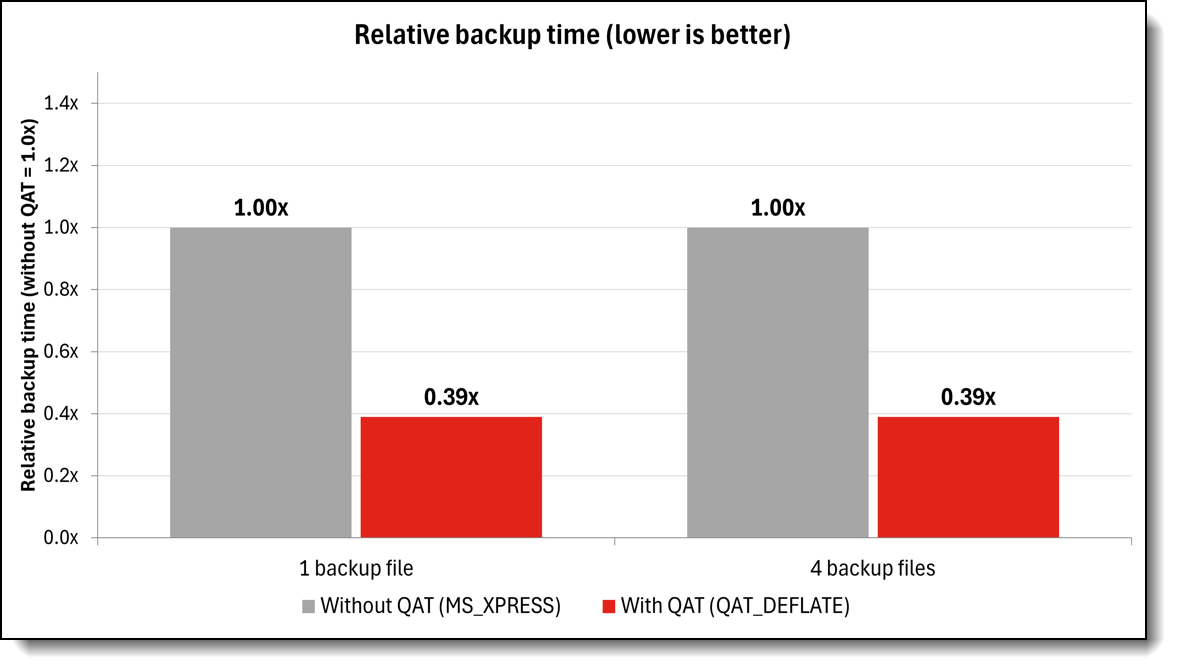
Figure 2. Relative backup time with and without QAT (lower is better)
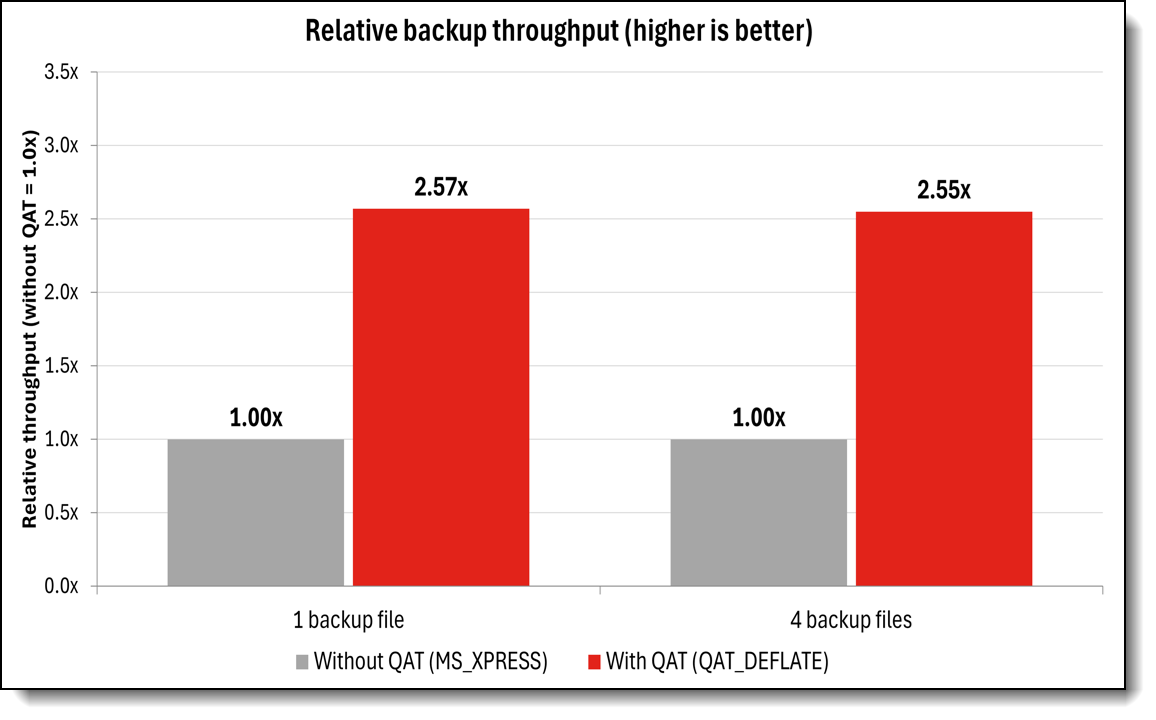
Figure 3. Relative backup throughput with and without QAT (higher is better)
Conclusion
As databases grow and backup windows shrink, SQL Server 2025 with Intel QAT on the Lenovo ThinkSystem SR650 V4 offers a straightforward way to protect data faster. Enabling QAT software mode requires only a driver installation and a few configuration commands, and in Lenovo testing it cut compressed backup time to 0.39x of MS_XPRESS with no loss in storage savings. Combined with pretested hardware configurations and the best practices in this brief, the SR650 V4 gives database teams a fast path to quicker backups and higher consolidation.
For More Information
To learn more about running Microsoft SQL Server 2025 with Intel QAT on Lenovo ThinkSystem SR650 V4, contact your Lenovo representative or Lenovo Business Partner, or visit the resources below. References:
References:
- Lenovo ThinkSystem SR650 V4 Server Product Guide:
https://lenovopress.lenovo.com/lp2127-thinksystem-sr650-v4-server - Microsoft Learn: Configure integrated acceleration and offloading:
https://learn.microsoft.com/en-us/sql/relational-databases/integrated-acceleration/use-integrated-acceleration-and-offloading?view=sql-server-ver17 - Microsoft Learn: What's new in SQL Server 2025:
https://learn.microsoft.com/en-us/sql/sql-server/what-s-new-in-sql-server-2025?view=sql-server-ver17 - Microsoft Learn: Integrated acceleration and offloading:
https://learn.microsoft.com/en-us/sql/relational-databases/integrated-acceleration/overview?view=sql-server-ver17 - Intel QuickAssist Technology Driver for Windows (HW Version 2.0):
https://www.intel.com/content/www/us/en/download/765502/intel-quickassist-technology-driver-for-windows-hw-version-2-0.html
Authors
Chris Honoré is a Solutions Product Manager at Lenovo with deep expertise in datacenter products and solution offerings. He has a strong background in consulting and solution development, helping customers design and support on-premises and hybrid environments. Chris has spent the past 15 years with IBM and Lenovo, specializing in x86 server and data center solutions. Prior to that, he built two decades of experience in the telecommunications industry, serving in both technical and business leadership roles.
Victor Talpeanu is a Microsoft Solutions Engineer with over 8 years of experience in the IT industry, specializing in Azure Local deployments and Azure Local cluster testing. He contributes to Lenovo’s MX portfolio through Software Builder Extension (SBE) validation, ensuring seamless integration and performance across hybrid and edge infrastructures. Victor focuses on delivering secure, modern, and reliable solutions built on Azure Local and enterprise cloud technologies.
Trademarks
Lenovo and the Lenovo logo are trademarks or registered trademarks of Lenovo in the United States, other countries, or both. A current list of Lenovo trademarks is available on the Web at https://www.lenovo.com/us/en/legal/copytrade/.
The following terms are trademarks of Lenovo in the United States, other countries, or both:
Lenovo®
AnyBay®
ThinkSystem®
XClarity®
The following terms are trademarks of other companies:
Intel®, the Intel logo and Xeon® are trademarks of Intel Corporation or its subsidiaries.
Microsoft®, NTFS®, SQL Server®, Windows Server®, and Windows® are trademarks of Microsoft Corporation in the United States, other countries, or both.
Other company, product, or service names may be trademarks or service marks of others.
Configure and Buy
Please select a locale
Full Change History
Course Detail
Employees Only Content
The content in this document with a is only visible to employees who are logged in. Logon using your Lenovo ITcode and password via Lenovo single-signon (SSO).
The author of the document has determined that this content is classified as Lenovo Internal and should not be normally be made available to people who are not employees or contractors. This includes partners, customers, and competitors. The reasons may vary and you should reach out to the authors of the document for clarification, if needed. Be cautious about sharing this content with others as it may contain sensitive information.
Any visitor to the Lenovo Press web site who is not logged on will not be able to see this employee-only content. This content is excluded from search engine indexes and will not appear in any search results.
For all users, including logged-in employees, this employee-only content does not appear in the PDF version of this document.
This functionality is cookie based. The web site will normally remember your login state between browser sessions, however, if you clear cookies at the end of a session or work in an Incognito/Private browser window, then you will need to log in each time.
If you have any questions about this feature of the Lenovo Press web, please email David Watts at dwatts@lenovo.com.


